Exporting Job Console Files
You can export information about the jobs in the Jobs console to a CSV file, and then download the CSV file to your local machine.
To export and download an Export Job Console file:
-
From the Jobs console, select the All Jobs tab.
-
Select the job(s) to export.
-
To export all the jobs in the Jobs console, click Export at the top right of the page.
-
To export a single job, click the checkbox next to a job to select it, and then click
 at the top right of the page, and select
Export.
at the top right of the page, and select
Export.
-
-
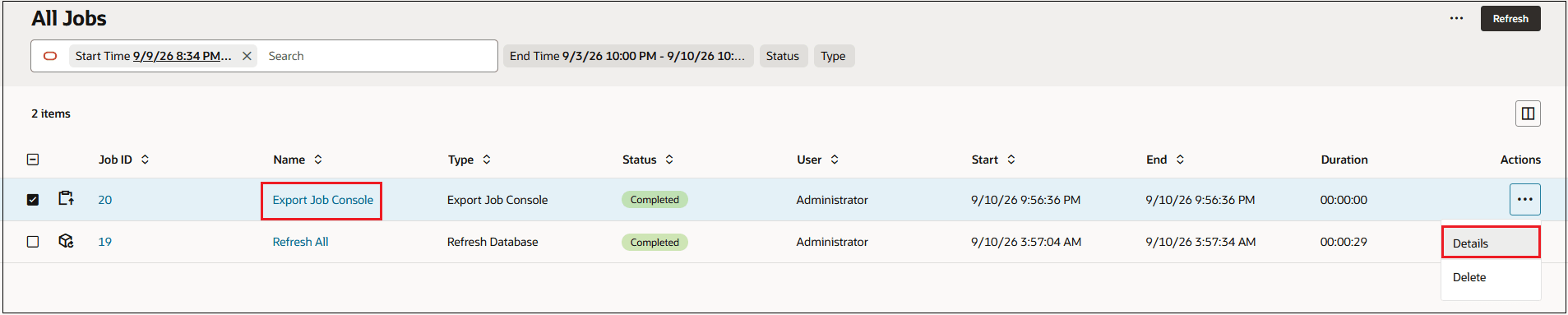
When the job status says "Complete", click the hyperlink for the Export Job Console job, or click
 , and select Details.
-
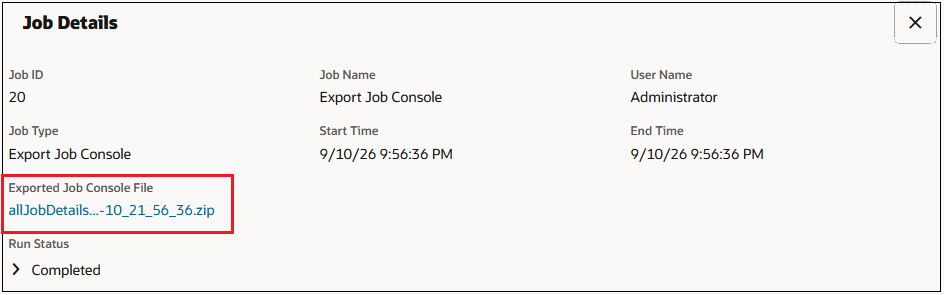
On the Job Details page, click the hyperlink for the Exported Job Console zip file.
-
Click the downloaded zip file to open it.

The file is downloaded to your local machine in a file called
allJobDetails<date>.csv. -
Click the
allJobDetails<date>.csvfile to open it in Excel.
Note:
You can also download the allJobDetails<date>.csv from
the Inbox/Outbox Explorer. See .