Feature Engineering and Selection
Advanced Predictions can perform Feature Engineering and Feature Selection on data before running predictions, which improves prediction accuracy.
When defining an Advanced Prediction, administrators can select a new option on the Data Preparation page, Enable automated feature engineering and selection. This option is selected by default.
Feature Engineering is the process of preparing data for machine learning by transforming existing features or creating new ones to improve model performance. Automated Feature Engineering accelerates this process, enabling better models with improved accuracy.
Without Feature Engineering, all of the drivers are treated just as they are. With Feature Engineering, additional information is derived from the features, leading to more accurate predictions. The following types of transformations are applied:
- Time-based features. For example, does a particular day of the week have more of an impact?
- Lag effects. For example, what is the lag effect of a business driver on a target, such as the impact of Marketing Spend for June on Sales Volume for August?
- Aggregate transformations. For example, what is the effect of the rolling average value on a business driver, rather than a single point of data?
When Enable automated feature engineering and selection is selected, multiple engineered features are created, and the top 15 (or fewer) features are selected for model generation and predictions. The Feature Importance chart shows the importance of the selected top 15 features for the output variable.
When Enable automated feature engineering and selection is not selected, no engineered features are created. However, feature importance is still assessed, and any features found to be unimportant are excluded from the model. All other features are used as-is for model generation.
The Feature Importance chart shows the importance of the given features for the output variable. The chart shows the top nine features; any remaining features are aggregated by their percentage values and grouped under the heading Others.
You can see the impact of Feature Engineering and Feature Selection in the Explain Prediction screen: In a form with Advanced Prediction predicted values, right-click a cell with predicted data and then select Explain Prediction. Review details about the prediction on the Feature Importance tab and on the Prediction Analysis tab.
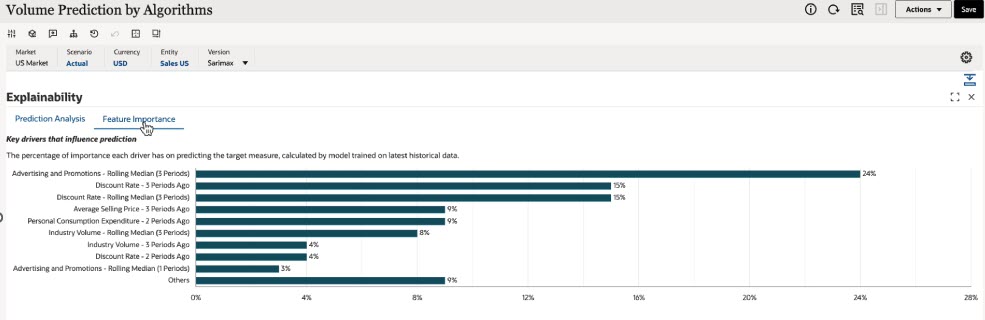
If you selected AutoMLx as the algorithm, note that AutoMLx automatically selects either a univariate or a multivariate model based on accuracy.
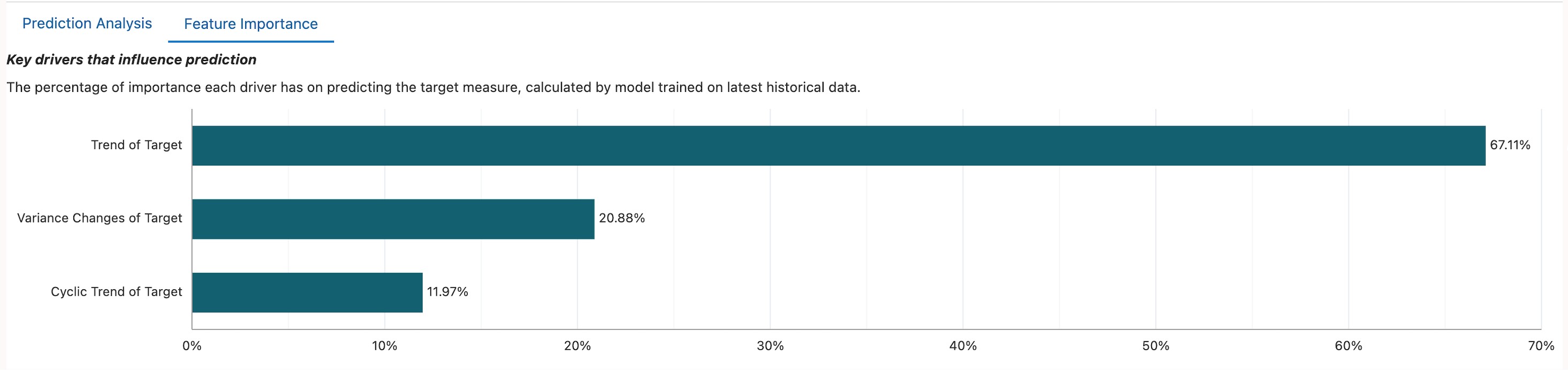
If a univariate model is selected, the Feature Importance graph displays only output/target-related features, such as Trend of Target, Target N Time Periods Ago, Variance Changes of Target, and Cyclic Trend of Target (as applicable).
The Feature Importance graph for a univariate model would look something like this:
Feature Engineering finds the hidden relationship between input features and the output variable. Well-engineered features allow models to capture more relevant information, leading to improved model performance and better predictions.
Feature Selection identifies the most relevant business drivers that impact forecast accuracy, and filters out "noisy" or low-impact variables to avoid over-fitting. It also improves performance by reducing complexity and processing time. It supports explainability by ranking features based on predictive power.
Note the following:
- Enable automated feature engineering and selection is selected by default.
- Selecting Enable automated feature engineering and selection increases the time required to run the prediction.
Videos
| Your Goal | Watch This |
|---|---|
| Learn how to incorporate multiple engineering features into your advanced predictions. With Feature Engineering, additional information is derived from the features leading to more accurate predictions. Transformations that are applied include time-based features, lag effects, and aggregate transformations. You can select the option to enable automated feature engineering and selection on the Data Preparation page when defining an advanced prediction. | 
|