Overview of the Architecture
You can use this suggested architecture that describes how to enrich the supplier profile with more information to guide you through the design and implementation of your own integrations.
Use Case
- A supplier is registered with the business relationship set to "spend-authorized".
- The registration is approved.
The supplier is created and a spend authorization request is sent to approvers based on your approval rules.
- You can enrich the supplier profile with more information, such as risk scores
and financial stability metrics, from an external data provider using the
Suppliers REST API with Oracle Integration Cloud (OIC) capabilities.
This provides approvers with more supplier risk details to make a more informed decision when reviewing the spend authorization request for the supplier.
Process Overview
This flow diagram shows the steps you take when designing and implementing the use case.
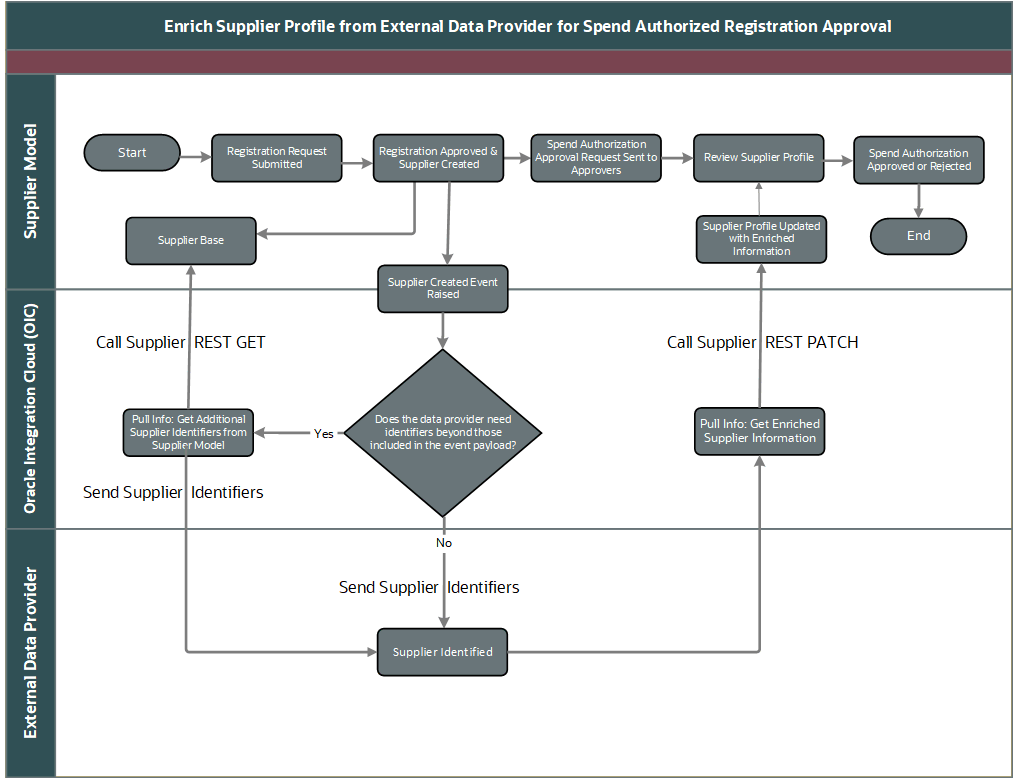
- Register supplier: The supplier is registered in Oracle Supplier Model either by an internal process with the business relationship set to Spend Authorized or through self-service registration using the spend authorization URL.
- Create supplier: After approval, the supplier is created in Supplier Model. This automatically triggers a spend authorization request and raises a supplier created business event.
- (Optional) Retrieve other key supplier identifiers: If the external data provider requires supplier identifiers beyond those included in the event payload, Oracle Integration Cloud (OIC) can retrieve more information (such as the D-U-N-S Number) from Supplier Model to ensure the supplier is uniquely identified in the provider's platform.
- Send key supplier identifiers to the external data provider: OIC sends the key supplier identifiers to the external data provider for unique identification.
- Retrieve enrichment data from the external data provider: OIC receives enrichment data, such as risk scores and financial stability, from the external data provider.
- Update supplier profile with enrichment data: OIC updates the supplier profile with the new enrichment attributes in Supplier Model and maps them to supplier attributes or descriptive flexfields (DFFs), as configured.
- Approvers review enriched supplier profile: Approvers access the supplier profile from the spend-authorized approval notification and review the enriched supplier information to support their approval decision.
Details of these steps are described in these topics:
- Overview of Security Reference
- Suppliers REST Endpoints
- Supported Procurement Business Events
- Outbound Supplier Profile Integration Using Oracle Integration Cloud
- Using Integrations in Oracle Integration 3
- Using the Oracle ERP Cloud Adapter with Oracle Integration 3: Understand the Oracle ERP Cloud Adapter
- Using the REST Adapter with Oracle Integration 3