Project Cost Adjustment Statuses
Understand the statuses that project costs go through during adjustment processing and the actions you can take at each stage.
After reviewing and submitting project cost adjustments for processing, Oracle Fusion Project Costing processes project costs for the specified costing and billing adjustments. The application tracks the adjustment activity in the Adjustment History of the project cost.
You can review the adjustment status and process the project cost accordingly.
Adjustment statuses reflect the current stage of processing for a project cost adjustment, including whether the adjustment is pending approval, in progress, rejected due to errors, or successfully completed.
During the adjustment lifecycle, a project cost typically progresses through validation, approval (if applicable), processing, and completion stages. If errors occur, the adjustment may move to a rejected or failed status, after which you can review and take corrective action.
Project Cost Adjustment Statuses
Here's a table that describes the possible adjustment statues of project costs during adjustment processing.
| Resulting Adjustment Status | Description | Tasks You Can Perform |
|---|---|---|
| Pending Approval | Adjustment is submitted and is pending for approval. | You can't cancel an adjustment in this status. Once approved, the status changes to completed. |
| Pending | Adjustment is submitted for processing. | You can cancel the adjustment. |
| Failed | Adjustment isn't selected for processing because of validation errors. Failure reasons are provided. | You can't resubmit or cancel an adjustment in this status. The transaction failed because of basic adjustment validation such as project status is closed or not allowing adjustment on a net-zero project cost. The billing adjustments aren't validated for the closed status of a project because you can perform adjustments on a closed contract. |
| Rejected | Adjustment is rejected for processing by the Import Costs process due to processing errors, transaction control validation errors, or costing errors. | Review the error details, correct the issues, and then resubmit to process them again. You can cancel the adjustment. Even if two adjustments in rejected status exist, you can cancel one of them independently. |
| Completed | Adjustment is successfully completed. | None |
| Canceled | Adjustment is canceled. You can cancel only pending or rejected adjustments of any type except rebuilding burden costs and updating project and task organizations. | None |
You can cancel only pending or rejected adjustments of any type except rebuilding burden costs and updating project and task organizations. Also, you can't cancel an adjustment performed on a project cost for which funds are already reserved against a control budget.
Adjustment statuses are updated automatically as the application validates, processes, and completes adjustments. If errors occur during processing, review the adjustment history for the project cost to identify the issue before resubmitting or canceling the adjustment.
Adjustment Statuses Associated with Single Project Cost Adjustments
The following process describes how adjustment statuses change when you trigger an adjustment on a single project cost.
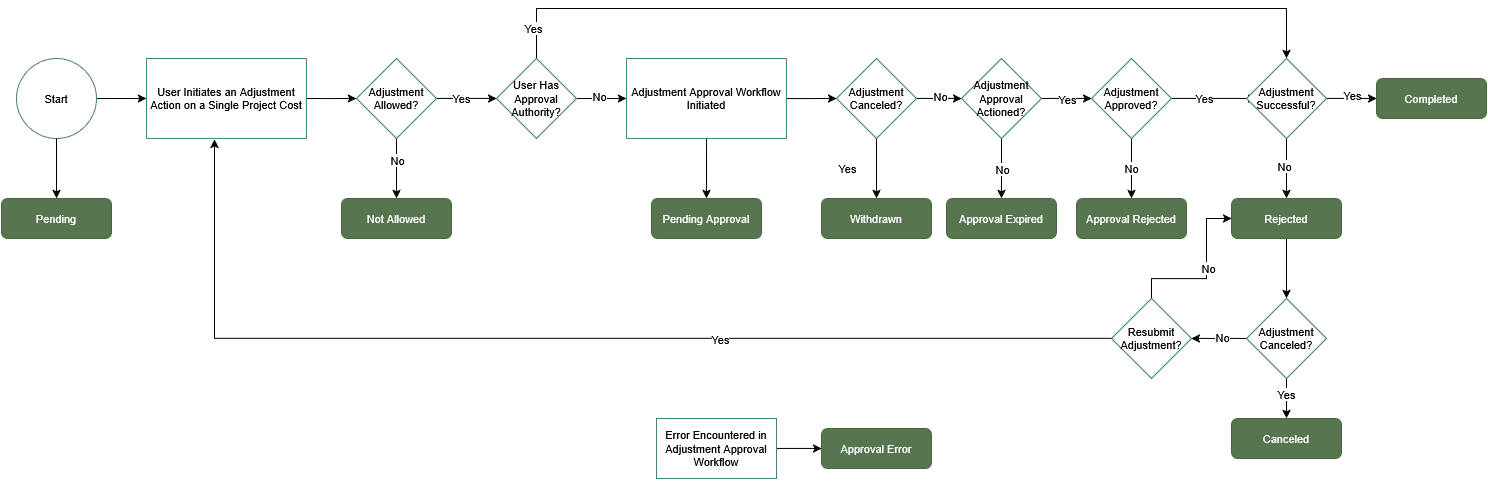
As illustrated in the graphic, adjustment statuses transition through the following stages:
- Before you start work on an adjustment, the status of the adjustment is Pending.
- When you initiate an adjustment on the project cost, the application checks whether
the project cost is eligible for adjustment.
- If the project cost isn’t eligible for adjustment, the status of the adjustment changes to Not Allowed.
- If the project cost is eligible, the application checks whether you have the authority to approve the adjustment.
- Based on your approval authority:
- If you have the required authority, the application skips the approval workflow, and the adjustment is processed automatically.
- If you don’t have the required authority, the adjustment workflow associated with the adjustment type is initiated, and the status changes to Pending Approval.
- During the approval process:
- If the adjustment isn’t approved, the status changes to Approval Rejected.
- If the approval request isn’t acted on within the specified time, the request lapses, and the status changes to Approval Expired.
- If you cancel the approval request during this stage, the adjustment is canceled and the status changes to Withdrawn.
- After approval:
- If the adjustment is approved, the application attempts to process the adjustment.
- If the adjustment succeeds, the status changes to Completed.
- If the adjustment fails, the status changes to Rejected.
- After a failed adjustment:
- You can review the error and choose to either cancel or resubmit the adjustment.
- If you cancel the adjustment, the status changes to Canceled.
- If you resubmit the adjustment, the adjustment reenters the approval workflow and follows the same process.
Adjustment Statuses Associated with Mass Project Cost Adjustments
Mass Adjustment is a utility within the Manage Project Costs page in the Costs work area. Use this utility when you need to adjust more than 500 cost transactions that match the search criteria. Mass adjustments are also called criteria-based adjustments.
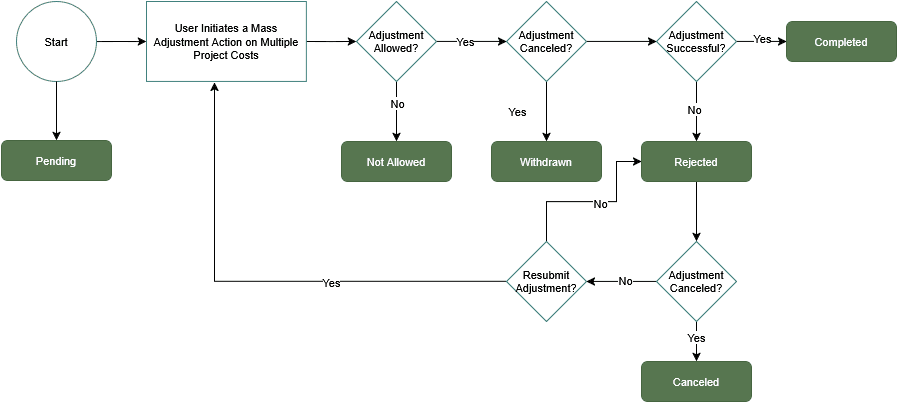
As illustrated in the graphic, adjustment statuses for mass adjustments transition through the following stages:
- There’s no approval workflow enabled for mass adjustments. Users who have access to the Mass Adjustment functionality can trigger the process when required. Before mass adjustment is triggered, the status of the adjustment is Pending.
- When you trigger a mass adjustment, the application checks whether adjustments are
allowed for each of the project costs included in the mass adjustment.
- The status of all project costs that aren’t eligible for adjustment is changed to Not Allowed.
- If you cancel the adjustment before it runs, the status of the scheduled adjustments is updated to Withdrawn.
- The mass adjustment process runs on the project costs that are eligible for
adjustment:
- The status of successful adjustments is updated to Completed.
- The status of unsuccessful adjustments is updated to Rejected.
- After processing:
- You can review rejected adjustments and decide whether to resubmit them.
- If you choose not to resubmit rejected adjustments, their status is updated to Canceled.
- If you update and resubmit rejected adjustments, they reenter the mass adjustment process.
Considerations for Mass Adjustments
Mass adjustments follow a similar processing lifecycle but don't use approval workflows. Adjustments are validated and processed directly after submission.
During mass adjustment processing:
- Project costs that aren't eligible for adjustment are marked as not allowed.
- If a scheduled mass adjustment is canceled before execution, the status is updated to withdrawn.
- Successfully processed adjustments are marked as completed.
- Adjustments that encounter errors are marked as rejected and can be reviewed and optionally resubmitted.
- If rejected adjustments aren't resubmitted, their status can be updated to canceled.