How Project Costs are Processed
Use the Import Costs process to import and process project costs from Oracle Fusion applications or third-party applications. This process imports transactions, derives transaction attributes, validates transactions, calculates cost, checks funds, and creates expenditure items, cost distributions, and accounting events.
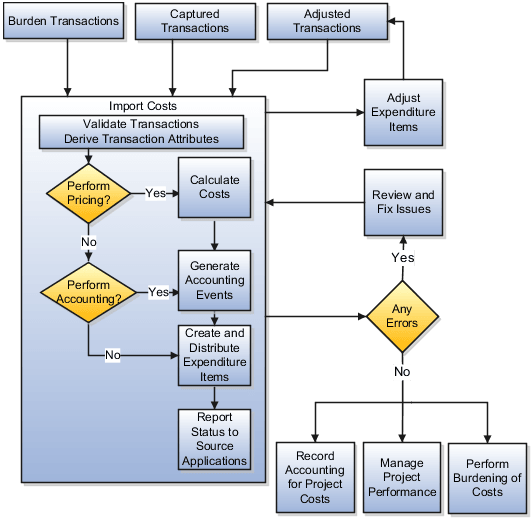
Setup Options: Import Costs
Transaction document and document entry options specify how cost transactions are imported and processed. The following table describes other setup options that determine the processing of project cost transactions.
|
Option |
Setup Level |
Description |
|---|---|---|
|
Burden costs |
Project type |
Enable burdening, assign burden schedule, and manage burden cost accounting options. |
|
Billable transactions |
Work type Project type Project Task Transaction |
Indicate whether transactions are billable. |
|
Expenditure organization validation and currency conversion |
Business unit |
Validate expenditure organization and determine project ledger currency conversion rate as part of your business unit implementation. |
|
Funds check |
Business unit Project Financial Plan Type |
Business Unit: Enable budgetary control and encumbrance accounting.
Project: Enable budgetary control
Financial Plan type: Enable budgetary control
|
|
Transaction controls |
Project Task |
Specify whether transactions are chargeable. |
How Transactions Are Processed
The Import Costs process performs the following steps on unprocessed transactions.
|
Transaction Processing Task |
Description |
|---|---|
|
Load transactions |
Loads transactions for import into Oracle Fusion Project Costing from other Oracle Fusion applications. |
|
Derive transaction attributes |
Derives transaction attributes, such as human resource assignment details for the person, accounting date, project accounting date, and period information. These attributes are used to derive cost rate information and perform accounting. |
|
Validate transactions |
Validates transactions for business and transaction control rules. If the Revalidate during import option is enabled at the transaction source document level, the process revalidates the cost transactions imported from other Oracle Fusion applications such as Payables, Cost Management, and Time and Labor. |
|
Create additional transactions |
Creates additional transactions if overtime is enabled. This is an optional task. |
|
Calculate costs |
Calculates raw and burdened costs, and also converts amounts from the transaction currency to project currency, provider ledger currency, and receiver ledger currency. |
|
Check funds |
Validates transactions based on budgetary control and encumbrance accounting rules and computes funds status. |
|
Generate accounting events |
Generates cost accounting events, which are used to create cost accounting entries for transactions. |
|
Create expenditure items and cost distribution lines |
Creates expenditure items and cost distributions after costs are calculated and validated. |
|
Reconcile transaction details with the source application |
Reconciles the transaction processing status with the source application. Third-party applications use a service to update the transaction status and error details. For Oracle Fusion applications, the transaction status is always updated. |
You can review the errors for pending and rejected transactions in the Manage Unprocessed Costs page or in the Import Costs Report. After fixing the errors, you can submit the transactions for reprocessing. Instead of reinitiating the process, the application reprocesses transactions from the point of error. For example, if a transaction is rejected while determining the cost rate, the application reprocesses the transaction from the cost rate determination stage and not earlier.
Expenditure Batch Deletion and Processing Considerations
A batch is a collection of project costs. If even one project cost in the batch is successfully imported and processed, the batch can’t be deleted because it contains the history of an approved project cost.
You can't delete expenditure batches that contain both processed and unprocessed project cost transactions, irrespective of the batch status.
However, if a batch contains only unprocessed or rejected transactions, you can delete it, provided that the batch is in one of the following statuses:
- In Draft
- Approved
- Rejected
- Validation Error
If all the transactions in a batch are unprocessed and the batch is in one of these statuses, you can delete the entire batch.
If a batch is in In Draft, Rejected, or Validation Error status and contains some unprocessed transactions, you can delete or edit each unprocessed transaction individually.
Once any transaction in a batch is successfully processed, the batch status becomes Processed, and you can no longer delete the batch.
After correcting any issues in unprocessed transactions, you can resubmit the transactions for approval and processing. Once all transactions in the batch are successfully processed, the batch status is updated to Processed.