Comparing License Activity
Agency staff can compare a business license amendment or renewal with the prior license activity to identify requested changes without manually navigating between separate activity records. The side-by-side comparison is available on the Activity Comparison page in the license activity details.
The Activity Comparison page is available only for amendment and renewal license activity records and for agency staff only. It displays the current amendment or renewal activity in the left column and the prior activity in the right column. The prior activity is the activity from which the amendment or renewal was created, such as the origination activity or a prior amendment or renewal.
You can also open the comparison from the License Worklist on the My License Applications tab. For more information, see Using the License Worklist.
The comparison displays license activity attributes by functional area. The available groups depend on the activity data configured for that license type, but can include these sections in the Attribute Name column:
-
Summary
-
Business Details
-
Owners
-
Location
-
Application Details
-
Industry Classification
-
Contacts
-
Contractor
-
Credentials
Application details can include custom fields, and credentials can include other license information.
This example illustrates the Activity Comparison page for a license amendment activity compared to the origination license activity displaying only differences between the two activities.
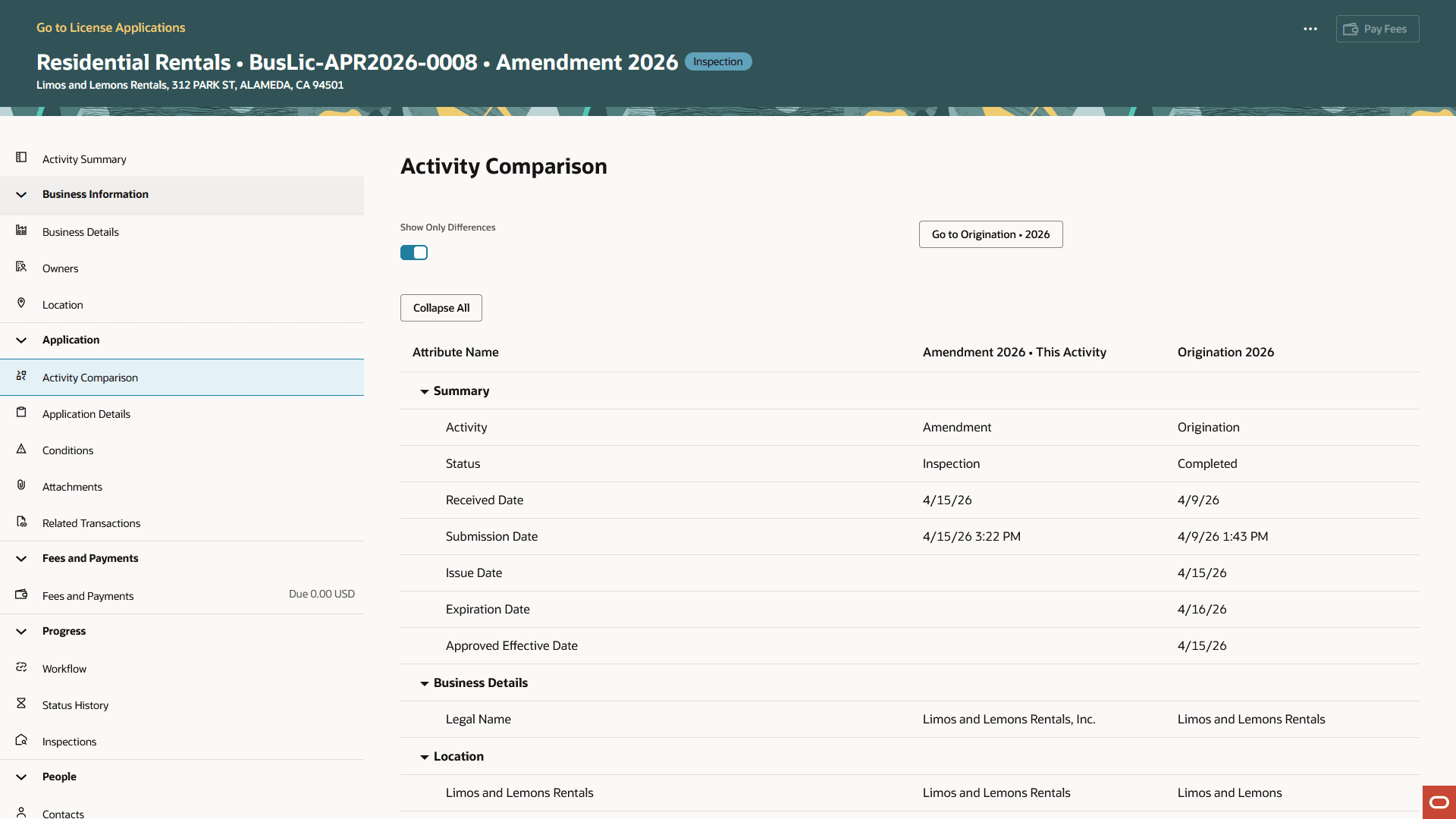
Let's take a look at how the comparison works:
| Page Element | Description |
|---|---|
|
Show Only Differences |
By default, the page shows only changed attributes, where the current activity and prior activity have different values. You can turn off the switch to view all compared attributes, regardless of whether there is a change to the attribute. Use this view to focus on changes requested in the amendment or renewal, such as updates to business details, owners, locations, contacts, or other application information. |
|
Collapse All or Expand All |
Click to hide details or expand the sections to show the details. Comparison attributes are grouped by functional area. You can expand or collapse individual groups to review the areas that are most relevant to your work. |
|
Go to <prior activity> |
Click the activity button to open the previous activity used in the comparison. For example, if you’re reviewing an amendment, the button might display Go to Origination • 2026. Use this option to review the full prior activity record. |
|
Attribute Name |
Displays the name of the compared attribute, grouped by functional area. |
|
<Current activity column> |
Displays the value from the amendment or renewal activity you’re reviewing in the left attribute value column. For example, Amendment 2026 • This Activity. |
|
<Prior activity column> |
Displays the value from the previous activity used for comparison in the right attribute value column. For example, Origination 2026. |