IPM Insights: Support for Scaling and Precision
You can now specify precision and scaling settings for IPM Insights.
Applies To: Enterprise Profitability and Cost Management, FreeForm, Planning
To apply scaling and precision for IPM Insights:
- From the Home page, click IPM and then click Settings. This option is available for all users.
- To turn on scaling, select Apply Scaling (K, M, B, T) to values displayed in IPM Insights. Scaling is applied to currency values and non-currency values.
- Specify the precision to apply after scaling for currency values and non-currency values and percentage values.
The default values are the precision settings that are set in User Preferences. The Example Preview panel shows how values will appear with the specified settings. - Click Save.
The settings are applied throughout the Insights list, and in the Insights Analyzer View, for example, in the insight description, the graph, the grid, the Explainability tab, and the Insights AI tab.
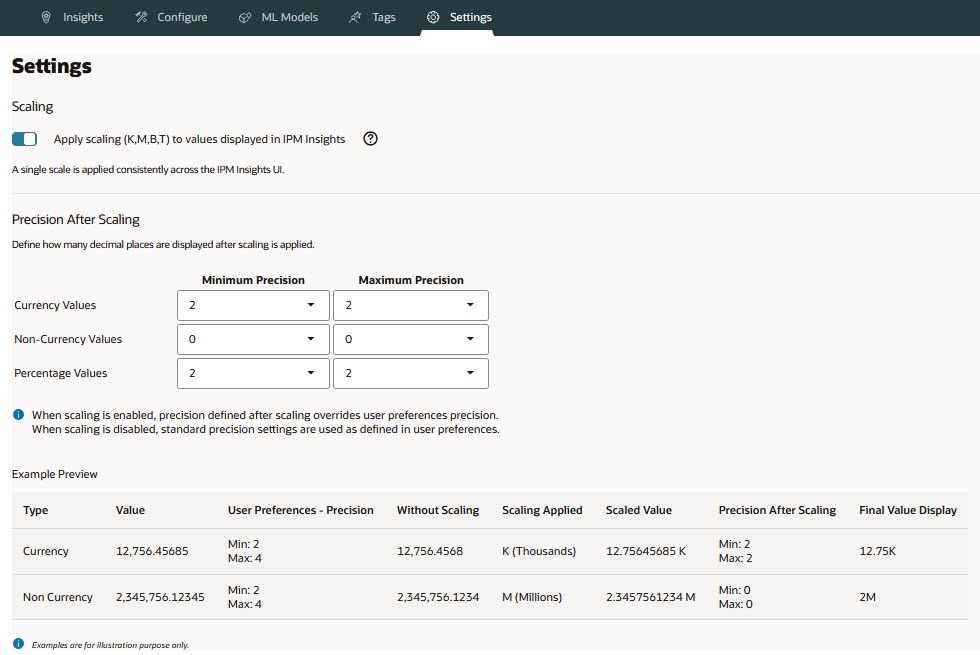
IPM Insights Scaling and Precision Settings
Alternatively, administrators can apply scaling using a UDA. If you use a UDA, it takes precedence over preferences and settings for scaling. You must first select Apply Scaling (K, M, B, T) to values displayed in IPM Insights in IPM Settings.
To apply a UDA:
- Open the Dimension Editor.
- Select the Account dimension and member to edit.
- Click the UDA tab.
- Apply one of the following UDAs and then click Save.
- HSP_DISPLAY_SCALE_K
- HSP_DISPLAY_SCALE_M
- HSP_DISPLAY_SCALE_B
- HSP_DISPLAY_SCALE_T
Business Benefit: Scaling and precision settings ensure consistent formatting for all data values displayed for an Insight.
Tips and considerations
- By default, the Apply Scaling (K, M, B, T) to values displayed in IPM Insights option is enabled, and insights are displayed for each user using the precision set in their User Preferences.
- You can apply a UDA only to the Account dimension.
- Scaling and precision settings are not applied in ad hoc grids.
- To apply the precision settings to narrative summaries for existing insights, you must re-run the insight.
Key resources
- Enterprise Profitability and Cost Management
- Administering and Working with Enterprise Profitability and Cost Management
- FreeForm
- Administering FreeForm
- Working with FreeForm
- Planning
- Administering Planning
- Working with Planning