Brazilian Fiscal Documents in Local Currency for Shipments of Sales Orders in Foreign Currency
Generate and report fiscal documents in Brazilian Real for shipments associated with sales orders entered in foreign currency. The process automatically converts foreign currency amounts to the local currency and displays the converted values on the Fiscal Document page and in the XML sent to the tax authority.
If a fiscal document requires reprocessing due to validation errors, tax information can be recalculated after updating tax determinants or conversion rates. The application validates the required currency conversion data and raises validation errors when conversion information is missing or incomplete.
For export transactions, specify the currency conversion rate negotiated with the exported broker and bank in the Fiscal Attributes page or in the Import Outbound Fiscal Document FBDI.
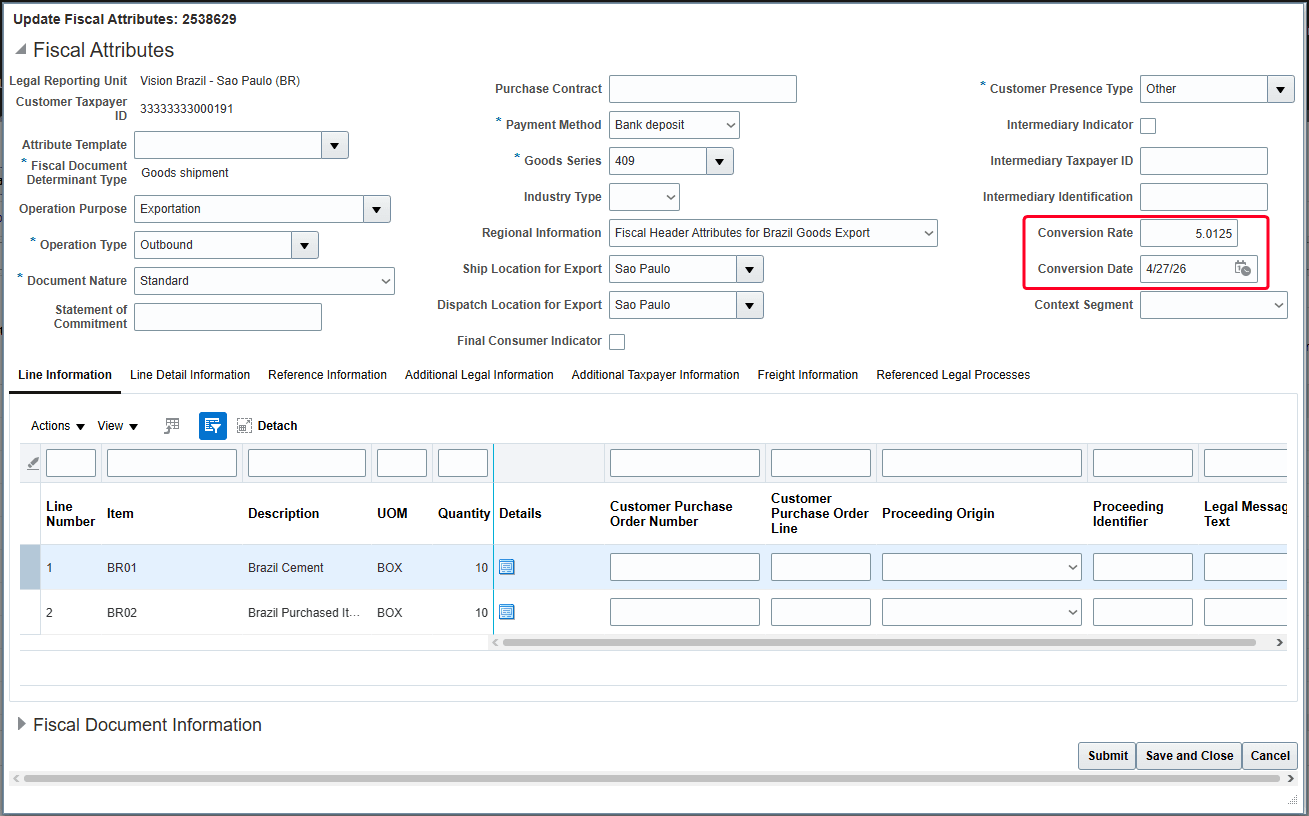
Fiscal Attributes page
The currency exchange is always from the sales order currency to Brazilian Real. The currency conversion rate specified in the fiscal attributes is also applied to the corresponding Receivables transaction created from the sales order. In Brazilian foreign currency sales order flows, the sales order currency conversion rate is for quoting purposes only.
Business benefit includes ensuring compliance with Brazilian tax authority regulations by generating fiscal documents in the required local currency, regardless of the sales order currency.
Steps to enable and configure
To enable the feature, follow these steps.
- In the Setup and Maintenance work area, click the Task icon and select the Search menu option.
- Search Manage Standard Lookups task and click on it.
- In the Search section on the Manage Standard Lookups page, enter ORA_ERP_CONTROLLED_CONFIG in the Lookup Type field and click Search.
- If the JL_ENABLE_FEATURE lookup type does not exist, create the lookup type. Click the New (+) icon to add the lookup type.
- In the Lookup Type field, enter ORA_ERP_CONTROLLED_CONFIG.
- In the Meaning field, enter Controlled feature or enhancement.
- In the Description field, enter ORA_ERP_CONTROLLED_CONFIG.
- In the Module field dropdown, select Shared.
- Click Save or Save and Close.
- In the ORA_ERP_CONTROLLED_CONFIG: Lookup Codes section, click the New (+) icon to add lookup code JG_35500622.
- Enable the Lookup code and select the Start Date.
- In the Meaning and Description field, enter JG_35500622.
- Click Save or Save and Close.
Tips and considerations
- Activate the feature by enabling the corresponding lookup. If the lookup isn’t enabled, the application continues to block fiscal document requests for shipments originating from sales orders in currencies other than Brazilian Real.
- The feature is restricted to sales order shipments.
- Enter a valid currency conversion rate and conversion date in the fiscal attributes. The application raises a validation error if either value is missing.
- The feature supports tax recalculation for fiscal documents previously rejected by the tax authority. Updates to tax determinants or currency conversion rates automatically trigger a tax re-evaluation during reprocessing.
Key resources
Based on Idea 626754 from the Idea Lab on Oracle Cloud Customer Connect.
Access requirements
No new access requirements.