Expenses Agent for Cash Advance Application
Use the Expenses Agent to apply cash advances using email or manually when submitting expense reports. When applying cash advances using email the Expenses Agent uses the Cash Advance Application Assistant.
Apply Cash Advances Manually
Each cash advance has a due date, and employees are recommended to apply available cash advances by the due date; after that date, the cash advance is considered overdue.
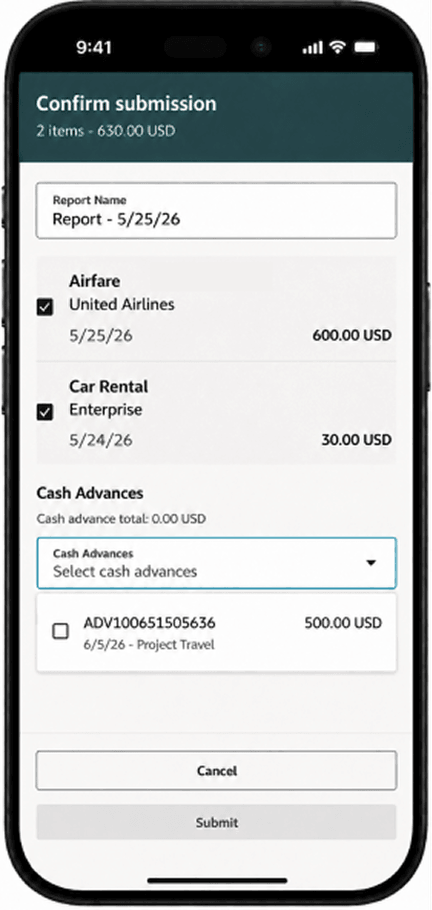
Select one or more cash advances to apply.
Alternatively, employees can choose 'Don’t Apply a cash advance' and enter the required justification before submitting.
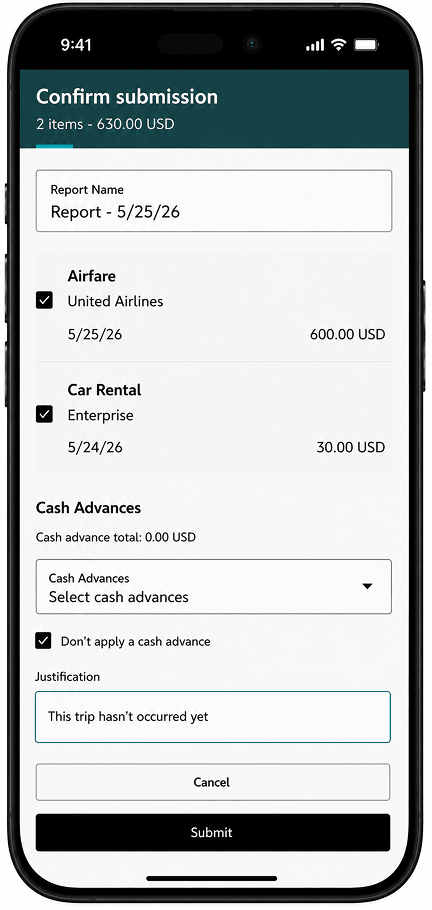
Don't apply cash advance and provide justification.
When an expense report is rejected, returned, or withdrawn, employees receive a notification indicating that the applied cash advance was removed.
Apply Cash Advances Using Email
The Expenses Agent applies a default cash advance to an expense report and notifies the employee by email, helping the submission process continue with less manual effort.
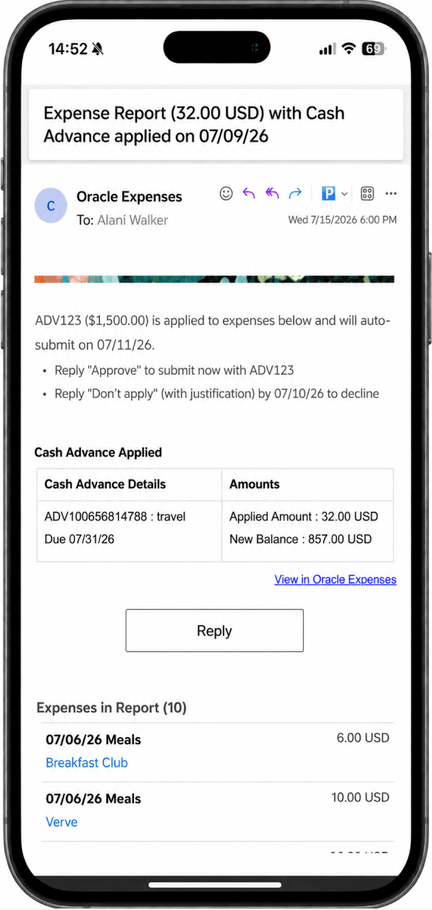
Email notification displaying an expense report with an applied cash advance
Employees stay in control of the final cash advance decision. From the email notification, they can submit the report with the applied cash advance, select a different available cash advance from the email options, or reply that they don’t want to apply a cash advance and provide a justification.
If the employee doesn’t respond by the auto-submission date, the report will be auto-submitted with the default cash advance applied. If the email response can’t be resolved, the agent directs the employee to Oracle Expenses to complete the request. When an expense report is rejected or withdrawn, the employee receives a notification that the report status changed and the applied cash advance was removed.
The business benefit is organizations can reduce unapplied cash advances, capture justifications when employees decline cash advance application, and keep expense reports moving through auto-submit.
Steps to enable and configure
1. To use these capabilities, first enable Expenses Agent as outlined in the Expenses Agent Detailed Adoption Guide.
2. Enable the Expenses Agent capabilities required for email-based expense completion.
- Ensure EXM_AGENTIC_EMAIL_PROCESSING profile option is enabled at user level.
3. Configure cash advance application settings for the applicable business units.
- Sign in as an Application Implementation Consultant.
- Navigate to Setup and Maintenance.
- In the Financials offering, open the Expenses functional area.
- Open the Manage Cash Advances and Authorization Policies task.
- Search for and select the business unit that will use manual cash advance application.
- Edit the applicable cash advance policy.
- Set the Cash Advance Application option to Manual Cash Advance Application.
- Click Save and Close.
4. Enable lookups EXM_39058079 and EXM_39738749.
- Navigate to Setup and Maintenance.
- Search for and open Manage Standard Lookups.
- Search for lookup type ORA_ERP_CONTROLLED_CONFIG.
- In Lookup Codes table, select Actions > New.
- Create and save a lookup code for EXM_39058079.
- Create and save a lookup code for EXM_39738749.
Tips and considerations
- The email flow can apply only one cash advance per expense report. Employees must use Oracle Expenses to apply multiple cash advances.
- Cash advances are applied at the expense report level, not at the individual expense line level.
- When multiple cash advances are available, the email will include one default cash advance and up to three other cash advance options.
- If an employee chooses Don't apply, a valid justification is required.
- If the employee response isn't recognized or can't be resolved after the allowed email follow-up, the agent directs the employee to Oracle Expenses.
- When a report is rejected or withdrawn, the applied cash advance is removed, the applied amount is credited back to the cash advance, and the due date remains unchanged.
Key resources
Access requirements
No new access requirements.