Project Planning Agents
Accelerate project delivery by transforming business inputs into execution-ready project plans, adapting to change faster, and enabling more informed planning decisions throughout the project lifecycle. With the Project Planning Agents, initiate projects from business documents such as Statements of Work, Requests for Proposal, or natural language prompts. The agents extract scope, schedules, milestones, resources, budgets, and financials to create structured, execution-ready project plans. During execution, the agents capture and process project change requests submitted via email and, after change approval, automatically update project plans, budgets, contracts, and financials according to organization-defined policies expressed in natural language. They also simplify resource replacements by updating affected financial plans and analyzing planned-to-actual cost variances to support faster, better-informed planning decisions.
The Project Planning Agents in this release provide a preview of agent-driven project management that you can try out in this release. This will be replaced with the Project Planning Workspace, which is available later in 26C and the Project Planning Agents will be retired in 27A.
The current experience includes the following capabilities:
Users can view predefined prompts that help them quickly start common project planning activities, such as initiating a project, creating a change request, implementing approved change orders, analyzing budget variances, summarizing budget changes, and managing resource transitions. For example, users can initiate a project using a business document, such as a statement of work or request for proposal. The agent analyzes the document and extracts project scope, milestones, deliverables, timelines, commercial assumptions, and resource requirements to create the initial project plan and budget, providing a foundation for managing project delivery.
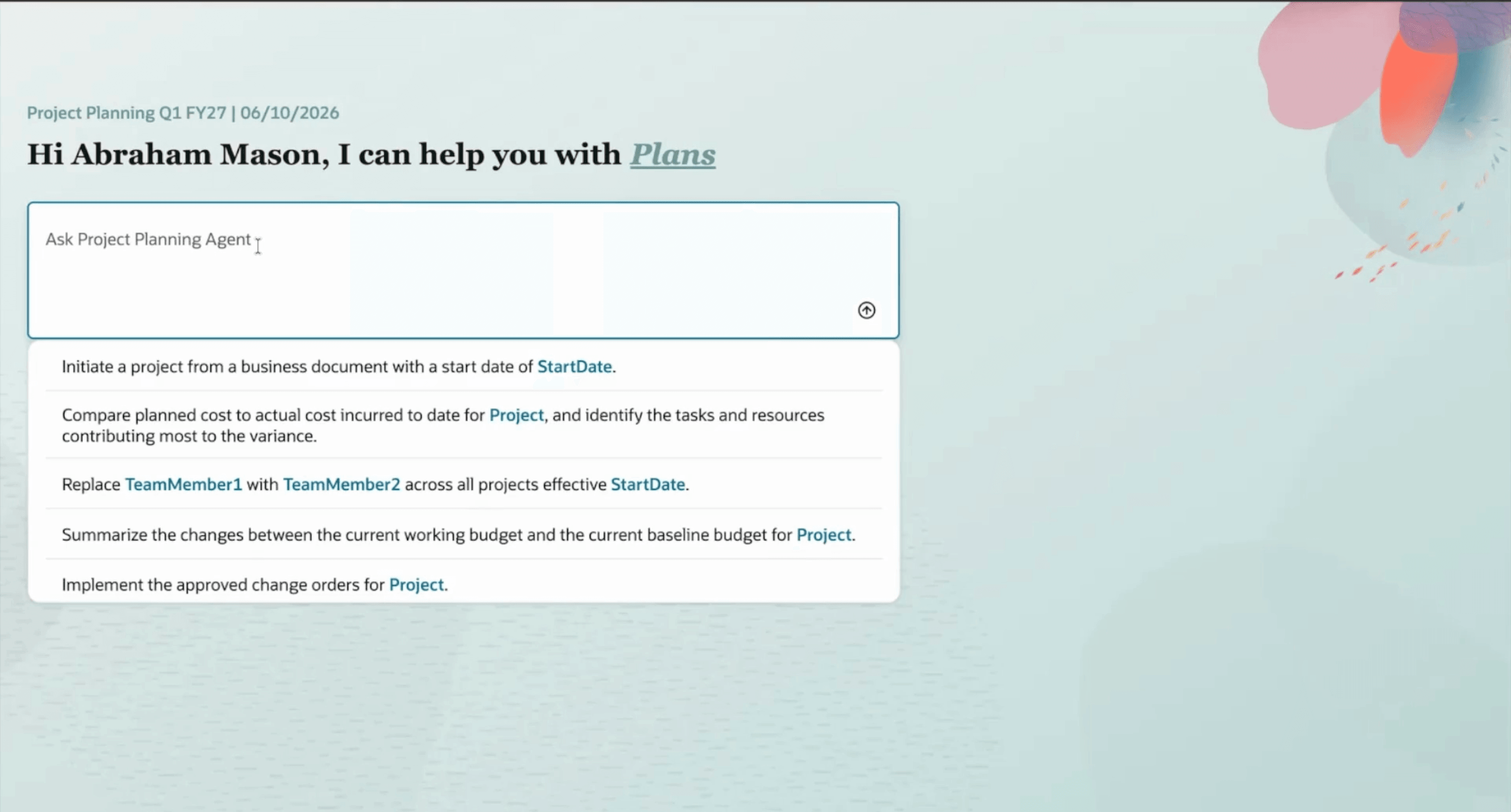
Planning Agents Landing Page with predefined prompts
During regular project reviews, users can compare planned costs with actual costs incurred to date to assess project health. Agents identify the tasks and resources contributing most to variances, highlight areas creating margin pressure, and surface root causes that require attention. Before meeting with project sponsors or finance stakeholders, users can also ask agents to summarize changes between the current working budget and the current baseline budget, including scope-related changes, resource-driven adjustments, and margin implications.
As project requirements evolve, users can efficiently capture scope changes by forwarding customer emails and supporting documents to the planning agents. The agents interpret the request and automatically create a change request, helping project teams respond quickly to customer scope changes while maintaining a clear and traceable record of requested changes.
Subsequently, as change requests are consolidated into a change order and approved, planning agents can automatically implement the approved changes across project plans, budgets, and contracts in accordance with organization-defined policies. For example, an organization can define a policy to always implement approved changes in the project plan and establish a new baseline. The policy can also update the customer contract by creating a new contract line to capture the approved change order amount. This policy-driven automation helps ensure that approved scope changes are implemented consistently across project plans, budgets, and contracts.
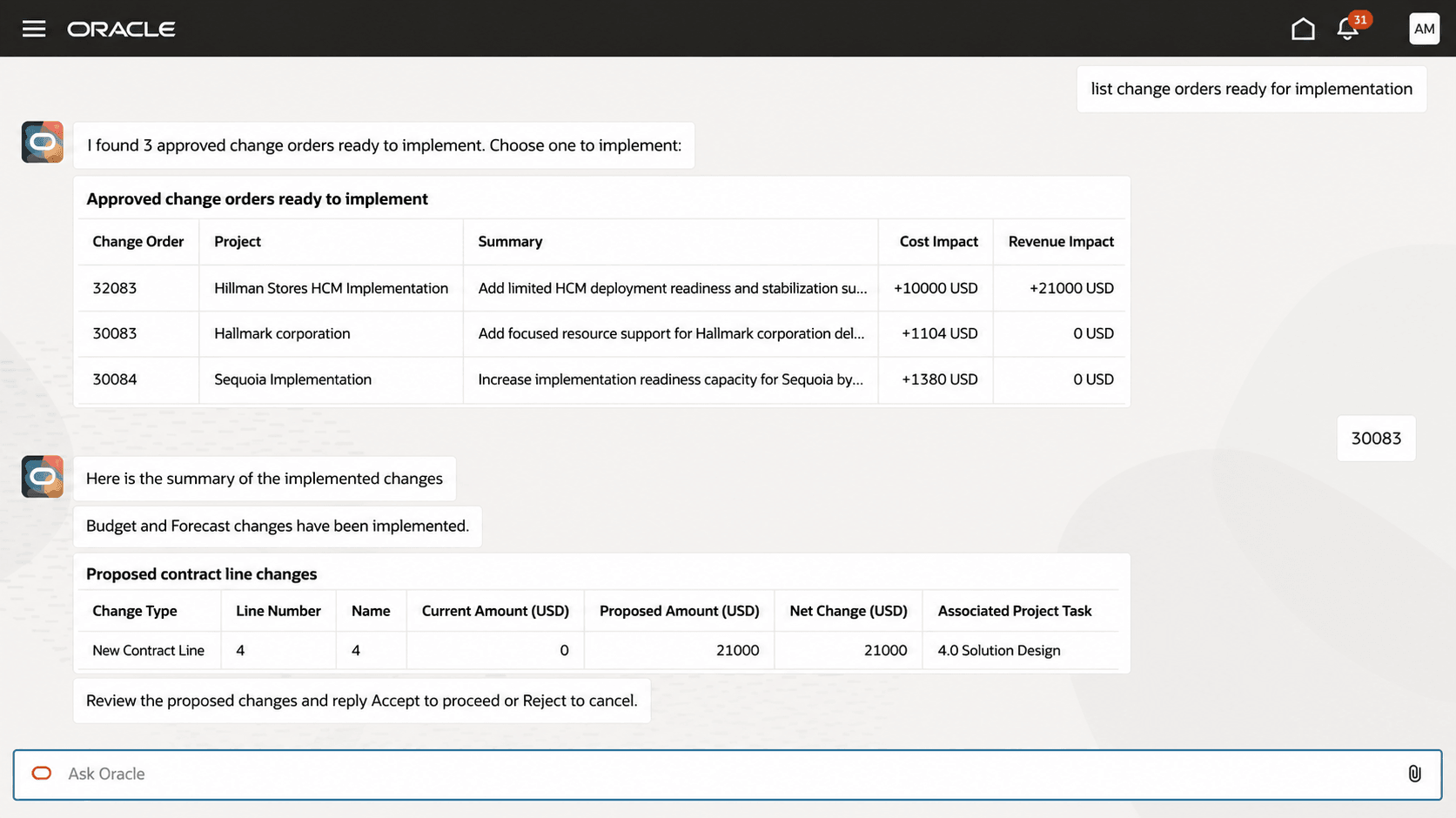
Change Order Implementation
Lastly, as resource changes occur due to factors such as attrition or termination, planning agents can automatically update resource assignments with replacement resources across affected projects. This helps project teams efficiently manage resource transitions while minimizing disruption to ongoing project delivery.
The business benefits are:
- Improves productivity by reducing manual execution, freeing project managers to focus on business outcomes and more critical activities.
- Delivers a more streamlined project start and more predictable schedule, scope, and budget outcomes by reducing administrative effort and operating costs through automated project initiation.
- Enables better planning decisions by keeping project plans, budgets, resources, and financials aligned, improving schedule and budget predictability throughout the project lifecycle.
Steps to enable and configure
- Configure the standard operating procedure document that guides change order implementation, see sample policy document. Change Order Implementation Policy (ORA_PRJ_CHANGE_IMPLEMENTATION_POLICY) defines the business rules and implementation options used by the Project Change Implementation Assistant.
- Assign the applicable and project planning privileges as described in the Access Requirements section.
- Navigate to Project Planning Agents using the following steps:
- Sign in as a configured user.
- On the application home page, click ERP Agents.
- Click Project Planning Agents.
- Select a predefined prompt, or enter a natural-language question.
Tips and considerations
-
When initiating a project, provide the project start date in the business document or in the prompt. If a date is provided in both places, the effective date specified in the prompt takes precedence over the date in the business document.
-
Attachments can’t be added directly from the landing page. To initiate a project or perform another activity using a document, the project manager first selects or enters the applicable prompt. After the chat opens, the project manager attaches the document and enters the prompt again.
-
For resource replacement, specify the resource name exactly as it appears in the project resource breakdown structure (PRBS). If the resource is identified by a different name or alias in another PRBS, submit a separate replacement request using the name or alias defined in that PRBS.
Key resources
- Creating Custom Roles for Projects: Learn how custom enterprise roles and project roles work together to provide functional and project-level access.
- Create Project Roles: Learn how to create a project role and associate it with an enterprise role.
- Configure the Security Console: Learn about the security synchronization processes used after role configuration.
- Security Reference for Project Management: Review the delivered Project Management roles, duties, privileges, and security policies.
- Project Manager Job Role: Review the delivered Project Manager role hierarchy and privileges.
Access requirements
Users require access to Project Planning Agents and to the underlying project, planning, change management, contract, and budget data required for their activities.
The Project Planning Agents discretionary job role provides access to the overview page, agent workflow, and the underlying atomic-agent capabilities. It doesn’t provide the functional privileges or data security needed to perform the related business transactions.
Configure one of the following access options:
A. Users with the Project Manager Job Role
Enable Permission Groups for the applicable role, if they aren’t already enabled, and assign the following roles to the user.
You can’t add functional privileges to seeded roles. Assign them directly to users or add them through a custom Project Manager role. Add the required data security privileges to the seeded roles.
Discretionary Job Role
| Job Role | Purpose | Role Code |
|---|---|---|
| Project Planning Agents | Provides access to the Project Planning Agents overview page and the delivered planning-agent capabilities. | ORA_PJF_PROJECT_PLANNING_AGENTS_DISCRETIONARY |
Duties
| Duty or Privilege Name | Purpose | Code |
|---|---|---|
| Project REST Service Agent | Allows creation and updates of projects and related project information through Projects REST services. |
PJF_MANAGE_PROJECTS_REST_PRIV |
| Create Contract | Allows users to create a contract when an approved change requires a contract amendment. | OKC_CREATE_CONTRACT_PRIV |
| Edit Contract | Allows users to update contracts and contract lines. | OKC_EDIT_CONTRACT_PRIV |
| Edit Contract by Web Service | Allows users to update contracts through REST services. | OKC_EDIT_CONTRACT_VIA_WEB_SERVICE_PRIV |
| View Contract | Allows users to view contracts, contract history, and financial summary information. | OKC_VIEW_CONTRACT_PRIV |
B. Users Without the Project Manager Job Role
Create a custom job role and enable Permission Groups for the role.
On the Roles and Privileges tab, add the following roles:
| Duty or Job Role Name | Purpose | Code |
|---|---|---|
| Project Planning Agents | Provides access to the Project Planning Agents overview page and the delivered planning-agent capabilities. | ORA_PJF_PROJECT_PLANNING_AGENTS_DISCRETIONARY |
|
Project Plan Management Duty |
Provides access to creates, edit, delete task assignments and view project progress. |
ORA_PJO_PROJECT_PLAN_MANAGEMENT_DUTY |
| Project Budget Management Duty |
Provides access to create, edit, and delete working budget versions and submit them for baseline creation. |
ORA_PJO_PROJECT_BUDGET_MANAGEMENT_DUTY |
On the Roles and Permission Groups tab, add the following supporting inquiry duties and enable them for Permission Groups:
| Duty Name | Purpose | Code |
|---|---|---|
| Project Foundation Setup Inquiry | Provides inquiry access to project setup information used during project initiation and planning. | ORA_PJF_PROJECT_SETUP_INQUIRY_DUTY |
| Project Inquiry | Provides inquiry access to view detailed project and task information, including project and task structure for reference, analysis, and reporting. | ORA_PJF_PROJECT_INQUIRY_DUTY |
| Manage Project Change Requests | Allows users to create, update, and retrieve project change requests. | PJE_MANAGE_PROJECT_CHANGE_REQUESTS_PRIV |
| Manage Project Change Orders Service User | Allows users to retrieve, update, and implement approved change orders. | PJE_MANAGE_PROJECT_CHANGE_ORDERS_SERVICE_USER_PRIV |
| Project Change Order Inquiry | Provides inquiry access to project change orders and related financial information. | ORA_PJE_PROJECT_CHANGE_ORDER_INQUIRY_DUTY |
| Project Performance Inquiry | Provides inquiry access to project performance information used for variance analysis. | ORA_PJS_PROJECT_PERFORMANCE_INQUIRY_DUTY |
| Project Budget Inquiry | Provides inquiry access to project budget information, including approved budgets, budget versions, budget allocations, and related financial details. |
ORA_PRJ_PROJECT_BUDGET_INQUIRY_DUTY |
| Financial Project Plan Inquiry | Provides inquiry access to financial project plans, planning amounts, resources, and forecasts. | ORA_PJO_FINANCIAL_PROJECT_PLAN_INQUIRY_DUTY |
After configuring the custom role, associate it with a project role in Manage Project Roles in the Setup and Maintenance work area and assign the project role to users for the projects they need to access.
Data Access
Configure the following data security access as and when applicable. The Project Planning Agents discretionary role doesn't provide this access automatically.
| Data Access Name | Purpose | Data Security Code |
|---|---|---|
| Project REST service access | Allows project creation and updates for projects to which the user has direct access. | PJF_MANAGE_PROJECTS_REST_DATA |
| Project template access | Allows users to select authorized project templates during project creation. | PJF_CREATE_PROJECT_DATA |
| Change request access | Allows users to create and update change requests for authorized projects. | PJE_MANAGE_PROJECT_CHANGE_REQUESTS_DATA |
| Change order access | Allows users to retrieve and implement change orders for authorized projects. | PJT_MANAGE_PROJECT_CHANGE_ORDER_DATA |
| Budget working-version access | Allows updates to a working budget when an implemented change order affects the project budget. | PJO_MANAGE_PROJECT_BUDGET_WORKING_VERSION_DATA |
| Budget baseline access | Allows creation of a budget baseline when required during change implementation. | PJO_CREATE_PROJECT_BUDGET_BASELINE_VERSION_DATA |
| Project task structure access | Allows updates to the project task structure when an implemented change order affects the project plan. | PJF_MANAGE_PROJECT_TASK_STRUCTURE_DATA |
| Contract access | Allows users to create, update, and view contracts for authorized business units. Users must also have the required organization membership. | Contract Header: OKC_K_HEADERS_ALL_B |