Bulk transaction printing and usability improvements in Bill Management
Select multiple transactions from the Account Overview page to print as PDF files and download as a zip file. Use the expanded search, sorting, and filtering options on the Account Overview and Transaction History pages to find intended transactions more quickly. Export results to Excel with the same expanded attributes for offline analysis and follow-up.
Print transactions in bulk
Select multiple transactions for printing from the Account Overview page. When you select the Print button, this generates zip file with individual PDF files for each selected transaction. The log will display the number of transactions selected, number of transactions printed, and the number of transactions that weren't printed.
New Bill Management Experience
Enable the attribute 'Enable New Bill Management Experience' in Manage Bill Management System Options to display the new Bill Management Experience.
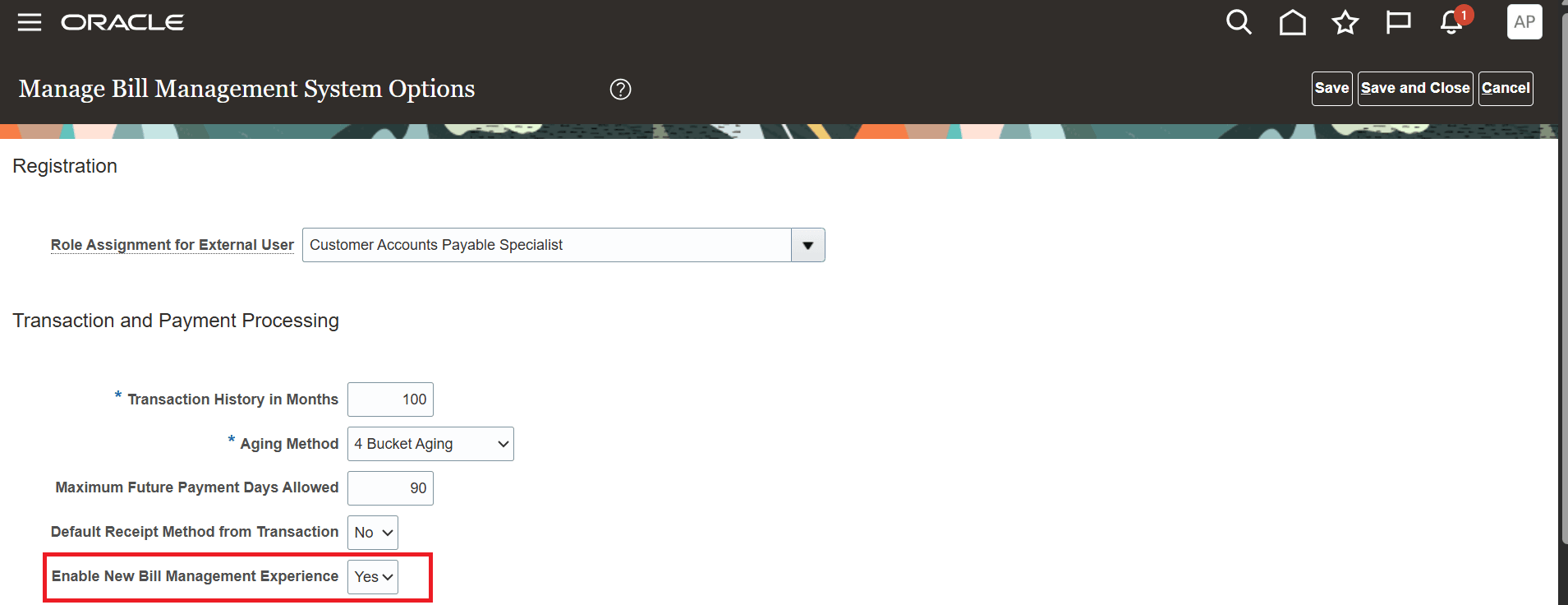
Manage Bill Management System Options
If you set the value of 'Enable New Bill Management Experience' to Yes -
- You will see new experience in the Account Overview page where
- the page is in query by example mode
- you can query and filter by any, few, or all the columns
- you can sort the columns as per your requirement
- you can export the query results to excel for offline analysis
- additional columns PO Number, Reference Number, Transaction Type, and DFF attributes are displayed
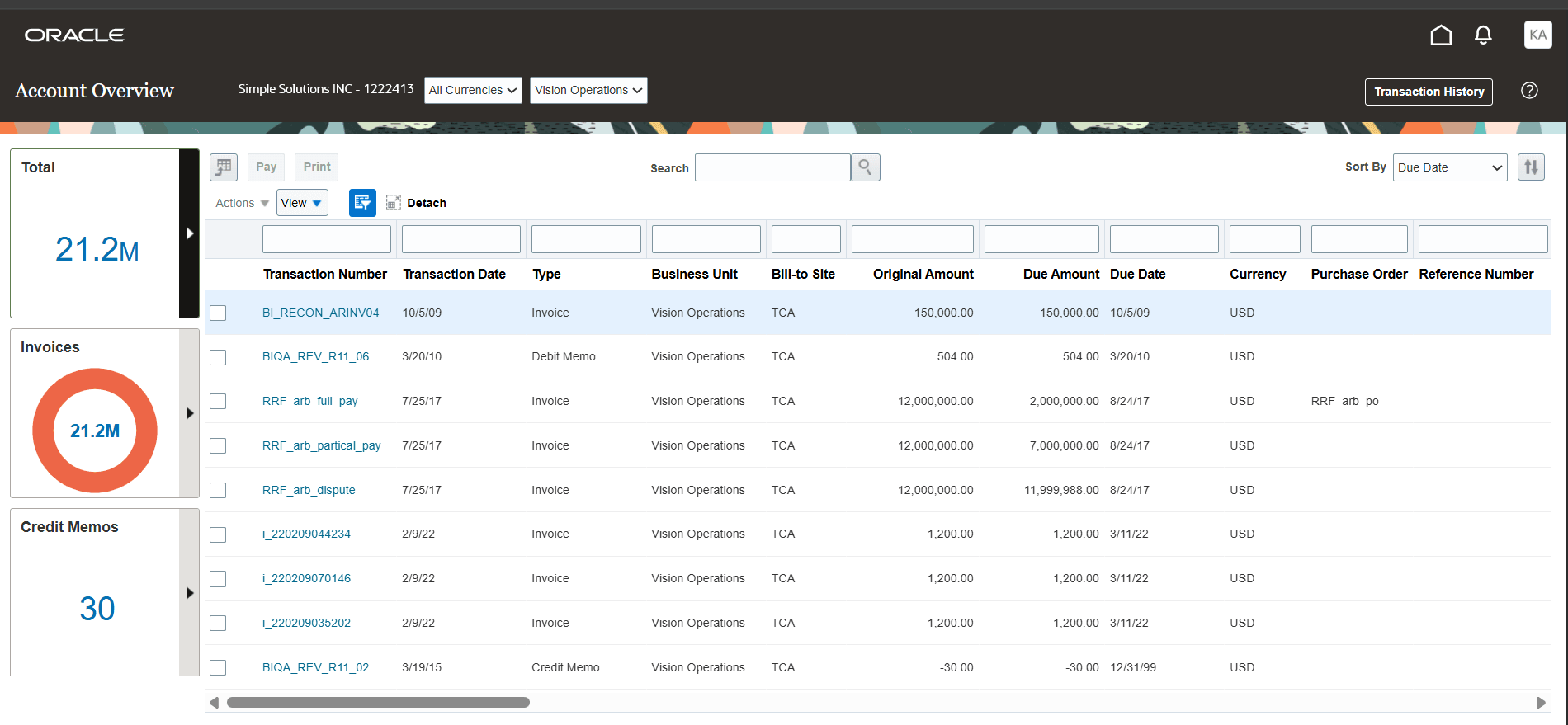
New Account Overview page
- You will see new experience in the Transaction History page where
- you can query and filter by any, few, or all the columns
- you can sort the columns as per your requirement
- you can export the query results to excel for offline analysis
- additional columns Business Unit, Customer, Party Site, and DFF attributes are displayed
If you set the value of 'Enable New Bill Management Experience' to No, you will continue to experience the traditional Account Overview page and traditional Transaction History page.
These are the business benefits:
- Increase productivity by printing multiple transactions at once, reducing repetitive effort during high volume reviews.
- Improve efficiency and follow up by using additional displayed attributes with expanded search, sorting, and filtering to quickly identify the right transactions.
- Reduce manual effort for offline work by exporting results to Excel with the same expanded attributes shown on the Account Overview and Transaction History pages.
Steps to enable and configure
Use the following steps to use this feature:
- Navigate to Setup and Maintenance
- Search and navigate to the Setup Task: Manage Bill Management System Options
- Locate the attribute Enable New Bill Management Experience
- Set the attribute value to Yes
- Save the changes
Tips and considerations
- Bulk Printing
- Prerequisites for bulk printing of transactions from Account Overview page:
- Enable the lookup code AR_STORE_PRINTED_TRANSACTIONS under the lookup type AR_FEATURES from Manage Receivables Lookups setup task (You must have already enabled this lookup if you are storing printed transactions as attachments)
- Run the Print Receivables Transactions process for the applicable business units and the range of transactions that you want to make available for bulk printing
- In Manage Bill Management System Options, set the Print option to Allowed for the applicable business units
- Selected transactions will not be printed into the zip file if they don't meet the prerequisites
- You don't need to enable the lookup code AR_STORE_PRINTED_TRANSACTIONS or run the Print Receivables Transactions process if you want to print a single transaction
- Prerequisites for bulk printing of transactions from Account Overview page:
- Enable New Bill Management Experience
- The default value for the attribute 'Enable New Bill Management Experience' is No
Key resources
- Based on Idea 915826 from the Idea Lab on Oracle Cloud Customer Connect.
- Refer to Manage Bill Management section under Using Receivables Credit to Cash for more information on Bill Management.
Access requirements
No new access requirements.