Enhancements In All-in-One Evaluations
Improve the evaluation experience of managers using All-in-One Evaluations with these enhancements:
- Managers see a message when competencies or goals can’t be marked as not ready to evaluate because the weight is not set to 100%. The Not ready to evaluate check box appears as read-only along with a message to clarify this.
- Managers see the attachments for a performance document directly without the need to drill down to the individual performance documents. See Steps to Enable.
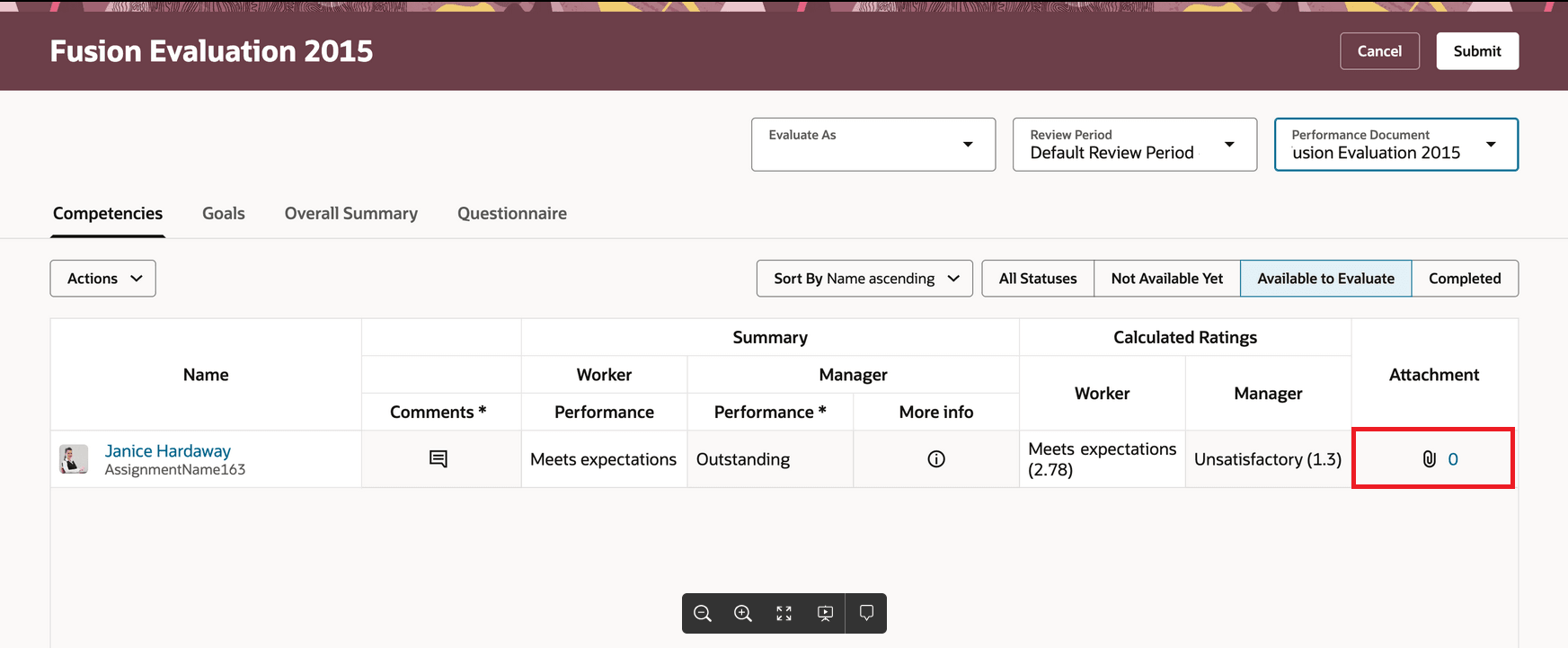
Attachment Count Displays for a Performance Document
- Managers see a list of competencies in the main page data grid. Selecting any of the rated or commented counts of competencies for a worker allows the manager to review all the workers competencies in one list in the panel drawer.
These enhancements enable managers to streamline the evaluation process in All-in-One Evaluations.
Steps to enable and configure
Ensure that you enable the following page property to display the Attachments column. When enabled, the attachments column will be displayed for every section.:
| Page Property | Label | Description |
|---|---|---|
| SHOW_ATTACHMENTS_COLUMN | Show Attachments Column in All-in-One Evaluations Page | This property controls the display of the Attachments column in the All-in-One Evaluations page. Set it to true or false to show or hide the column respectively. |