Configure Termination and Resignation Dates in Redwood
You can now control notification and effective date behavior in Redwood termination and resignation flows.
Redwood termination and resignation pages now support more flexible configuration for notification dates and resignation or termination dates. You can align Redwood behavior with your business rules for date entry, visibility, and editability.
You can now do these actions:
- Allow past-dated resignation notification dates for selected users.
In Termination Flow it was already enabled.- This is only applicable for Resignation Flow
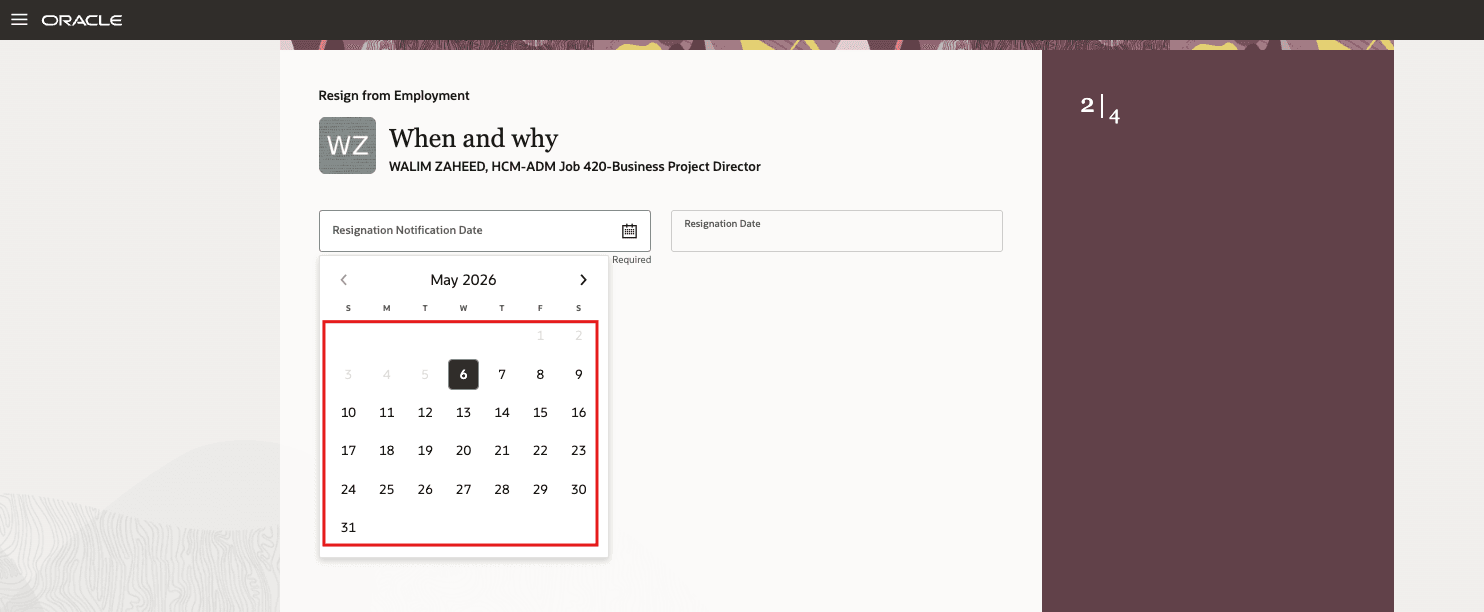
Before the feature details - past dates were not enabled for Notification Date
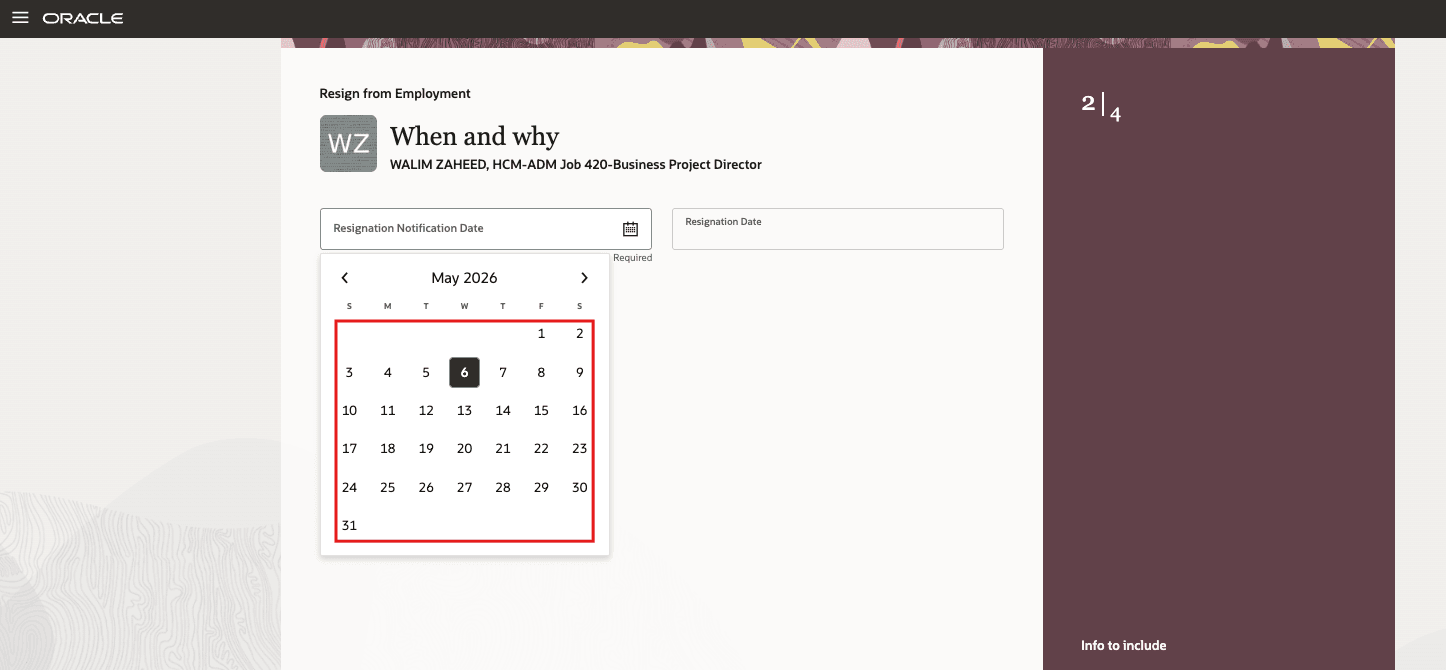
After the feature details - past dates are enabled for Notification Date
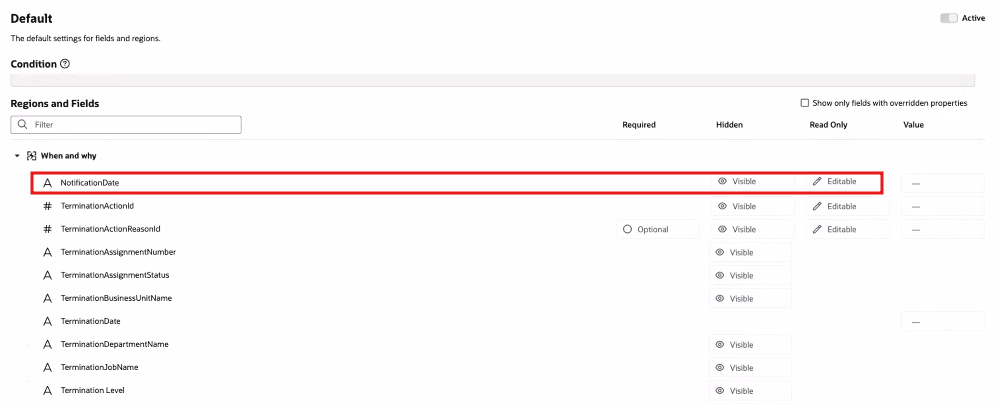
- Hide the Notification Date field in resignation and termination flows.
- Applicable for both Resignation and Termination
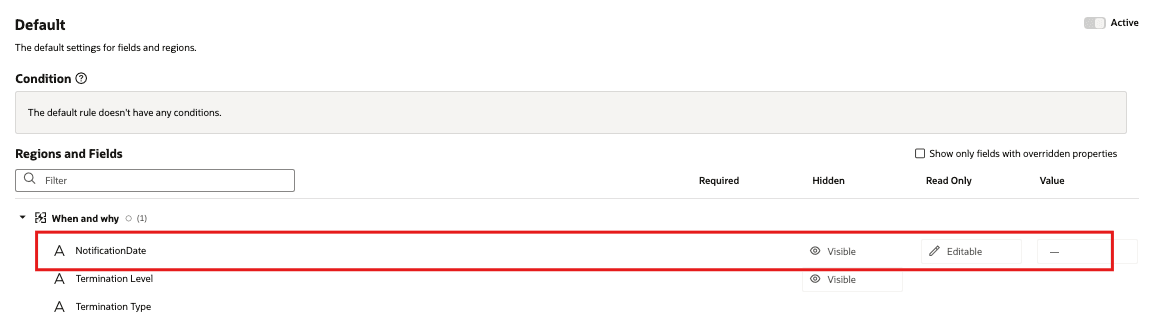
Before the feature details - Hidden property was switched OFF
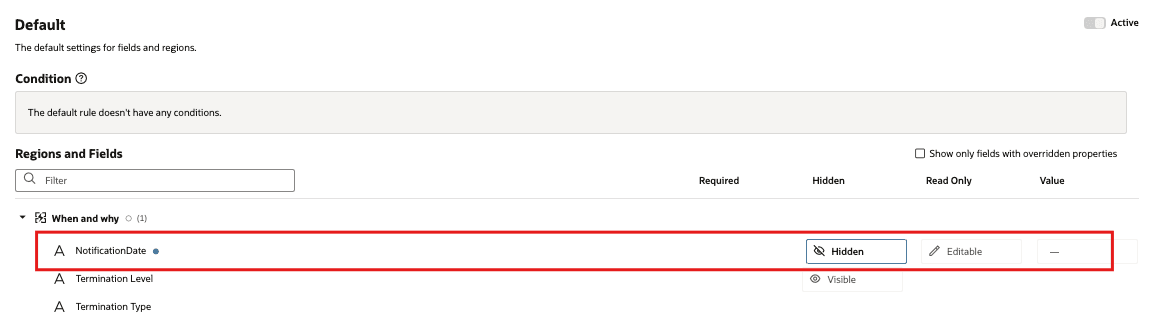
After the feature details - Hidden property is switched ON
- Hide the Notification Date field based on action or action reason.
- Make the Notification Date field read-only.
- Applicable for both Resignation and Termination
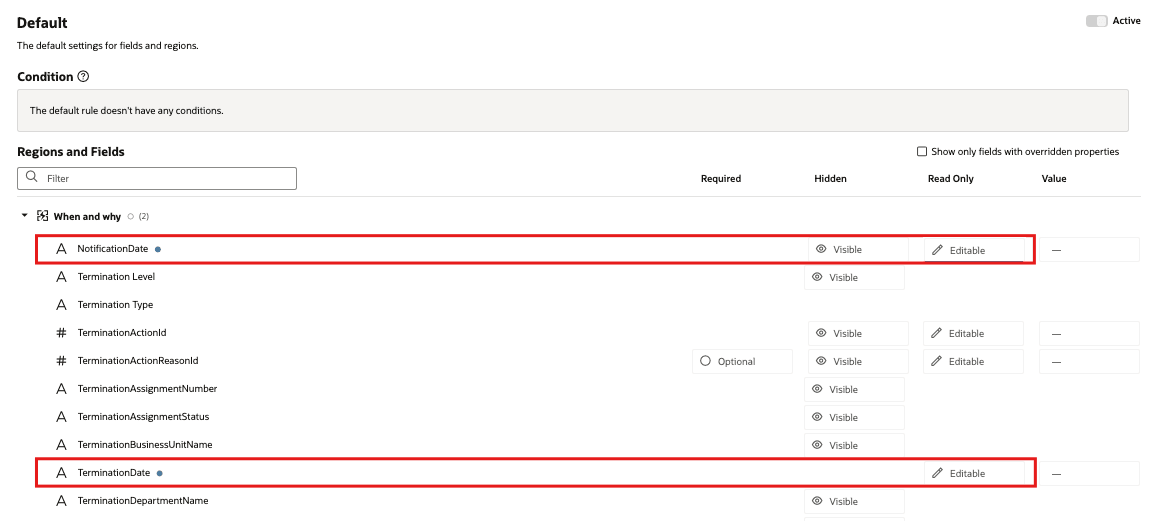
Before the feature details - Read Only Property was switched OFF
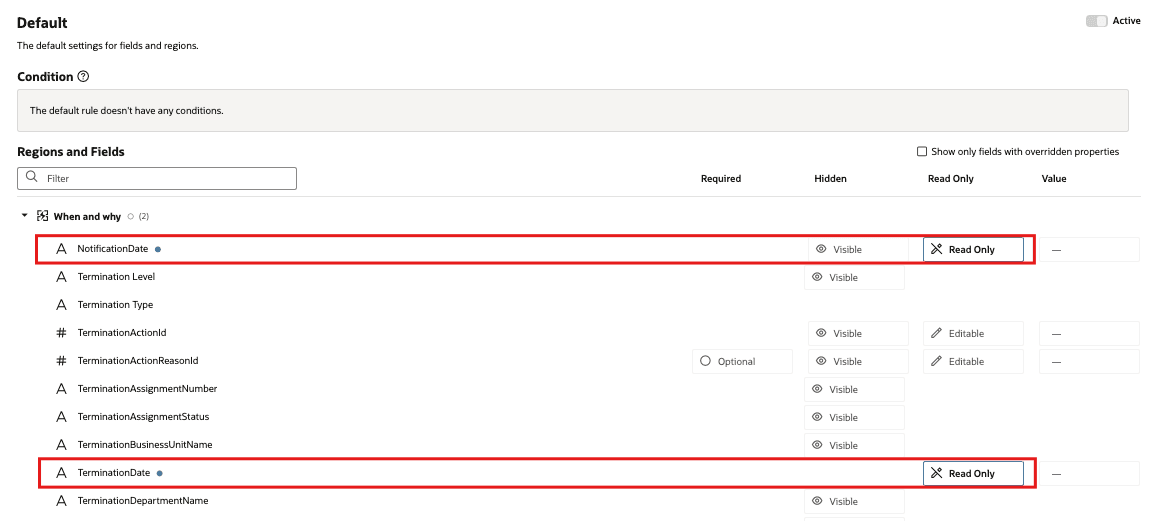
After the feature details - Read Only Property was switched ON
- Configure Notification Date visibility based on user role.
- Applicable for both Resignation and Termination
Before the feature details - Hidden property was switched OFF
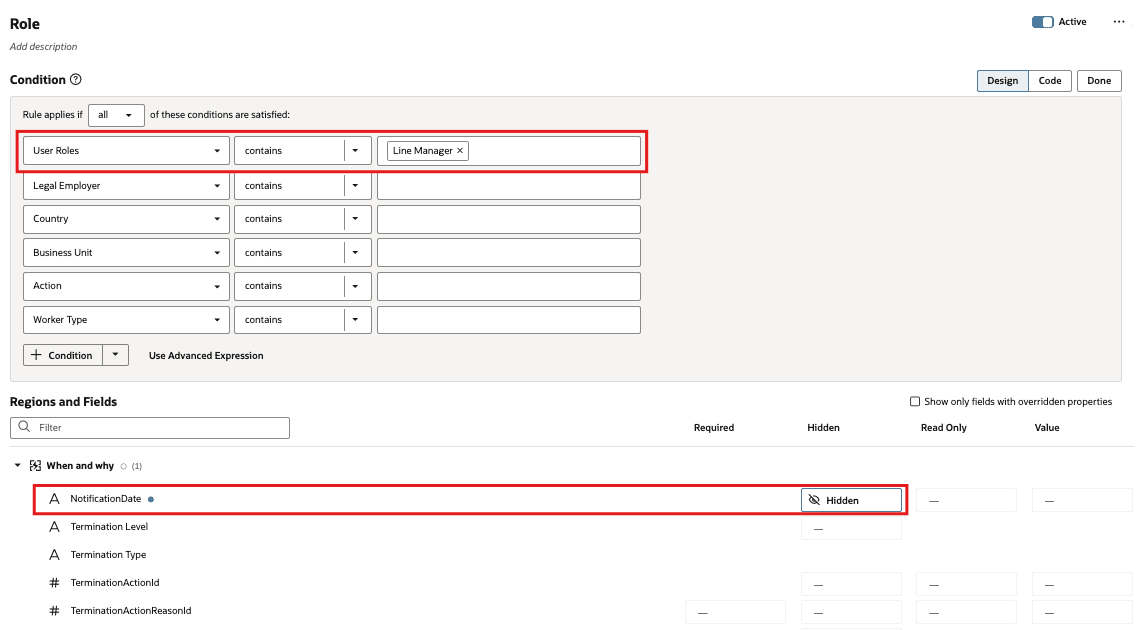
After the feature details - Hidden property is switched ON
This feature gives organizations more control over termination and resignation date entry in Redwood pages. It helps customers align Redwood behavior with existing business rules from Responsive UI, reduce incorrect date entry, support audit requirements, and simplify the page when the notification date isn’t needed.
Steps to enable and configure
Leverage the Visual Builder Studio to expose your applications. To learn more about extending your application using Visual Builder, visit Oracle Help Center > your apps service area of interest > Books > Configuration and Extension.
- Configure the Redwood resignation and termination pages for your organization’s date-entry requirements.
- Use the Enable Past Dated Resignation constant to control whether users can select a resignation notification date in the past. Set this property to Yes to enable past-date selection.
- Review whether each user population should be able to view or update notification, resignation, and termination dates. Then, configure field visibility and editability for the applicable flow, role, action, or action reason.
Key resources
For more information about extending Redwood pages in HCM, see the following guide on the Oracle Help Center:
Access requirements
Access to the Redwood Terminate Employment and Resign from Employment pages is controlled using the same security privileges that control access to the responsive Terminate Employment and Resign from Employment pages.
For information on existing security privileges, refer to this resource on the Oracle Help Center.
The following security privileges are required for the worker to manage and view these sections in the Redwood Termination and Resignation pages:
| Section |
Aggregate Privilege |
Abstract or Job Role |
|---|---|---|
|
Additional Assignment Info |
Manage Additional Assignment Info ORA_PER_MANAGE_ADDITIONAL_ASSIGNMENT_INFO |
Human Resource Specialist |
|
Seniority Dates |
View Seniority Dates ORA_PER_VIEW_SENIORITY_DATES |
Employee Line Manager Human Resource Analyst Human Resource Specialist |
|
Need Help? Contact Us |
Use REST Service - Representatives Read Only ORA_PER_REST_SERVICE_ACCESS_REPRESENTATIVES_RO |
Employee Contingent Worker Pending Worker Line Manager Human Resource Analyst Human Resource Specialist |
| Document Records |
Manage Person Documentation by Worker |
Employee Line Manager Human Resource Specialist |
The following security privileges are required for the worker to view these sections on the Redwood View Termination and View Resignation pages:
| Section | Aggregate Privilege | Abstract or Job Role |
|---|---|---|
|
Additional Assignment Info |
View Additional Assignment Info ORA_PER_VIEW_ADDITIONAL_ASSIGNMENT_INFO |
Employee Contingent Worker Line Manager Human Resource Analyst |
|
Seniority Dates |
View Seniority Dates ORA_PER_VIEW_SENIORITY_DATES |
Employee Line Manager Human Resource Analyst Human Resource Specialist |
|
Need Help? Contact Us |
Use REST Service - Representatives Read Only ORA_PER_REST_SERVICE_ACCESS_REPRESENTATIVES_RO |
Employee Contingent Worker Pending Worker Line Manager Human Resource Analyst Human Resource Specialist |
The following security privileges are required for the worker to view these sections in the Redwood Reverse Termination and Withdraw Resignation pages:
| Section | Aggregate Privilege | Abstract or Job Role |
|---|---|---|
|
Seniority Dates |
View Seniority Dates ORA_PER_VIEW_SENIORITY_DATES |
Employee Line Manager Human Resource Analyst Human Resource Specialist |
| Need Help? Contact Us |
Use REST Service - Representatives Read Only ORA_PER_REST_SERVICE_ACCESS_REPRESENTATIVES_RO |
Employee Contingent Worker Pending Worker Line Manager Human Resource Analyst Human Resource Specialist |