 Record of Employment (ROE) Contact Enhancements
Enhancements were made to the management of ROE contacts, designed to meet the needs of large organizations with more complex requirements. This enhancement allows creation of different ROE contacts for different types of ROEs and the use of existing ROE contacts as overrides for any department.
Previously, ROE contacts could only be configured at the Legal Reporting Unit (LRU) level, with a single contact type and one allowed primary contact. With this update, we have delivered:
- Three New ROE Contact Types
- ROE Contacts Defined at the LRU
- Department-Level ROE Contacts to Override LRU Defaults
New ROE Contact Types
To provide greater flexibility, we've introduced the following contact types to align with the applicable ROE reasons:
- Absence Contact
- Termination Contact
- General Contact (for ROEs not due to absence or termination)
Configuring ROE Contacts at the LRU
Previously, the ROE contact was configured at the LRU using the Manage Contacts page by attaching the legal role of Record of employment contact.
Instead, you can now configure all ROE contact types directly on a new page dedicated to ROE contacts at the LRU level. Access this through the Manage Legal Reporting Unit HCM Information task. On this page, you can:
- Create and manage all ROE contacts for the LRU
- Designate a default contact for each type
- Set the preferred language for each contact
You must create all ROE contacts at the LRU level, with one designated as the default, for each contact type.
This image illustrates the ROE Contact Information page to configure the new types of ROE contacts.
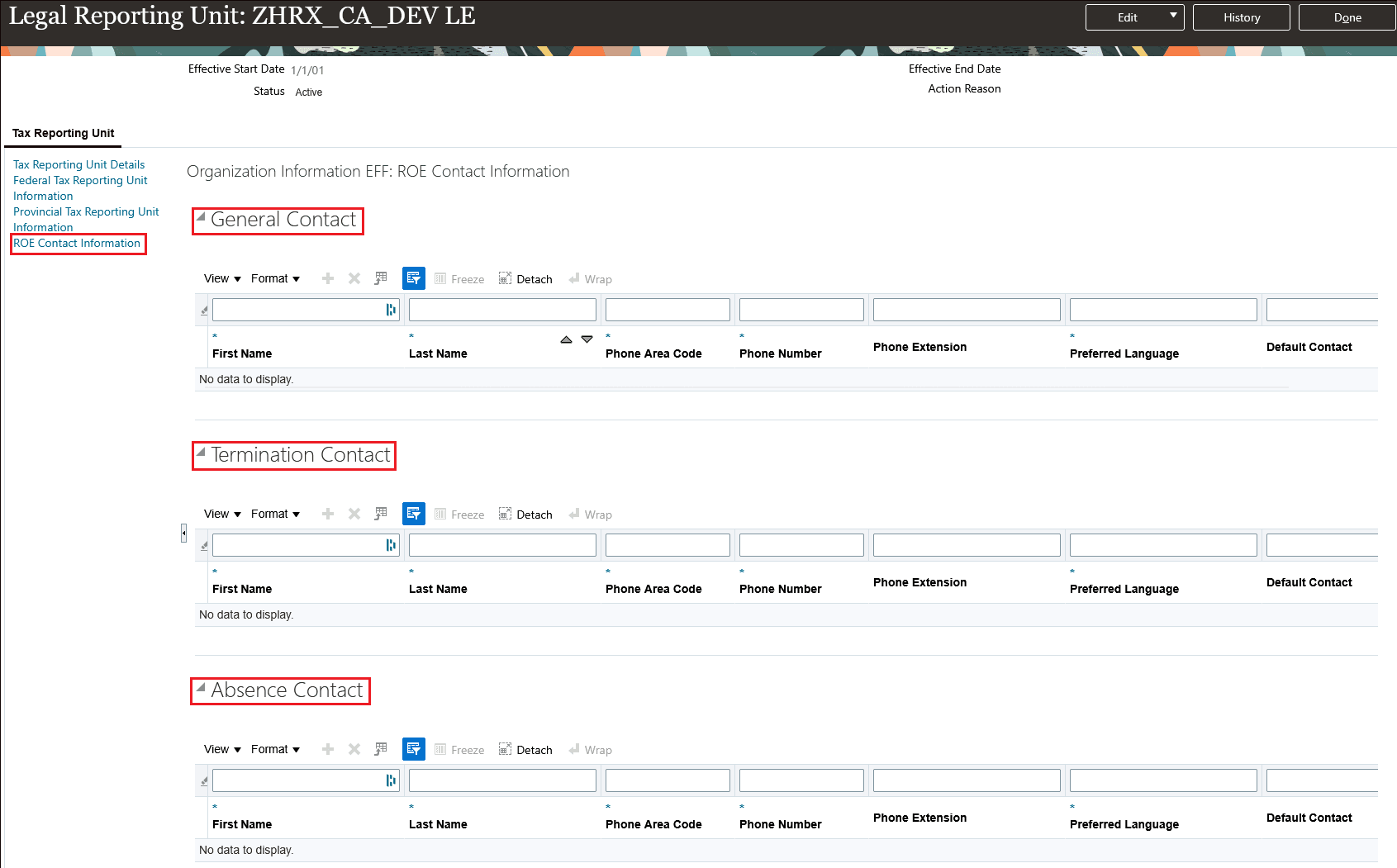
LRU: ROE Contact Information
Configuring ROE Contact Overrides for Departments
To provide even more flexibility, you can now override LRU defaults by setting department-level ROE contacts. Only ROE contacts previously created at the LRU level are available for selection as overrides at the department level.
Key points for employees with multiple assignments:
- For multiple assignments within the same LRU, the system uses the department-level ROE contact override (if available) from the primary assignment.
- For multiple assignments across different LRUs, the system uses the department-level ROE contact override (if available) from each respective assignment.
Note: If the employee does not have an assigned department, the default contacts specified at the LRU level are used.
Use the Manage Departments task and complete the Canada Record of Employment Contact Information section for each department as needed.
This image illustrates the new Canada Record of Employment Contact Information section used to override the default ROE contacts.
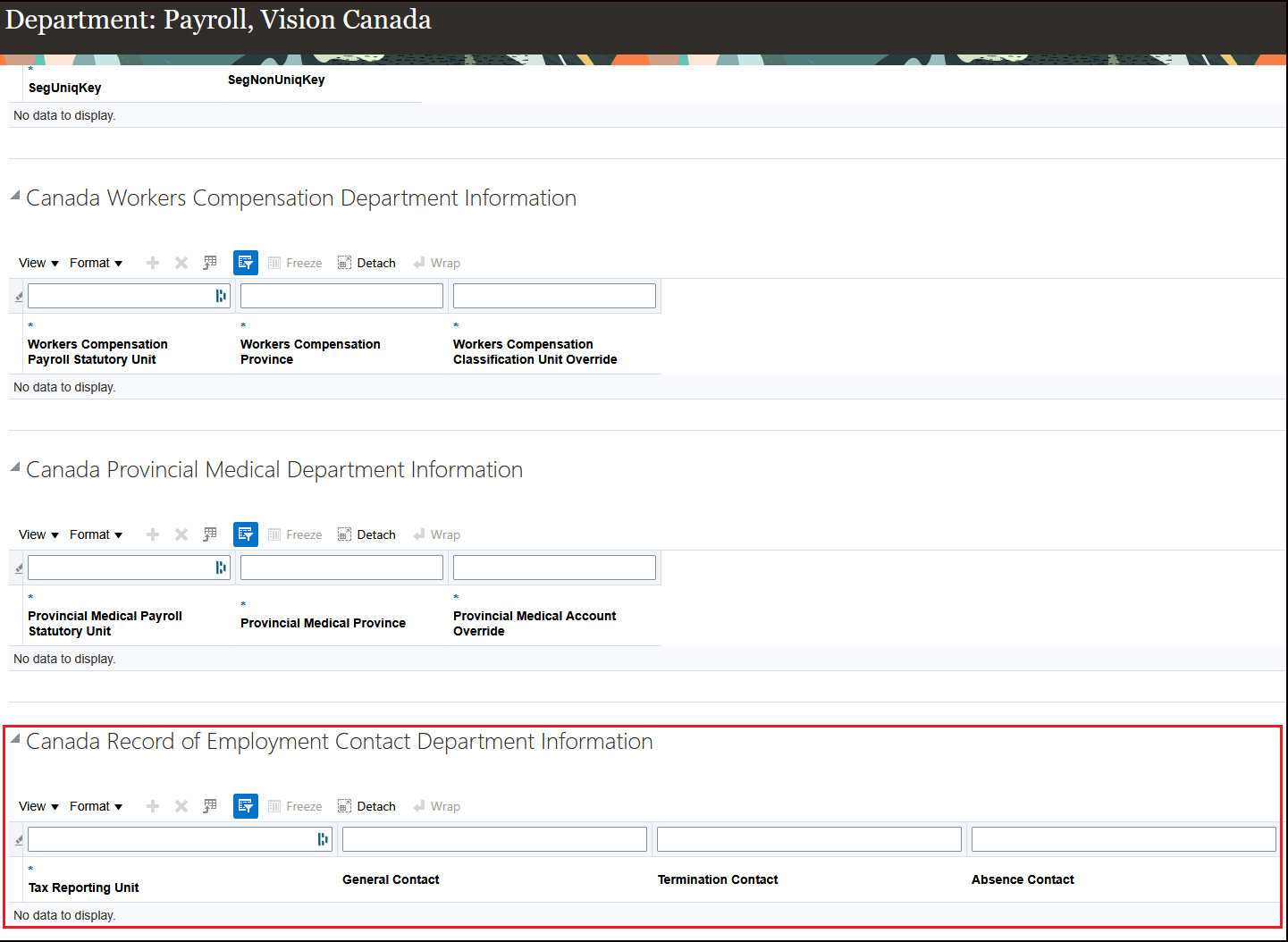
Department: Canada Record of Employment Contact Information
ROE Contact Hierarchy
The rules below determine which ROE contact is used, based on the type of ROE processed and the configuration at both the LRU and department levels.
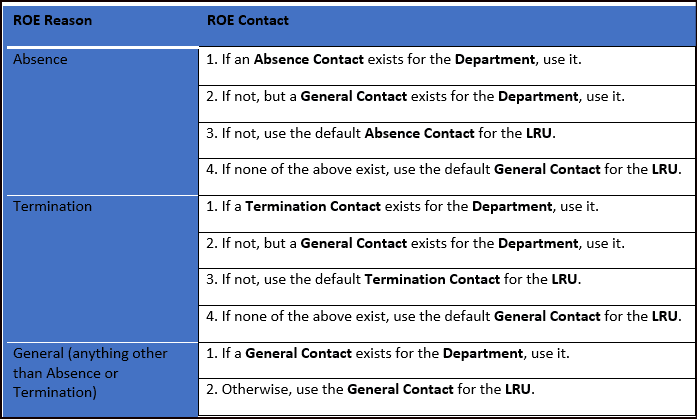
ROE Contact Hierarchy Table
The image below is a graphical representation of the same information in the table to help illustrate the hierarchy.
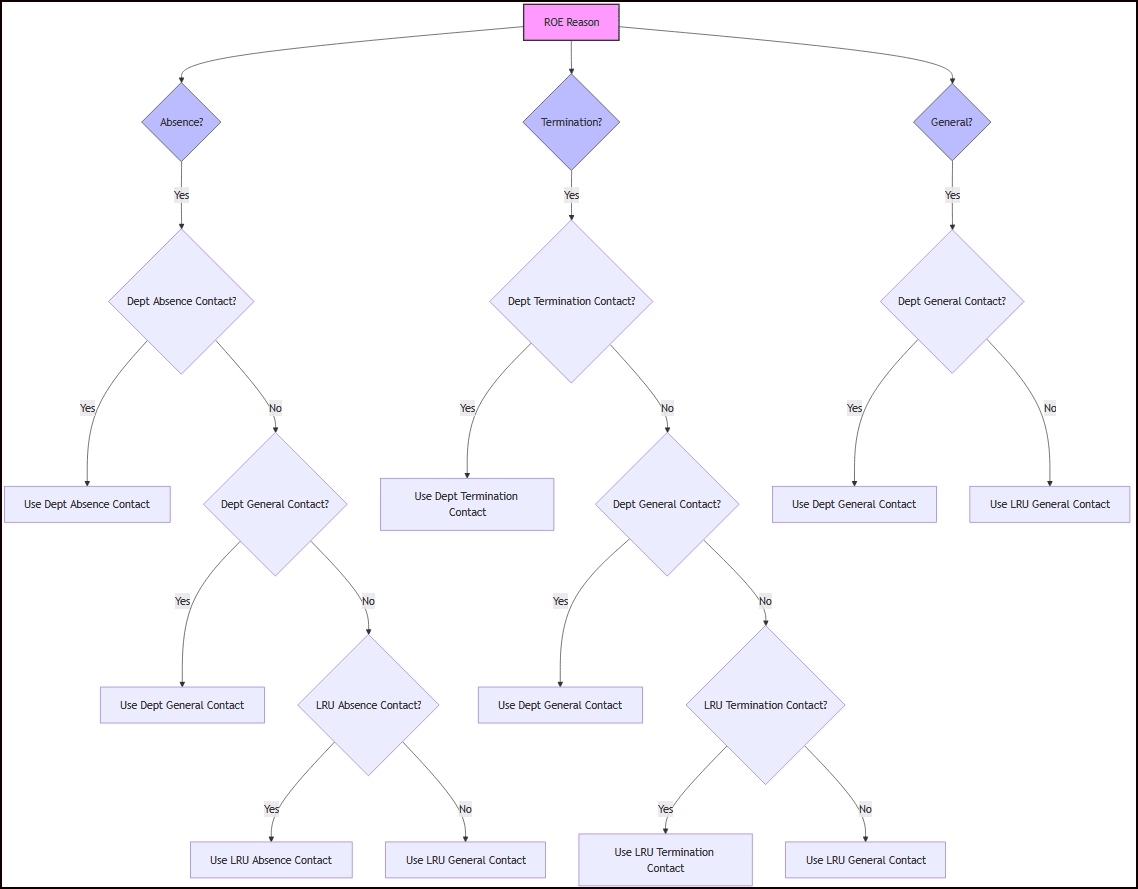
ROE Contact Hierarchy Condition Diagram
Automatic Upgrade of Existing ROE Contacts
As part of this enhancement, existing contacts set up in the old location are copied to the new ROE Contact Information page. Here’s how the upgrade will work:
- Only contacts with the legal role Record of employment contact will be copied.
- Contacts marked as primary will become the default contacts. Others will transfer without being set as default.
- Contacts without a phone number won’t be copied.
- For Preferred Language, see the following table for the values assigned to the new record.
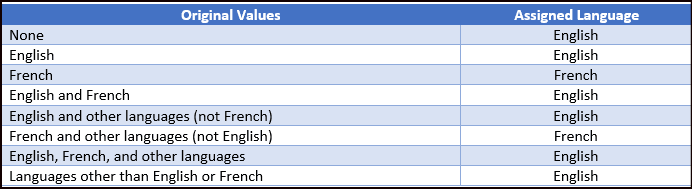
Preferred Language
This feature allows large organizations to tailor configuration of their ROE contacts by enabling the creation of multiple contact types and allowing for department-specific customization.
Steps to enable and configure
You don't need to do anything to enable this feature.
Tips and considerations
Note these important considerations for this feature:
- After the 26A update is applied, ROE contacts configured at the LRU using the Manage Contacts page will no longer be supported. Any existing or newly added contacts in the Manage Contacts page will be ignored.
- When the ROE is generated for reasons other than termination or leave of absence, the type of ROE contact is determined based on the ROE Reason override defined on the Reporting Information card.
Key resources
Refer to these documents on the Canada Information Center for additional information.
Canada Information Center: https://support.oracle.com/rs?type=doc&id=2102586.2
- CA – Payroll tab > Product Documentation > Payroll Guides > Administering Payroll for Canada