Recruiting Activity Center: Requisition and Job Application Preview Extensibility
You can create business rules in Visual Builder Studio to display or hide sections and fields in the job requisition and job application preview panels of the Recruiting Activity Center. You can also set conditions to determine when a rule is applied.
Example of a rule where the Recruiting Type field is hidden in the Requisition structure section of the preview panel.

Rule When a Field is Hidden
Example of a rule where the Career site posting section is hidden in the requisition preview panel.

Rule When a Region is Hidden
Example of a condition where fields and regions are displayed or hidden if requisitions' recruiting type is Campus and location is United States.
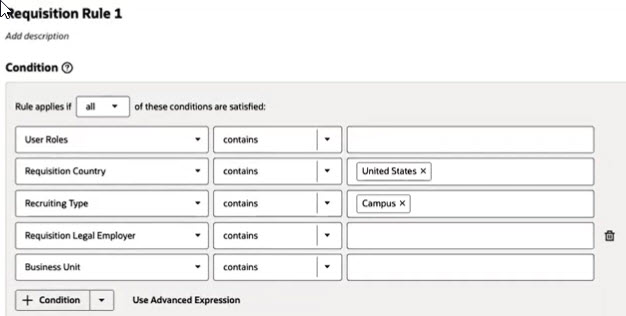
Condition to Display or Hide Fields and Regions
Business benefit: This feature helps configure and simplify the job requisition and job application preview panels to show relevant information to Recruiting Activity Center users.
Steps to enable and configure
Navigate to the Redwood Hiring page. Then, in Visual Builder Studio, in the top left menu, click the Recruiting Activity Center page in the Hiring sub-menu. Then follow the steps detailed here:
- How do I hide or show a section in Visual Builder Studio?
- How do I hide or show a field in Visual Builder Studio?
For details on the configuration and privileges required to use the Recruiting Activity Center, see How do I set up the Recruiting Activity Center?
Access requirements
Users need this duty role to use the Recruiting Activity Center:
- Access Recruiting Activity Center (ORA_IRC_ACCESS_RECRUITING_ACTIVITY_CENTER_DUTY)