Display Empty Fields in Weekly Working Hours Section on Redwood Employment Information and Employment Details Pages
The Redwood Employment Information and Employment Details pages now display all configured fields in the Weekly Working Hours section, including fields that don’t currently have values. Previously, fields with empty values weren’t shown in this section even when they were configured as visible through business rules. This enhancement extends the existing behavior already available for the Assignment, Job Details, and Additional Assignment Info sections on these pages.
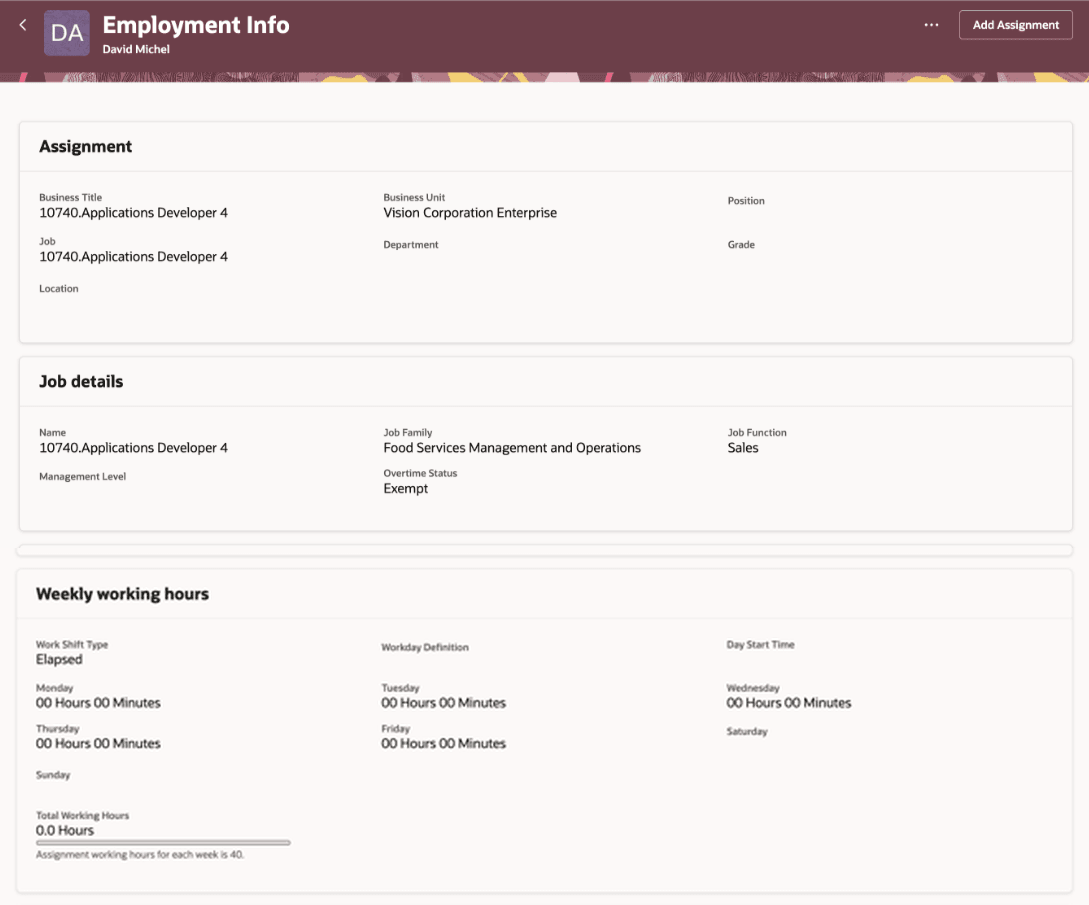
Empty fields are now displayed in the Weekly Working Hours section
This feature gives users a more complete view of worker information on the Employment Information and Employment Details pages. By displaying configured fields even when values aren’t yet entered, it improves page consistency, reduces ambiguity about which fields are available, and helps users understand the full set of information that can be maintained in the Weekly Working Hours section.
Steps to enable and configure
No additional enablement is required beyond configuring field visibility through business rules and Visual Builder Studio.
Key resources
For more information, refer to these resources on the Oracle Help Center:
- View and Manage Your Employment Information in the Using Global Human Resources guide
- How do I hide or show a field in Visual Builder Studio? in the HCM Common Questions and Answers
- Employment Processes in the Using Global Human Resources guide
For more information, refer to these resources:
- Express Mode in VBS for detailed instructions on using specific Express Mode features.
- Extending Redwood Applications for HCM and SCM Using VB Studio for details on what’s supported by HCM.
- You can refer to the VB Studio documentation "Configure an Oracle Cloud Application" to check the steps to access VB Studio from a Redwood page.
- Extending HCM Redwood Applications Using Visual Builder Studio
- Refer to the Customer Connect forum Visual Builder Studio for HCM