Manager Edge Agent
Manager Edge is a coaching assistant that helps managers turn existing talent signals into practical, employee specific coaching actions. Manager Edge analyzes the manager’s query and uses relevant data from Oracle Fusion Cloud HCM—such as performance and development goals, check-ins, team sync, feedback (requested and anytime), recognition and awards, and performance documents—to surface themes, progress, potential risks and ready-to-use guidance for conversations and next steps.
Note: Manager Edge doesn’t make employment decisions like promotions or terminations. It avoids answering queries on sensitive and restricted data.
Engaging your team in meaningful conversations can be challenging, especially when employee data is spread across multiple modules in Oracle Fusion Cloud HCM. Instead of navigating different systems, recalling past discussions, and piecing together development priorities, the Manager Edge agent brings data together in one place—delivering clear summaries, coaching insights, and actionable next steps.
Here are a few sample tasks that Manager Edge can help you with:
| Tasks | Sample Questions | What Manager Edge Does? | Result |
|---|---|---|---|
| Understand employee trends |
|
Summarizes observable patters from check-ins, performance goals, development goals, recognitions, feedback, and celebrations. |
|
| Quickly prepare for a 1:1 discussion | What should I focus on in my next 1:1 discussion with Robert? | Provides focus areas, growth signals, conversation starters, and coaching tips. | Better prepared for the discussion. |
| Spot development opportunities | What are the strengths to reinforce and development areas to focus on for William? | Identifies incomplete goals, development opportunities from check-ins, feedback, and performance documents. | Shifts from reactive management to proactive management. |
| Enhance manager self-awareness and effectiveness | How can I improve my management style? | Scans check-in notes, development comments, and goal feedback. | Creates professional, growth-oriented narratives. |
The Aggregated Oracle Touchpoints Data scheduled process collects and consolidates relevant employee data, enabling Manager Edge to securely access and analyze it for coaching insights. This process aggregates data from the following sources for the past 2 years:
- Performance and development goals
- Performance evaluation documents
- Anytime and Requested Feedback
- Recognitions and awards
- Check-Ins (includes Team Sync)
The consolidated dataset ensures Manager Edge can generate reliable, contextual, and data-driven coaching guidance for managers.
To use Manager Edge effectively:
- Frame clear, time-bound questions to improve accuracy and clarity in responses. Focused questions lead to more meaningful and actionable insights.
- Review the information from the agent response as discussion points.
- Apply your managerial judgement. Manager Edge uses data, you bring context, nuance and leadership, together it becomes a powerful tool to create a high-performing team.
If the user query to the agent doesn’t contain a duration, then the agent applies these default duration:
- Check-ins (includes Team Sync): last 6 months
- Feedback: last 12 months
- Goals: include goals with a start date within the last 12 months
- Recognitions: last 6 months
- Awards: last 6 months
- Evaluations: last 2 years (if evaluation data is available)
For example, the following screenshot displays the response for the question: How is Mia progressing against their current goals?
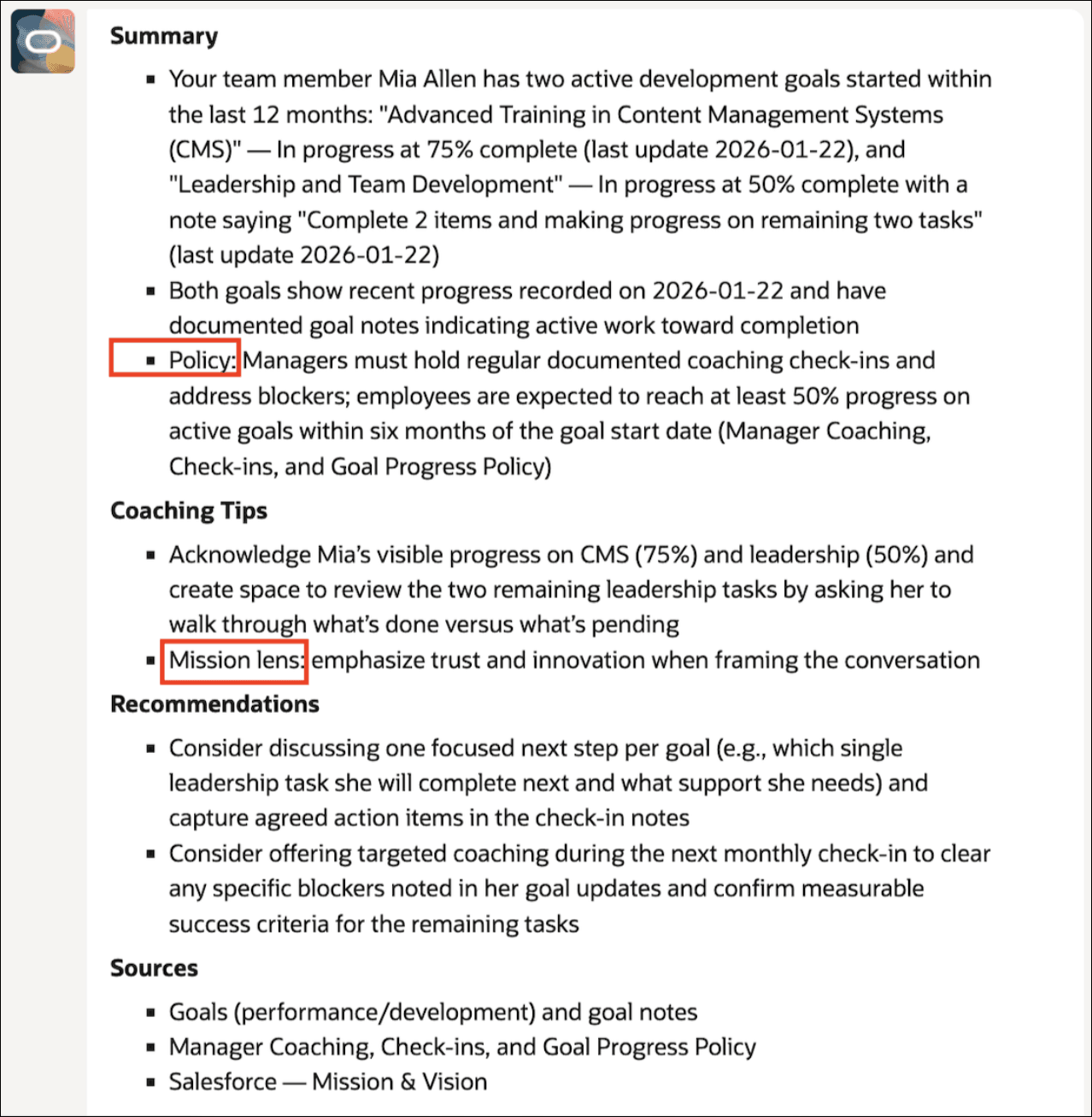
Manager Edge Agent Response
As shown in the screenshot, the response is organized into four sections: Summary, Coaching Tips, Recommendations, and Sources. The highlighted text indicates you can attach the company’s HR policies and mission and vision statements to the agent. This reinforces that Manager Edge aligns its guidance with both HR policy requirements and the company’s mission and leadership principles—paraphrasing and citing relevant policy content when compliance or eligibility rules apply, and using mission principles to shape the coaching tone and recommended conversation approach.
Business Benefit
Manager Edge can be seamlessly embedded within your existing HCM workflow, enabling managers to stay both data-driven and people-focused without disrupting daily operations. It helps managers to:
- Guide the team based on facts, not assumptions.
- Quickly grasp key needs and opportunities of team members.
- Prepare for conversations with confidence.
- Have information at fingertips to take appropriate actions.
- Support employee development.
Steps to enable and configure
Run Aggregate Oracle Touchpoints Data Scheduled Process
You must run the Aggregate Oracle Touchpoints Data scheduled process every day. For more information, see: Configure and Run Scheduled Processes for Touchpoints,
Note: The data generated by the scheduled process reflects previous day's data. The data is not real-time, it depends on how frequently the scheduled process is run.
You can launch the agent using a guided journey from the Team Touchpoints page.
Configuring the Agent
- Your environment must have certain necessary configurations. Ask your help desk to contact Oracle Support, who can verify what your environment has and address these gaps. For more information, see FAQ2521 on My Oracle Cloud Support.
- Set the Enable Security Console External Application Integration (ORA_ASE_SAS_INTEGRATION_ENABLED) profile option to Yes and enable permission groups for the appropriate roles. See Access Requirements for AI Agent Studio.
To learn how to set up AI agents, see Create AI Agents Using Preconfigured Agent Team Templates.
Key resources
- Explore AI Agents for Oracle Fusion Cloud Applications
- How do I use AI Agent Studio?
- Configure Notifications Using Alerts Composer
Access requirements
The agents you can view depend on the roles and privileges assigned to you. To access this agent, your role must be explicitly granted access to it by an AI Studio Administrator. See How can I give users access to AI agents and Access Requirements for AI Agent Studio.