Introducing the Total Compensation Statements Setup Subject Area
Now you can report on the total compensation statements setup configuration. Users can view statements definitions and sections, periods, categories, items, conditions, and item tags that have been configured.
Employee transactional reporting for statement objects will be delivered through another Generated Statements subject area in the future. Here's a feature overview for the Total Compensation Statements Setup subject area:
- Statement Definition
- Report on the structure of the total compensation statement
- Statement Period
- Report on the period of the statement
- Category
- Report on the categories in the statement
- Item
- Report on the compensation items in the statement
The subject area has 1 fact folder and 7 dimension folders as shown below. Dimension folders are enriched with sub-folders to give deeper insights.
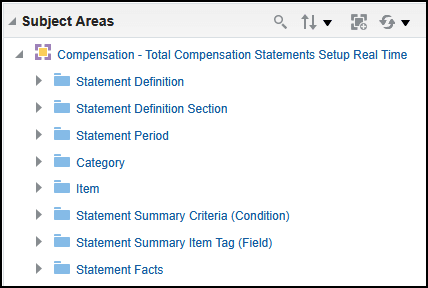
Total Compensation Statements Setup Real Time
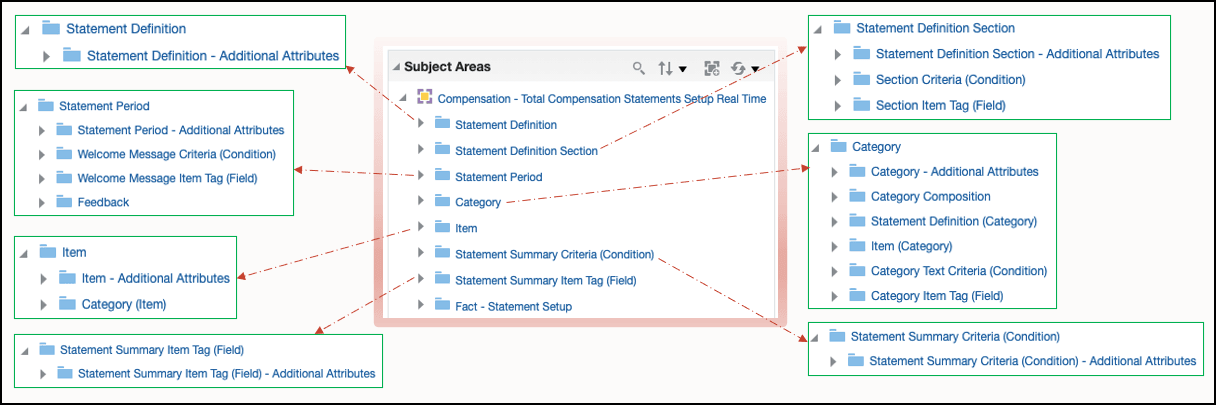
Dimension Subfolders Illustration
Introducing the ability to report on setup data in the Compensation - Total Compensation Statements Setup Real Time subject area. This enhancement allows users to report on setup data relevant to total compensation statements.
- Business Questions Answered
- First level reporting (columns exposed in primary folders)
- What is the count of items in a statement?
- What is the count of categories in a statement?
- What is the total number of statements?
- What is the distribution of items by source type (benefit balance, salary, element entry etc.)?
- What is the distribution of categories by category type (benefits, cash comp, savings etc.)?
- Second level reporting (columns exposed in sub-folders)
- What are the sections associated with a statement?
- What are the conditions associated with a category?
- What are the feedbacks associated with a period?
- What are the items associated with a category?
- What are the categories associated with an item?
- First level reporting (columns exposed in primary folders)
Steps to enable and configure
You don't need to do anything to enable this feature.
Tips and considerations
Brought to you by Idea Lab: community.oracle.com/customerconnect/discussion/613527/configuration-report-for-total-compensation-statements.
The new setup subject area does not expose HCM Common Dimensions (Worker, Dept, Job etc.). This is the functional behavior of the subject area. We will deliver another subject area in the future for generated statements, that will allow reporting on common dimensions.
There is no Time dimension, no concept of effective dating, and no as-of-date reporting for this subject area. You can use statements periods.
Access requirements
- Data Security
- No data security will be applied on the setup objects.
- Duty (hcm stripe) ORA_FBI_HCM_TOTAL_COMPENSATION_STATEMENT_TRANSACTION_ANALYSIS_DUTY_HCM
- Functional Security
- Duty (obi stripe) FBI_HCM_TOTAL_COMPENSATION_STATEMENT_TRANSACTION_ANALYSIS_DUTY
- Duty Name: Total Compensation Statement Transaction Analysis Duty
- Fusion Job Roles:
- Compensation Manager
- Compensation Administrator
- Compensation Analyst