Career Advancement Command Center
The Career Advancement Command Center helps employees take the next step in their careers from a single, AI-powered workspace. Instead of navigating separate systems for profile management, jobs, gigs, learning, and events, employees can see where they are today, identify where they want to go next, and discover the actions that can help them get there.
Using AI-powered recommendations and large language model (LLM) assisted matching, the Career Advancement Command Center brings together career opportunities, skill development, and networking resources in one place. Employees receive personalized guidance based on their skills, interests, experiences, and career goals.
With the Career Advancement Command Center, employees can:
- View an AI-generated summary of their skills, career opportunities, and development priorities.
- Add suggested skills to their profile based on completed gigs and learning activities.
- Discover internal jobs and gigs matched to their verified skills and career interests, understand why opportunities are a strong fit, and identify skill gaps that may affect eligibility.
- Receive recommendations for learning, gigs, and events that can help close skill gaps and support career goals.
- Get personalized next-step recommendations, such as applying for a gig, enrolling in learning, or connecting with relevant contacts.
- Generate draft communications to connect with hiring managers, share learning opportunities, or coordinate development plans.
Once enabled, and for users who have the privileges, there's new quick action appears under Me > Opportunity Marketplace that opens the command center.
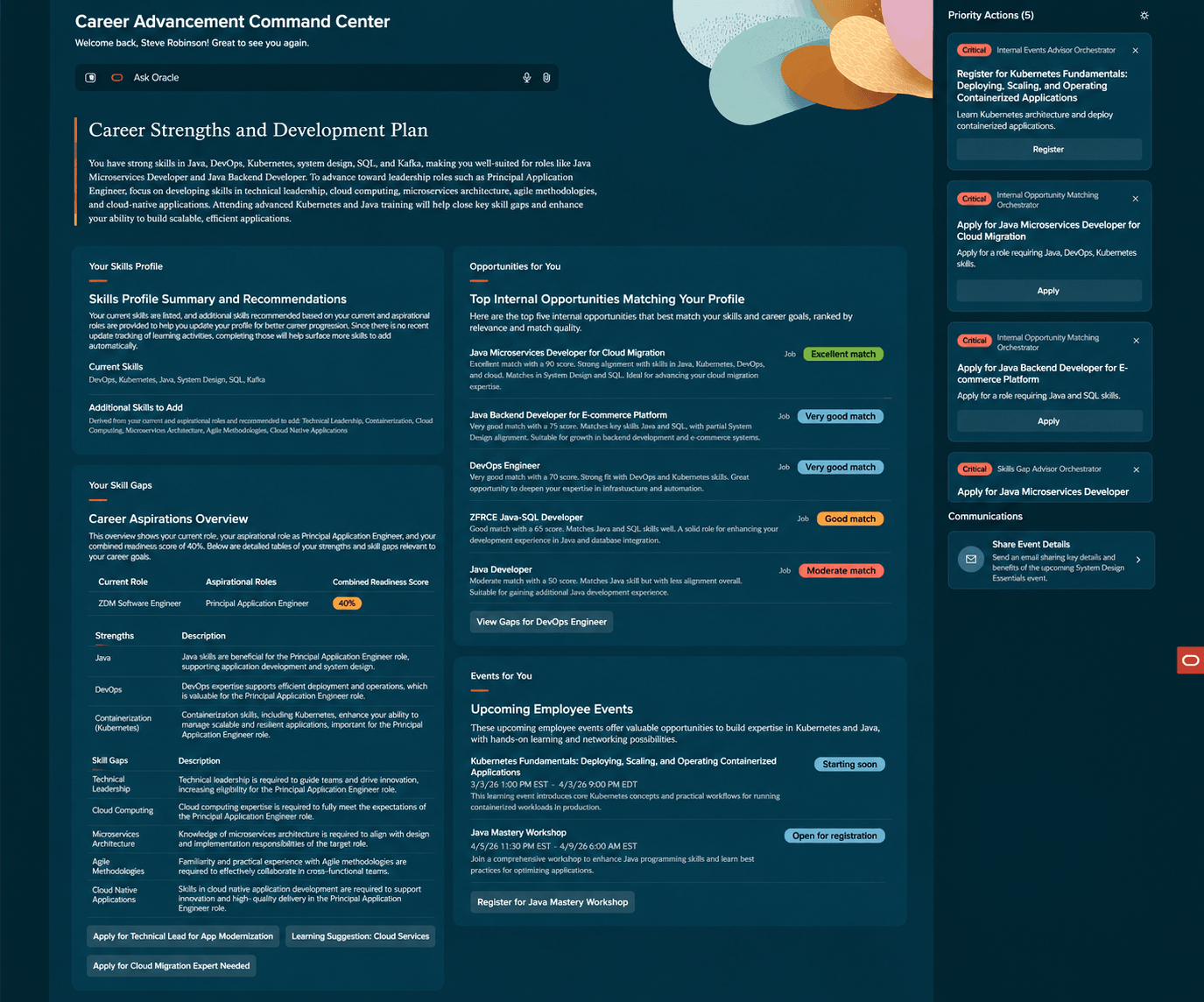
Career Advancement Command Center
Your Skills Profile
The Your Skills Profile widget helps employees keep their skills profile current and accurate by identifying skills they may have gained through recent activities, such as gigs and learning experiences. It also recommends additional skills that could be added to their profile to fill gaps and better reflect their capabilities.
Skill recommendations are generated by analyzing recent employee activity and using AI-powered reasoning to infer relevant skills that may not yet be included in the profile.
Maintaining an up-to-date skills profile improves personalized matching across jobs, gigs, learning opportunities, and events.
Opportunities for You
The Opportunities for You widget recommends jobs, gigs, and other opportunities that align with an employee's current skills and career interests. It also suggests opportunities that can help build skills they want to develop.
Employees can view requisition details to understand why they were matched to specific opportunities. Recommendations are based on skills, interests, and readiness, rather than keyword searches alone. Employees can also:
- Save opportunities as favorites for quick access in Opportunity Marketplace.
- Draft communications to hiring teams for jobs and gigs directly from the opportunity.
Your Skills Gaps
The Your Skills Gaps widget compares an employee's current skills profile with a target career role and provides a readiness score.
The widget highlights skill gaps and recommends learning activities and gigs that can help close them. Recommended actions appear as priority items in the right-side panel, making it easier to focus on the most impactful development opportunities.
Events for You
The Events for You widget recommends internal events that support an employee's career goals and professional growth. Recommended events may include networking opportunities, workshops, leadership sessions, and role-specific development activities.
Employees can view why an event is relevant to their career journey, helping them make informed decisions about where to invest their time. These recommendations recognize that career growth comes not only from formal learning, but also from networking, exposure, and shared experiences.
Employees can make career decisions in a single AI-guided workspace that connects skills, opportunities, learning, events, and contacts. Organizations can support internal mobility by helping employees discover opportunities, identify skill gaps, and take action on personalized development recommendations.
Steps to enable and configure
- Enable Gigs, Jobs, and Career Roles in Opportunity Marketplace. For details see How do I set up Opportunity Marketplace?
- Enable ORA_HRT_SKILLS_ENRICHMENT_ENABLED so the Add to Profile action works on the Your Skills Profile widget. For details see How do I enable a profile option?
- Create a custom role or update existing roles and inherit ORA_HCM_IRC_EMP_WF_AGENT_ACCESS.
- Assign the IRC_ACCESS_CAREER_ADVANCEMENT_COMMAND_CENTER_PRIV to allow access to the Career Advancement Command Center quick action.
For Roles, see Access Requirements.
Tips and considerations
- There's a known issue with the Career Advancement Command Center. By default, the URL includes "fscmUI". Users need to replace it with "hcmUI" for the quick action to appear.
Access requirements
Users must have the privileges required to use Opportunity Marketplace. For details see Assign Opportunity Marketplace Privileges to Users.
If you create a new role ensure that it inherits:
- Employee Abstract Role
- Roles required for Opportunity Marketplace Access
- Opportunity Marketplace Career Roles.