Global Uptake: Retroactive Overpayment and Recovery for Absence Elements
The Retro Overpayment Processing feature has been extended to support Entitlement absence elements. This feature was first introduced in Update 26A for Standard Earnings elements and extended in Update 26B to include Supplemental Earnings elements and Time Card elements.
With this enhancement, retroactive absence overpayments can be offset across multiple pay periods rather than recovered in full in a single period, reducing the impact on the employee's net pay. Repayments are tracked through the Recoveries calculation card until the overpayment is fully settled.
A new element template question, “Is this element subject to retroactive recoveries”, is now available when creating absence elements.
The options for the template question are:
- Yes
- No (Default)
The question is set to No by default. Setting the question to Yes creates the elements required to generate the Recoveries card.
This image illustrates the Element creation page showing the new template question.
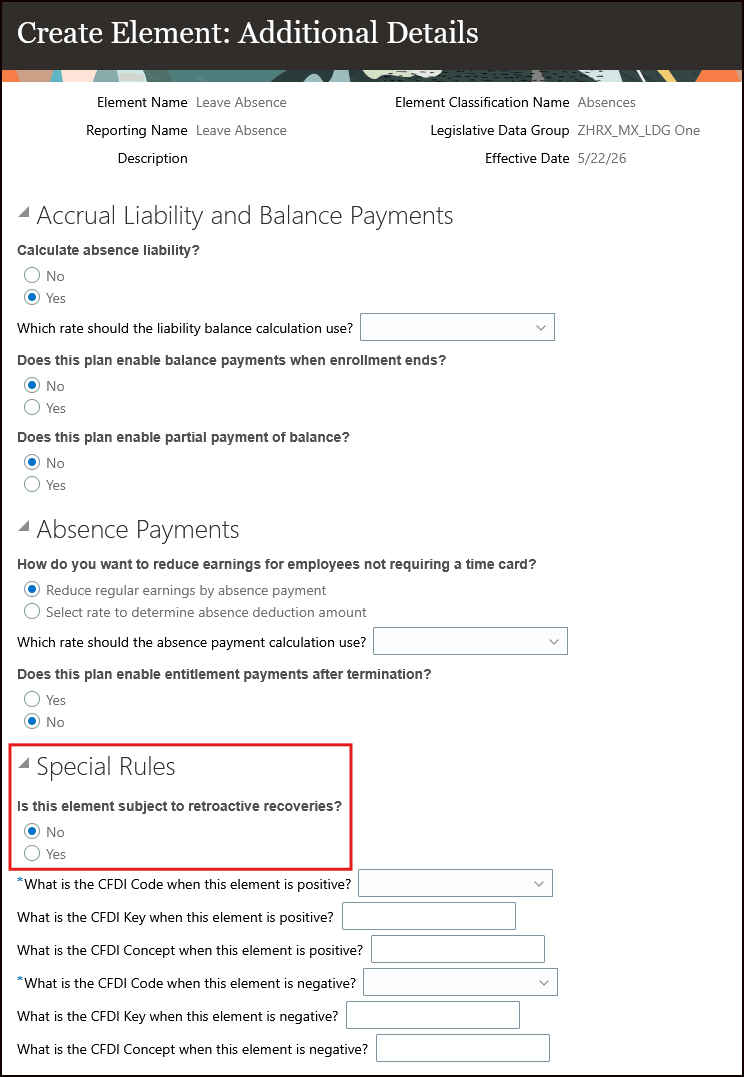
Image: Element Creation
For information on the Overpayment Recovery report, refer to the topic, How do I use the Overpayment Recovery report to manage retroactive recoveries that I have identified?
Retroactive absence overpayments resulting from retrospective absence entries can now be recovered automatically through the Recoveries calculation card, with the recovery distributed across multiple pay periods to minimize the impact on the employee's net pay.
Steps to enable and configure
To use this feature, you must configure the payroll action parameter, Overpayment Recovery Process Enabling the Over payment for Recovery Process.Default:N.
To change the payroll action parameter to Y:
- Navigate to Payroll Process Configuration.
- Search for Overpayment Recovery Process Enabling the Over payment for Recovery Process.Default:N.
- Set parameter default value to Y.
Note: Prerequisite steps to configure legislation for Human Resources (described in How do I set up Retroactive Overpayment and Recovery for Earnings Elements?) are not required, as they are already delivered for Mexico.
Tips and considerations
This feature only applies to new Entitlement absence elements. Existing elements are not impacted.
Key resources
Refer to the Implementing Payroll for Mexico and Administering Payroll for Mexico document located on the Oracle Help Center for additional information.