Redwood Experience: Keyword Parameter in Search URL
A keyword search URL parameter, ?keyword=, is available to use for keyword and natural language searches in Hiring and Candidate Sourcing.
Here’s how it works:
By following a URL with this search parameter included, you automatically arrive on the Candidate Search page. You'll see the keywords are in the keyword field and the search has been executed. The candidate list is the search result. When natural language search is enabled filters will be identified.
Configuring the URL
You create the deep link URL outside of Oracle Recruiting with the new parameter and the keywords to be searched outside of Oracle Recruiting which you can then share.
You create the deep link outside of Oracle Recruiting by appending your URL with this parameter and then adding your keywords to be searched outside of Oracle Recruiting. You can then share this link with your users which takes them directly to candidate search results.
To take advantage of this keyword parameter you need to navigate to candidate search through the Hiring and Candidate Sourcing deep links, not the in-app navigation or the parameter gets ignored.
(Hiring > Candidate Search or Candidate Sourcing > Candidate Search)
To use ?keyword=, add it to the end of your URL and then add your search terms separated by %20, spaces or +.
For example, if you enter any of the below URLs each will show you results containing the keyword Oracle and developer.
https://xyzcompany.com/fscmUI/redwood/recruiting-sourcing/candidate/search?keyword=Oracle developer
https://xyzcompany.com/fscmUI/redwood/recruiting-sourcing/candidate/search?keyword=Oracle+developer
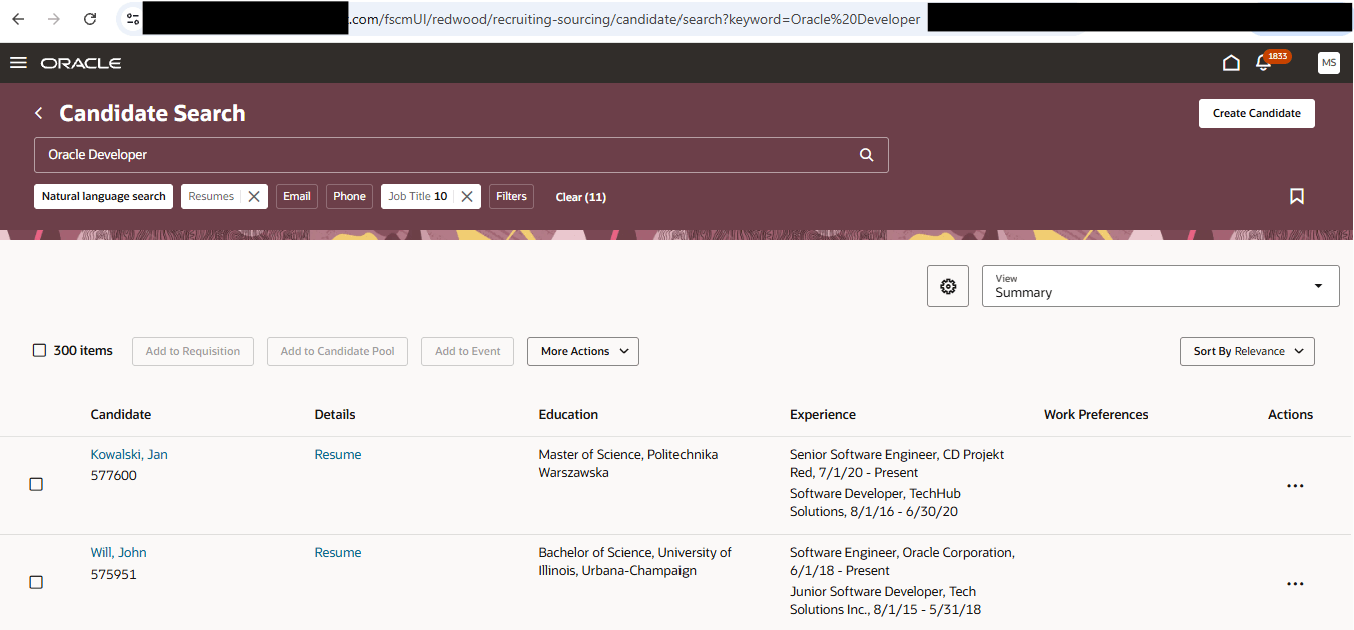
Candidate Search Results Using Keyword Search URL Parameter
Business benefit: Quick, convenient and direct access to candidate search results which leverages keywords contained within a URL.
Steps to enable and configure
You don't need to do anything to enable this feature.
Tips and considerations
When a user isn't authenticated into Recruiting, attempting to access a deep link with keyword values will first prompt them to authenticate prior to reaching the Search Results page.