Recruiting Activity Center: Message Team Action
You can send messages to the hiring team for specific activity items using the Message Team action available in Recruiting Activity Center. When you select the Message Team action, a panel opens where you can define the message content and recipients (you’re no longer redirected to the responsive UI page).
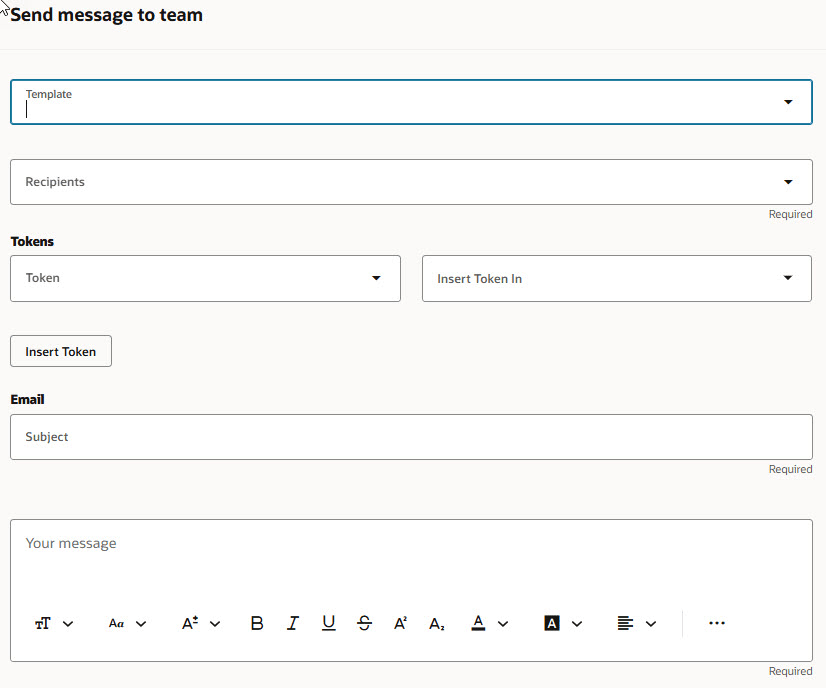
Send Message to Team Panel
The Message Team action is available for these recruiting activities:
- Awaiting hiring team review (Job Application activity type)
- Pending approval (Requisition activity type)
- Pending approval (Offer activity type)
Business benefit: Recruiting users can quickly send hiring team messages for an activity item and no longer have to navigate away from the Activity Center.
Steps to enable and configure
You can control the display of fields in the Send message to team panel. In Visual Builder Studio, go to Hiring > Activity Center > Message Team Action and create business rules. For details, see How do I hide or show a field in Visual Builder Studio?
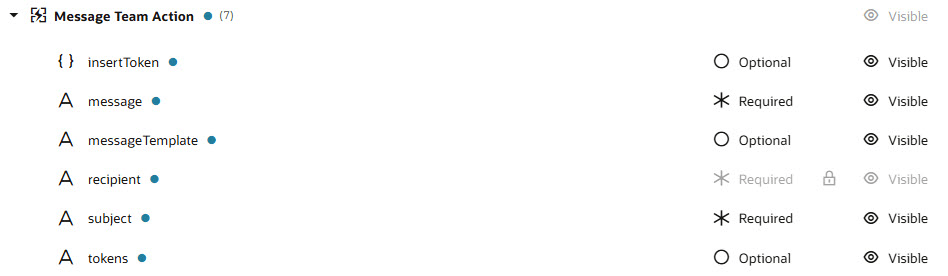
Control the Display of Fields in Visual Builder Studio