Activity Centers: Automatically Launch AI Agents from Activities
You can configure published HCM workflow agents to perform actions on behalf of users and send notifications when activities are generated in activity centers. This is available for all activity centers: Recruiting Activity Center, Sourcing Activity Center, and Interview Activity Center.
Business benefit: Quicker task completion and coordinated communication can shorten time-to-hire and improve coordination among recruiters, sourcing users, and interviewers.
Steps to enable and configure
Step 1: Enable the ORA_IRC_ENABLE_RAC profile option
Make sure the ORA_IRC_ENABLE_RAC profile option is enabled. Otherwise, the configured agents won’t be triggered. For details, see How do I enable a profile option?
Step 2: Configure activity items
When you configure an activity item, a new field is available: Agent Team Code. Enter the agent’s workflow code for each activity item you want processed by the agent. The agent must be a published HCM workflow agent.
Note: There’s no validation done on the agent code you enter. The code must not exceed 200 characters.
Go to Setup and Maintenance > Recruiting and Candidate Experience > Recruiting and Candidate Experience Management > Enterprise Recruiting and Candidate Experience Information > Configure Activity Centers.
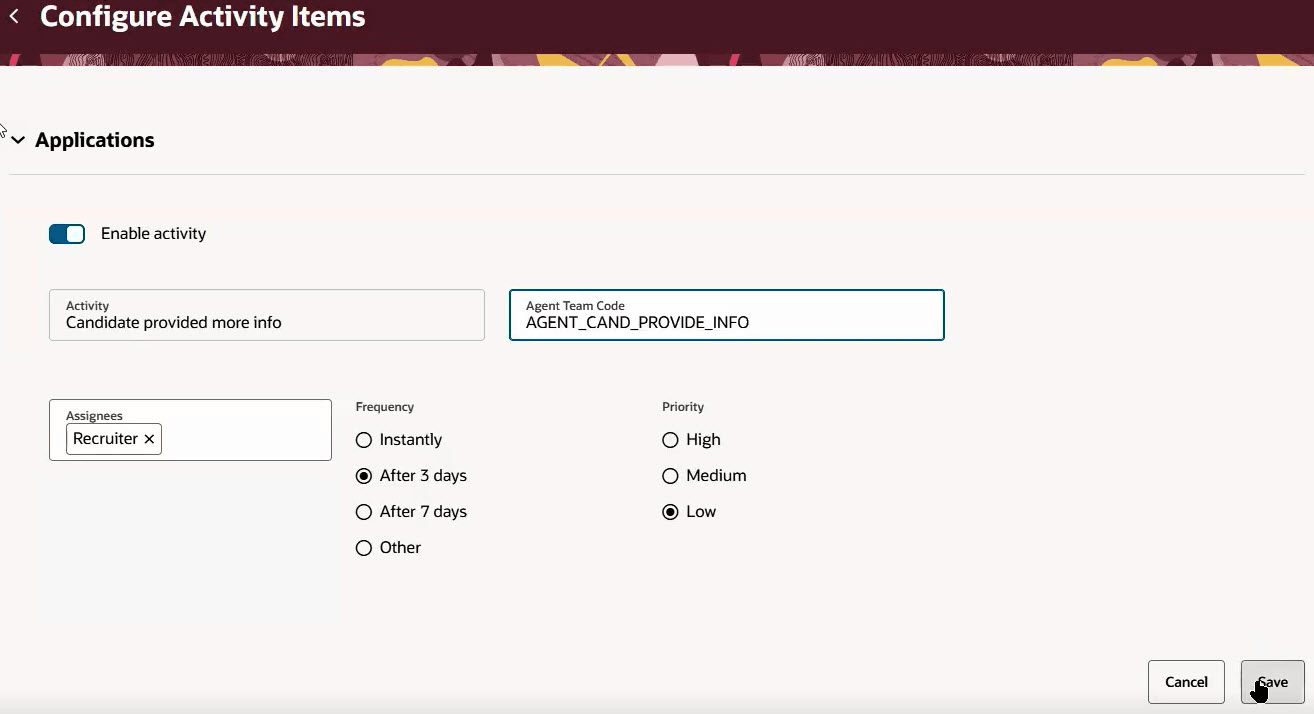
Agent Team Code When Configuring an Activity Item
Step 3: Run the Trigger Workflow Agents for Activity Items scheduled process
When you’re done configuring activity items, run the Trigger Workflow Agents for Activity Items scheduled process. You can schedule the process to run periodically.
Go to Navigator > Tools > Scheduled Process.
When the agent is being called by the scheduled process, the process looks for activity items where an agent is configured and the agent status is null or ORA_ERROR. These items will then be set to ORA_PENDING by the scheduled process and the agent will be called.
Workflow agents should use the updateActionItemAgentStatus REST service with payload "{Long actionItemId,String agentStatusCode}" to set the status for the action item:
-
If the agent wants to start processing the activity item, it will set it to ORA_IN_PROGRESS which indicates that the agent is starting to process the item.
-
If the agent wants to indicate that it has finished processing the item and the processing was successful, the agent will set the status to ORA_COMPLETE.
-
If at any point the agent fails when processing an item, the item will be set to ORA_ERROR. The scheduled process will then try to call the agent again based on the amount of tries left.
Access requirements
To schedule the Trigger Workflow Agents for Activity Items scheduled process, users need the following:
- Manage Recruiting Administration (IRC_MANAGE_RECRUITING_ADMINISTRATION_PRIV) privilege
- Recruiting Manager role who has access to data security and privileges to access all Recruiting data and REST services
- FAI GenAI Agent Runtime Duty (ORA_DR_FAI_GENERATIVE_AI_AGENT_RUNTIME_DUTY) role