Redwood Experience: Customize Payroll Section in the Create and Edit Job Offer Flows
Using Visual Builder Studio, you can customize the Payroll region in Redwood create and edit job offer flows.
Business benefits:
- Stronger payroll data integrity: Restricting edits to payroll fields under specific business conditions helps ensure that critical compensation and payroll information remains accurate and consistent.
- Improved compliance and risk reduction: Organizations can enforce payroll governance policies by preventing unauthorized or unintended updates during job offer creation and editing.
Steps to enable and configure
To customize the Payroll region, in Visual Builder Studio, go to Hiring > Create or Edit Job Offer > Payroll info and create business rules. You can set fields as read-only for specific business conditions.
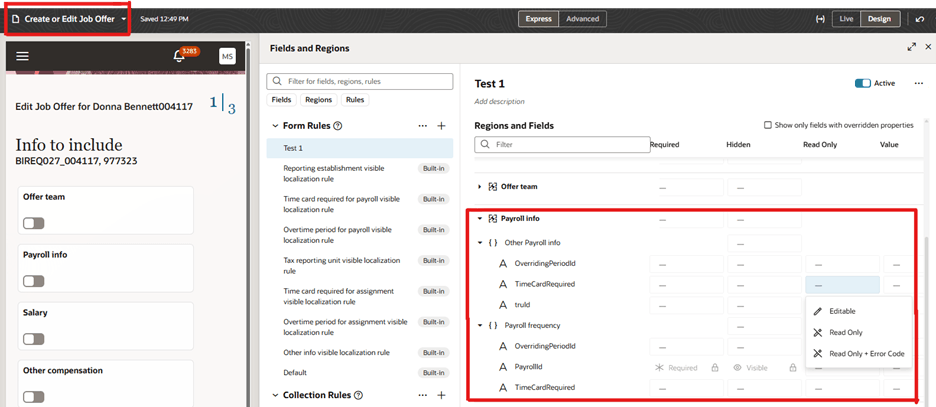
Create Business Rules for the Payroll Info Region
To use Redwood experience, you need to enable the Recruiting Redwood pages profile options. For details, see Set profile options for Redwood pages.
For details on enabling and customizing Redwood for HCM, see How do I adopt Redwood for HCM? and Extending Redwood Applications for HCM and SCM Using Visual Builder Studio