AI Agentic App: Team Talent Calibration and Review Workspace
The Talent Calibration and Review Workspace is your AI Agent-powered workspace to help managers align employee ratings with organizational targets, improving fairness, consistency, and confidence before Talent Review meetings begin.
With Talent Calibration and Review Workspace, you can leverage these capabilities:
- Give managers visibility to organization targets, and key talent trends in the team.
- Recommend and perform objective rating adjustments with clear justifications.
- Reduce manual effort and potential bias by synthesizing information from multiple talent sources to provide context.
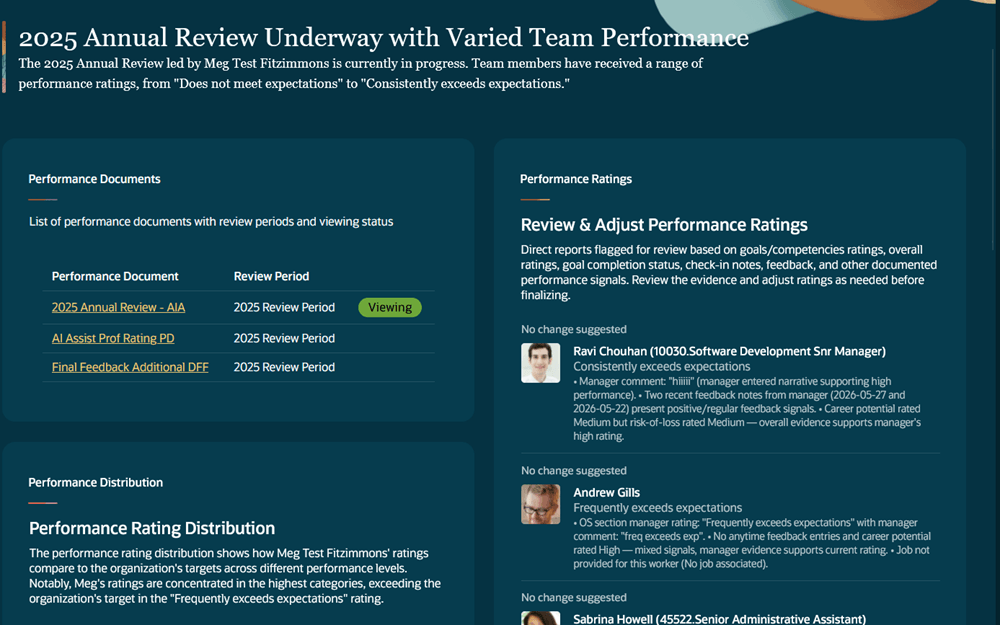
Manager workspace
Managers can access the workspace using the Ask Oracle homepage. The workspace provides a default performance document selection and lets managers select another eligible performance document when needed
It includes a high-level AI-generated summary, Ask Oracle for questions related to the widgets, and widgets for rating distribution, overall performance rating recommendations, Potential rating recommendations, and Risk of Loss rating recommendations. 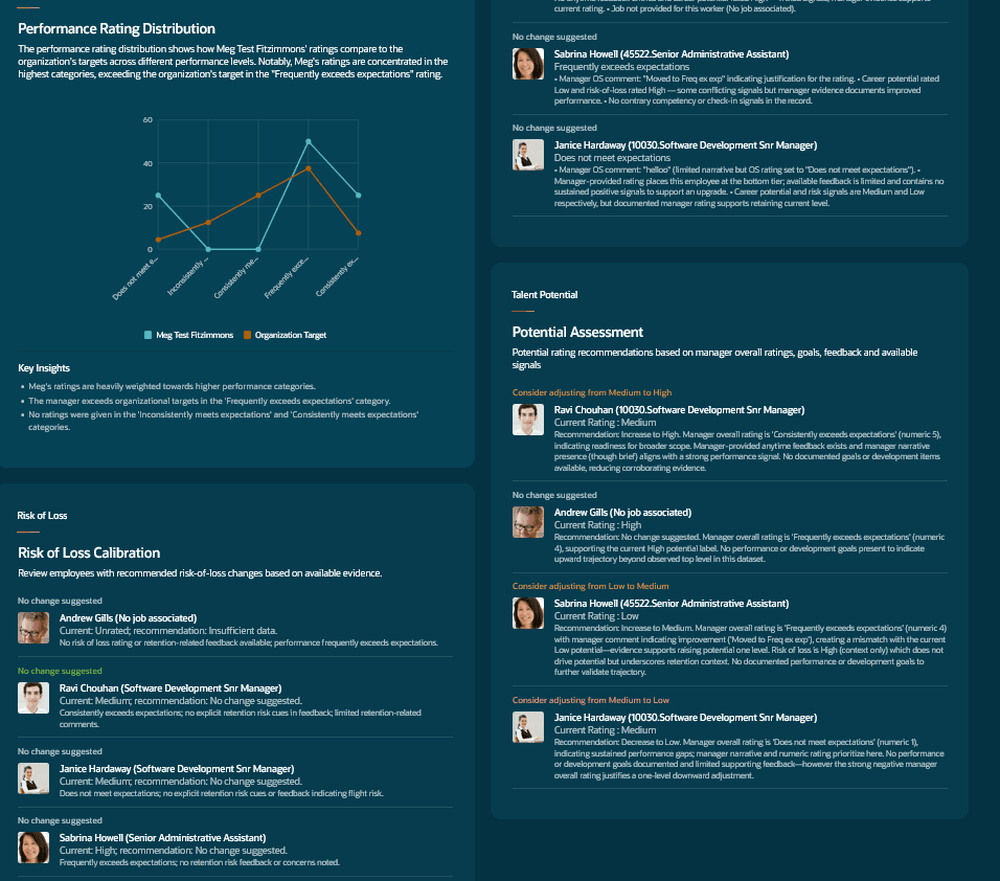
Widgets for rating distribution, potential and risk of loss
The agent recommends rating adjustments for Performance, Risk of Loss, and Potential ratings for specific employees by synthesizing:
• Check-ins and overall sentiment
• Completed vs overdue goals
• Peer and manager feedback, including Anytime and Requested Feedback
• Manager Overall Summary Section Ratings and Comments
It also highlights the following priority actions:
- Adjust ratings
- Email team talent report
- Generate a presentation
Managers can review the report before the calibration meeting and use data-backed insights and suggested actions to prepare. They can adjust the ratings, send an email to stakeholders for employees the agent identifies as high risk of loss, and generate a presentation with talent snapshots for each employee or direct report reporting to them.
Business benefit: This feature enables leaders to conduct more strategic and efficient Talent Reviews by spending less time debating ratings and more time focusing on exceptions, succession planning, retention, and high-impact talent decisions.
Steps to enable and configure
- Your environment must have certain necessary configurations. Ask your help desk to contact Oracle Support, who can verify what your environment has and address any gaps. For more information, see FAQ2521 on My Oracle Cloud Support.
- Set the Enable Security Console External Application Integration (ORA_ASE_SAS_INTEGRATION_ENABLED) profile option to Yes and enable permission groups for the appropriate roles. See Access Requirements for AI Agent Studio.
- The Representative Agent is a preconfigured template. You need to create your own agent using the preconfigured template.
- To learn how to set up AI agents, see Create AI Agents Using Preconfigured Agent Team Templates.
Tips and considerations
- The default review period is the past review period with the start date closest to today. The default performance document is the document in that period with the end date closest to, but before, today.
- Managers can choose other performance documents in the default review period if they’re the performance document manager for at least one document. They can also choose documents from up to two other review periods with end dates closest to today. The list shows the review period name and performance document name.
- To be selected, a performance document must be a regular or anytime document, include an overall summary section, not be configured to use calculated ratings only and include manager manual overall summary rating. and have a completed manager evaluation task.
- The selected performance document must have a rating model associated with the overall summary section which has a 'Minimum Distribution' configured for all valid rating levels.
- Only employees assignments that have an in-progress manager evaluation task will be displayed in the workarea for calibration.
- Anytime Feedback, Requested Feedback, and Check-ins all use a 13-month lookback. Check-ins aren’t yet limited to the same review period as the selected performance document.
- The Rating Distribution widget shows rating summaries against the target distribution, a line graph by rating level, and key insights. The graph compares your performance document ratings with the organizational target, based on the Minimum Distribution in the performance rating model. The overall summary rating model must have a Minimum Distribution for at least one rating level.
- The Team Talent widget shows the employees you rated and whether AI recommends an adjustment or no change.
- Risk of Loss and potential recommendations are based on factors such as overall performance context, goals more than three months overdue, Anytime Feedback, Requested Feedback, manager comments in performance documents, and check-in comments with negative sentiment or concerns about career growth, opportunities, workload, or compensation. If there isn’t enough data, the recommendation shows no change suggested or no adjustment suggested. Managers can review recommendations in the workspace, but they can’t change ratings there.
- The agent uses data from performance goals, development goals, the selected performance document, Anytime Feedback, Requested Feedback, check-in notes, Potential ratings and descriptions, and Risk of Loss ratings and descriptions.
- Managers can generate a presentation with talent snapshots for each employee or direct report reporting to them.
- Managers can email stakeholders about employees the agent identifies as high risk of loss. One email is sent per employee.
- Each recommendation will have an explanation for the suggested change or no change based on the following data sources:
Manager
- Overall performance rating
- Overall performance rating description
- Overall comment
- Section ratings
- Section rating descriptions
- Section comments
- Item ratings
- Item rating descriptions
- Item comments
Employee
- Overall performance rating
- Overall performance rating description
- Overall comments
- Section ratings
- Section rating descriptions
- Section comments
- Item ratings
- Item rating descriptions
- Item comments
Performance goal details in the performance document
- Goal Name
- Goal Description
- Success Criteria
- Completion Percentage
- Progress Notes
Development goal details in the performance document
- Goal Name
- Goal Description
- Success Criteria
- Completion Percentage
- Progress Notes
- Anytime Feedback Summary - for the performance document dates (past 13 months from today's date)
- Requested Feedback Summary - included in performance document and feedback completed past 13 months from today's date
- Manager Check-in Summary Comments - based on the discussion notes and questionnaires (only text based questions) that are configured to display in the performance document
- Employee Check-in Summary Comments - based on the discussion notes and questionnaires (only text based questions) that are configured to display in the performance document
Key resources
Explore AI Agents for Oracle Fusion Cloud Applications
How do I use AI Agent Studio?
Access requirements
- Functional privilege to access the Talent Calibration and Review Workspace
- Access Talent Calibration and Review Workspace (HRA_ACCESS_TALENT_CALIBRATION_AND_REVIEW_WORKSPACE)
- Duty role to access the Talent Calibration and Review Workspace AI Agentic App
- Talent Calibration and Review Workspace Access Duty (ORA_DR_HRA_TALENT_CALIBRATION_AND_REVIEW_WORKSPACE_ACCESS_DUTY
The agents you can view depend on the roles and privileges assigned to you. To access this agent, your role must be explicitly granted access to it by an AI Studio Administrator. See How can I give users access to AI agents, and Access Requirements for AI Agent Studio.