Redwood: Support for LinkedIn URL and Attachments for External Candidates of Succession Plans
From this release, HR specialists can add LinkedIn profile URLs for external candidates to easily access detailed candidate information. They can upload, view, download, and delete multiple attachments such as resumes and cover letters to centrally store candidate documents for succession planning if their administrator has enabled this. The attachments can be in 1 of these formats: .pdf, .txt, .rtf, and .docx.
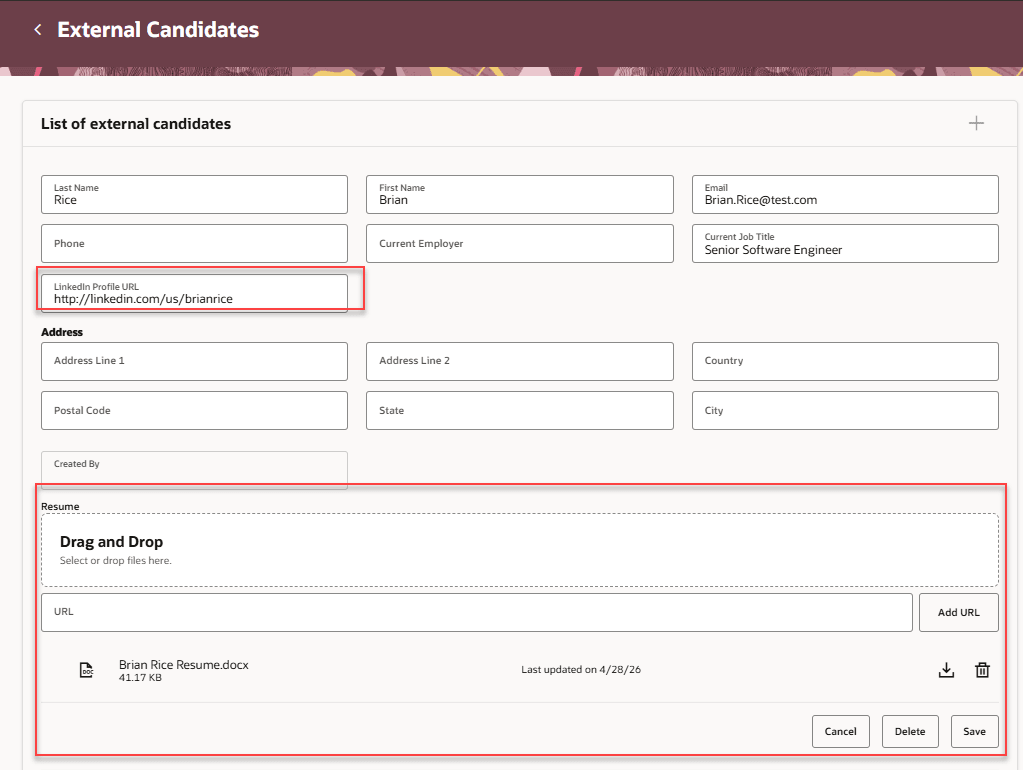
LinkedIn profile URL and resume attachment
Business Benefits
Increase HR efficiency by enabling quick access to external candidates' LinkedIn profiles for richer candidate insights. Streamline candidate data management with centralized storage and tracking of multiple attachments for succession planning.
Steps to enable and configure
To view the Redwood Succession Planning pages, you need to enable the profile options listed in this table.
|
Profile Option Code |
Profile Option Display Name |
Value |
|---|---|---|
|
ORA_HCM_VBCS_PWA_ENABLED |
Enable VBCS Progressive Web Application User Interface |
Y |
| ORA_HRM_SUCC_PLANS_REDWOOD_ENABLED | Redwood Succession Plans Enabled | Yes |
For more information, see How do I enable a profile option?.
To enable HR specialists to upload and view attachments for external candidates, edit the External Candidates page in Visual Builder Studio and set the Show Attachments Section for External Candidates page property to true.
For more information on how to do this, see How do I control the display of a UI element in Visual Builder Studio?.
Key resources
For more information on extending Redwood pages in HCM, refer to this guide on the Oracle Help Center: