Redwood: Notification for Worker Deleting Own Goal
Notify managers when team members delete performance or development goals that their team members created and ensure that the managers are informed of the changes in the priorities of the team members. This notification will help managers evaluate if the goal deletion is appropriate or not.
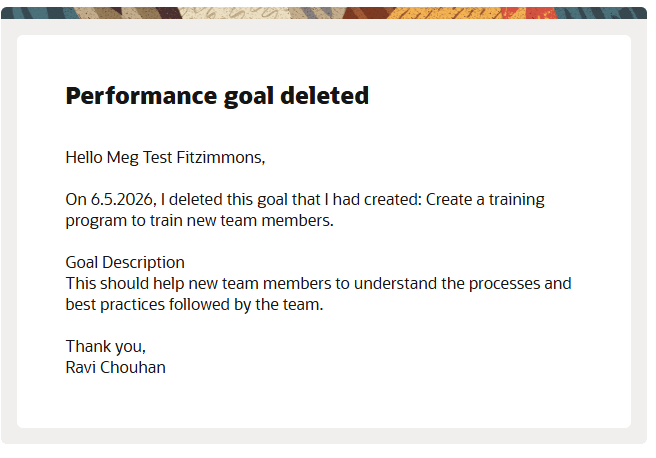
Notification to manager after a team member deletes a performance goal that they created
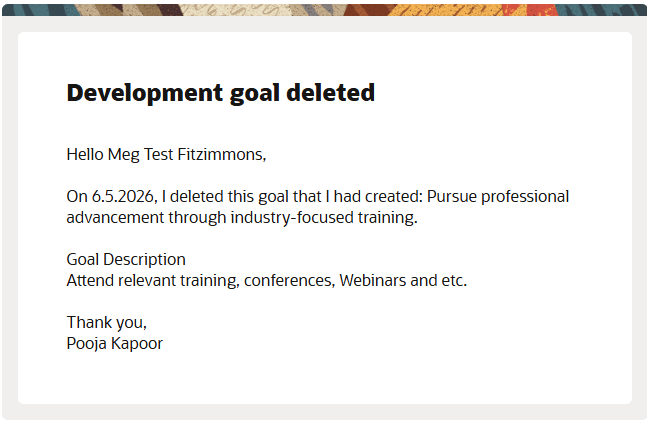
Notification to manager after a team member deletes a development goal that they created
This feature provides these benefits to line managers:
- Increased visibility to team members decisions
- Enhanced performance tracking and auditing
- Ability to understand the workload issues of team members
Steps to enable and configure
To enable Redwood Goals Center, you need to enable the profile options indicated in the table.
|
Profile Option Code |
Profile Option Display Name |
Value |
|---|---|---|
|
ORA_HCM_VBCS_PWA_ENABLED |
Enable VBCS Progressive Web Application User Interface |
Y |
|
ORA_HRA_PERFORMANCE_DOCUMENTS_AND_GOALS_REDWOOD_ENABLED |
Enable Redwood Performance Documents and Goals Center |
Yes |
NOTE: The Performance Document, Check-in, and Goals Center features are closely connected. So, the Redwood version of these pages can all be enabled or disabled only using the common ORA_HRA_PERFORMANCE_DOCUMENTS_AND_GOALS_REDWOOD_ENABLED profile option. These features can't be enabled individually.
For more information, see How do I enable a profile option?.
To enable Redwood notifications for deletion of own performance and development goals to managers, do these steps:
- Use the Alerts Composer tool.
- Search for the Performance Goals Alerts event.
- Ensure that the Manager Notified After Worker Deletes Goal alert is enabled.
- Search for the Development Goals Alerts event.
- Ensure that the Manager Notified After Worker Deletes Goal alert is enabled.