Career Progression Tab
Career Role and Know Your Role pages include an enhanced Career Progression experience that presents potential next career roles from historical organizational career movement and structured career paths.
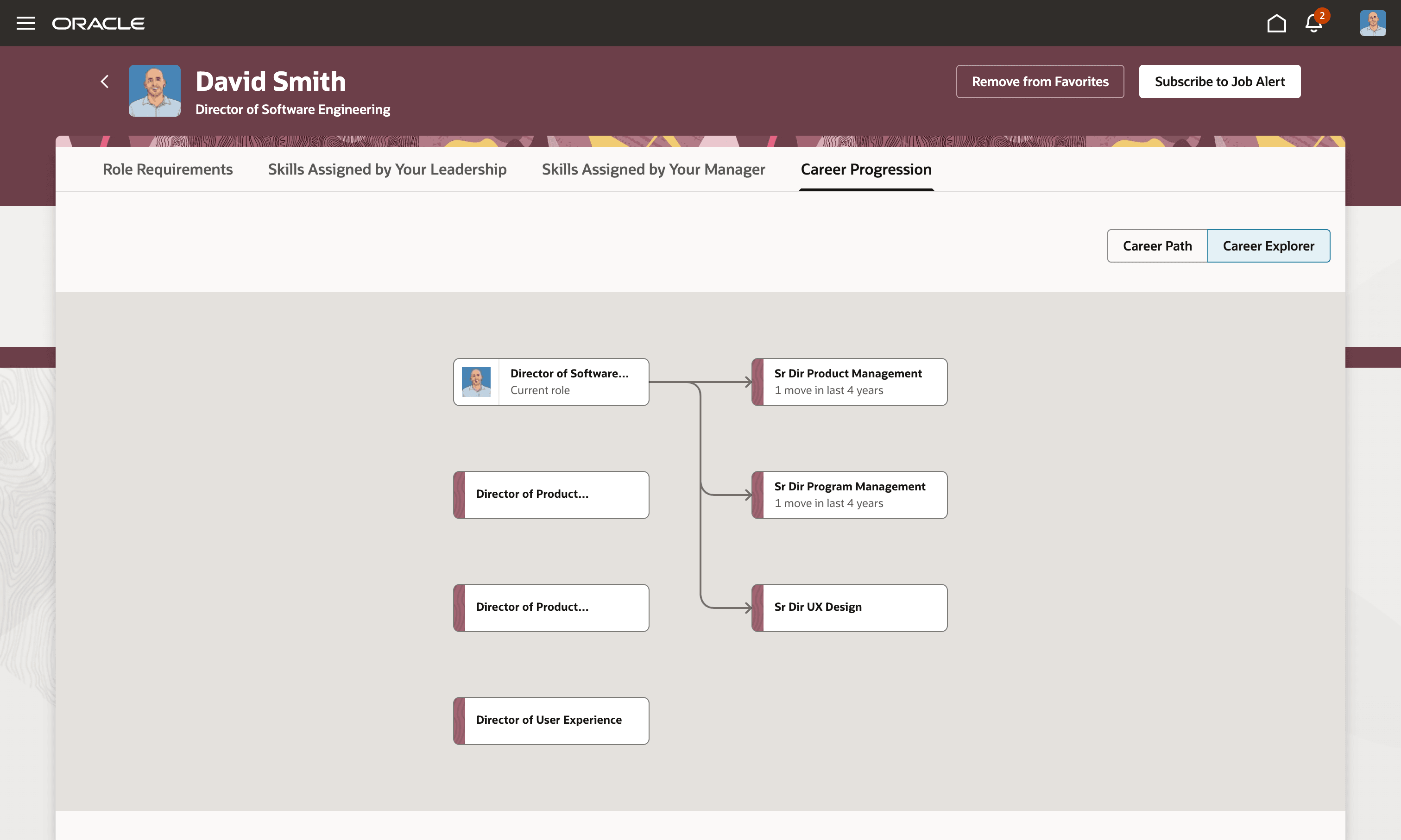
Career Path View
Use the Career Path view to retain the existing career-path experience, or use Career Explorer to view a tree of applicable roles from historical career movement and career paths. This view shows historical transitions other employees took from the current role or any career role in the last 4 years.
The Career Progression tab displays only when relevant data is available and replaces the existing Popular next role tab.
Business benefit: This feature helps employees understand potential next career opportunities by bringing historical organizational career movement and structured career paths into one Career Progression experience.
Steps to enable and configure
For details, see Enable Career Roles in Opportunity Marketplace and Configure Career Paths in Opportunity Marketplace.
Tips and considerations
- Career Path isn't displayed when career-path data isn't available.
- Career Explorer can still display popular roles when career-path data isn't available.
- Career Progression isn't displayed when neither career-path data nor popular-role data is available.
Key resources
Access requirements
Managers and employees need have career roles privileges. For details, see Enable Career Roles in Opportunity Marketplace.