Enhancements to the Campaign Line
This feature introduces enhancements to the campaign line, including new fields and updated labels.
Key Enhancements:
- New fields have been added to the Campaign Line.
- Usability improvements are implemented across both Campaign and Campaign Line.
New Fields on the Campaign Line
- New Qualification Status: A new status value, DISCONTINUED, can be used to indicate that a part is no longer available. This status is copied to item qualification when the Approve Campaign action is triggered.
- Wholly Originating: This drop-down list should be set to YES if a part is considered wholly originating under the trade agreement (default is NO). This information is copied to item origin and/or item qualification when the Approve Campaign action is performed.
When suppliers update a campaign line, they can now provide additional information to campaign administrators, which is then propagated to item-based objects during the approval process.
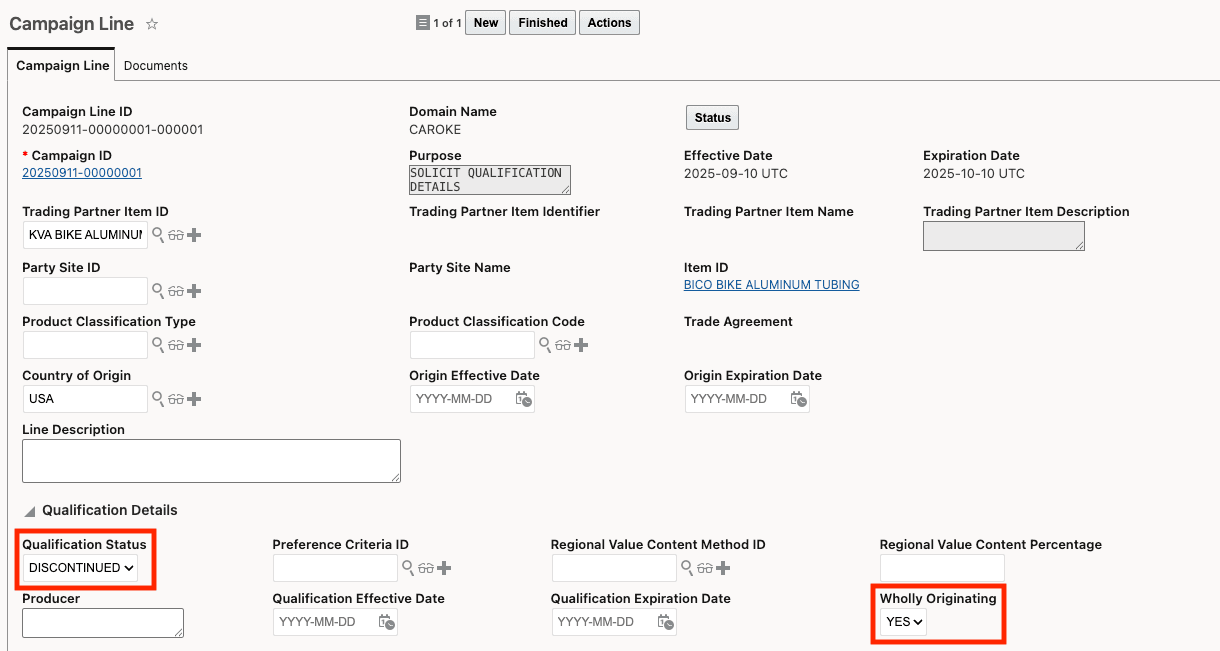
New Fields on Campaign Line
Usability Enhancements across Campaign and Campaign Line
The "Qualified" field has been renamed to "Qualification Status" to provide greater clarity. This update is available on the Campaign Line finder, finder results, view, and edit pages. On the Campaign, the Line tab on the finder, view, and edit pages has also been updated.
Additionally, the Regional Value Content Percentage field is now available on the Campaign Line when accessed through the Campaign. This change applies to the Campaign Finder > Line tab and the view and edit pages of Campaign > Campaign Line.
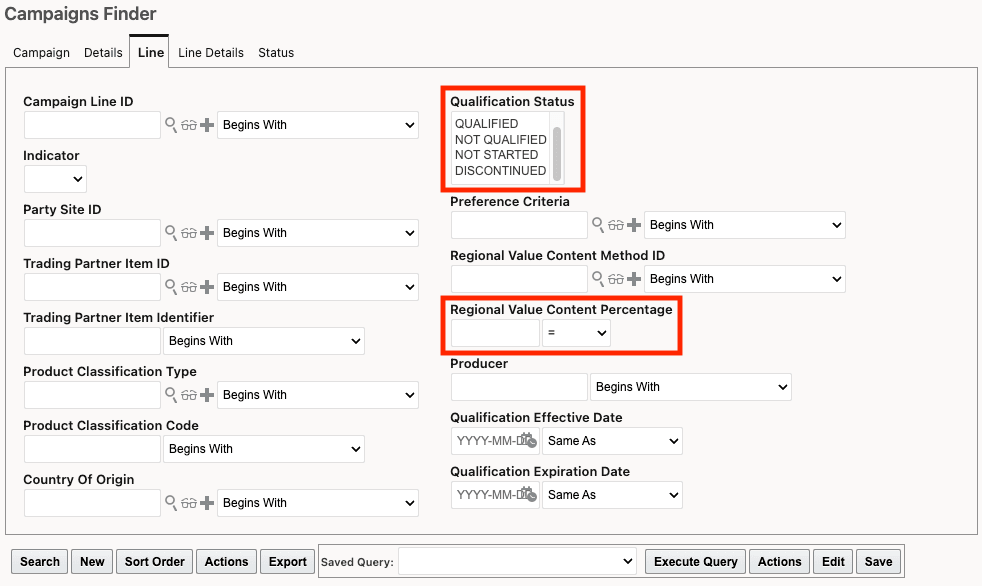
Campaign Finder - Line Tab
Business Benefit: These enhancements to the campaign line provide greater visibility and control over campaign items, improving both compliance and operational efficiency. These changes help your organization manage campaigns and items more effectively — supporting informed decision-making, maintaining compliance, and optimizing supply chain operations.
Steps to enable and configure
You don't need to do anything to enable this feature.
Tips and considerations
The Logic Configuration on the Campaign Line determines the campaign process flow. Specific parameters are used during this process:
- PURPOSE: Defines the reason for the campaign.
- APPROVE DATA CONFIGURATION: Specifies the Data Configuration that determines which data is copied from the campaign line to item, item origin, or item qualification records when the Approve Campaign action is triggered.
When the purpose is set to "Qualification," the Qualification Status and Wholly Originating fields are copied to the Item Qualification record upon campaign approval, if configured in the Data Configuration.
When the purpose is set to "Origin," the Wholly Originating field is copied to the Item Origin record upon campaign approval, if enabled in the Data Configuration.
Key resources
For more information on campaign lines and the supplier solicitation process, refer to the GTM How To/Configuration Topic called "Supplier Solicitation" in help.