 Download Documents on Trade Transaction
This feature introduces a new action called "Download Documents" on a trade transaction which allows you to select and download multiple documents (standard or additional) at once. Previously, documents could only be downloaded individually.
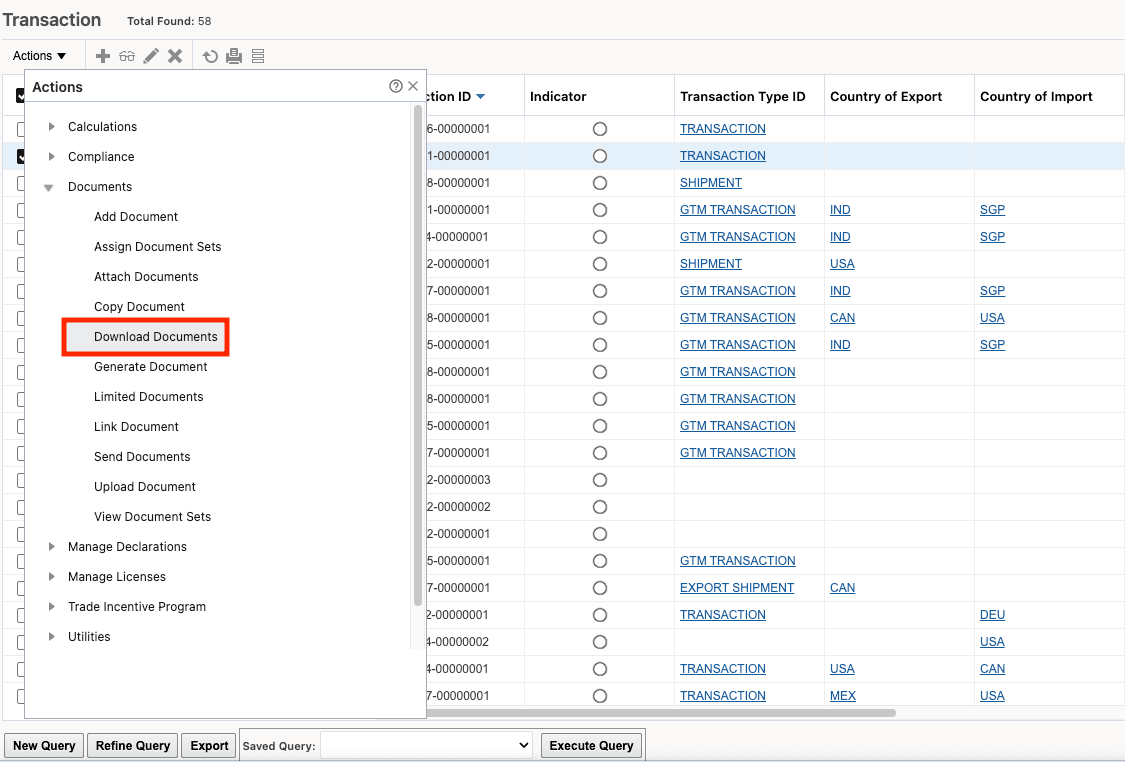
Trade Transaction - Download Documents Action
When the "Download Documents" action is triggered for your trade transactions, all available documents (both standard and additional) are listed. After selecting the documents you wish to download and clicking "Download Documents", GTM initiates the download process. You may select as many documents as needed; however, note that there is a 10 MB download limit.
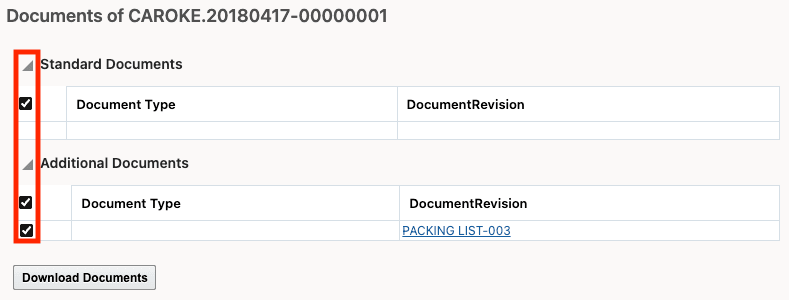
Select Documents to Download
Business Benefit: This feature increases efficiency and convenience for users by allowing multiple trade documents to be selected and downloaded simultaneously, reducing manual effort and saving time during trade transaction processing.
Steps to enable and configure
You don't need to do anything to enable this feature.