Define Default Parameters for the Propose Classification Code Action
This feature allows you to define default values for the project, scenario, and threshold which are used when triggering the Propose Classification Code manual action. New parameters are available in the logic configuration of type GTM LOGIC CONFIGURATION. When you initiate the Propose Classification Code manual action, the fields for project, scenario, and threshold will be automatically populated with the default values you have specified. These default values can be overridden within the action, or, if no defaults are set, you can enter them directly during the action.
On the logic configuration, there are 3 new parameters:
- DEFAULT PROPOSE CLASSIFICATION PROJECT ID
- DEFAULT PROPOSE CLASSIFICATION SCENARIO ID
- DEFAULT PROPOSE CLASSIFICATION THRESHOLD
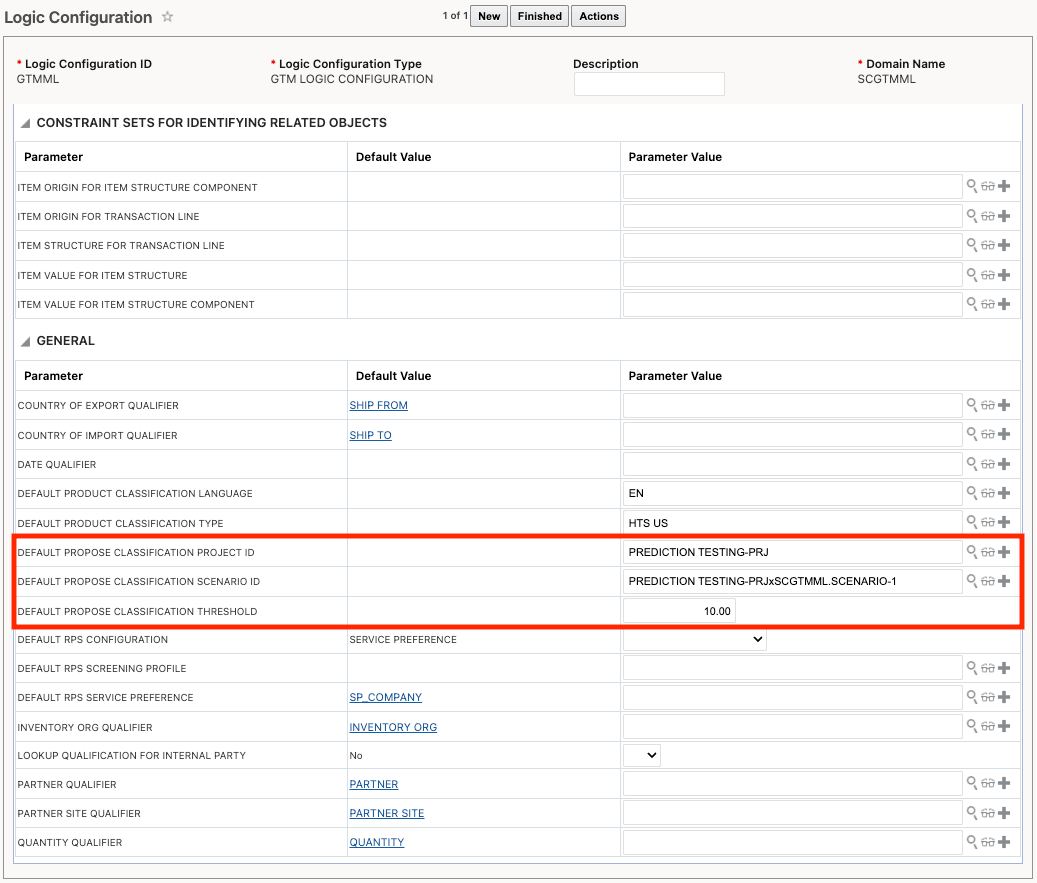
Logic Configuration
Business Benefit: This feature enhances efficiency and consistency in the classification process by allowing users to predefine default project, scenario, and threshold values for the Propose Classification Code manual action. By automatically populating these fields, it reduces manual data entry, minimizes user error, and accelerates the classification workflow. This leads to improved productivity and data accuracy, while still providing the flexibility to adjust values as needed.
Steps to enable and configure
After configuring the default parameters in the logic configuration, assign the logic configuration to a parameter set.
Tips and considerations
The default parameters set in the logic configuration are available only for the Propose Classification manual action. If you are configuring the agent action, you will need to specify the appropriate project, scenario, and threshold within the agent action.
Key resources
For more information on the new Threshold% field, please the the What's New topic 'Enhancements to the Propose Classification Code Action' in this document.