HTTP Header Profile
This feature enhances the HTTP Header Profile functionality allowing you to now define both static and/or dynamic parameters. The available dynamic parameters are based on either saved queries or properties.
The HTTP Header Profile is accessed via Business Process Automation > Power Data > Integration > HTTP Header Profile. The Parameter Type field supports the configuration for the parameter type desired - Static, Saved Query, or Property.
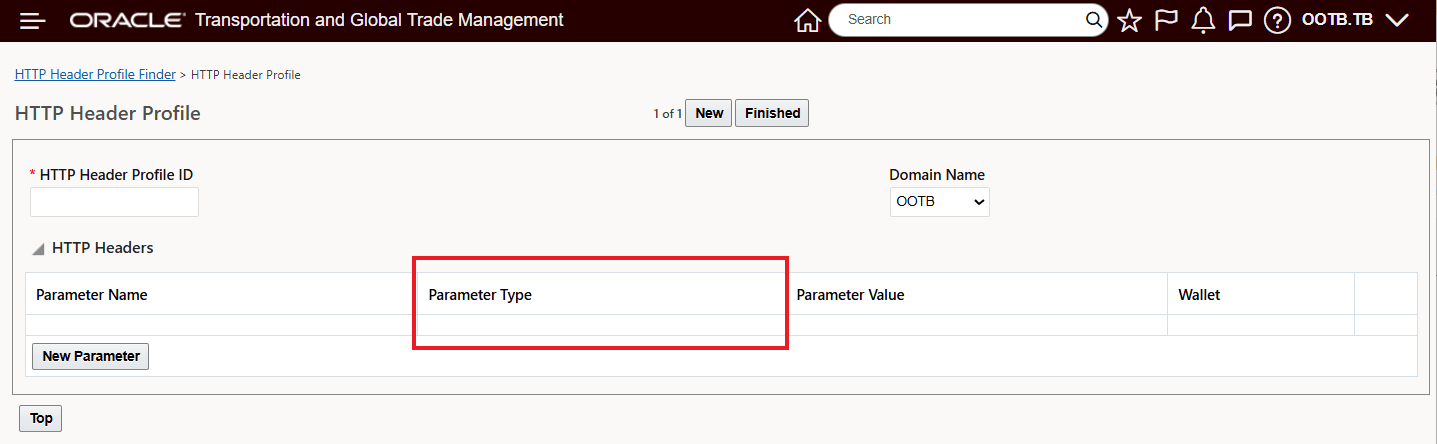
HTTP Header Profile - New Parameter Type - Static, Saved Query, Property
The Parameter Type drop-down list shows the new dynamic options (Saved Query and Property) as well as the original Static option.
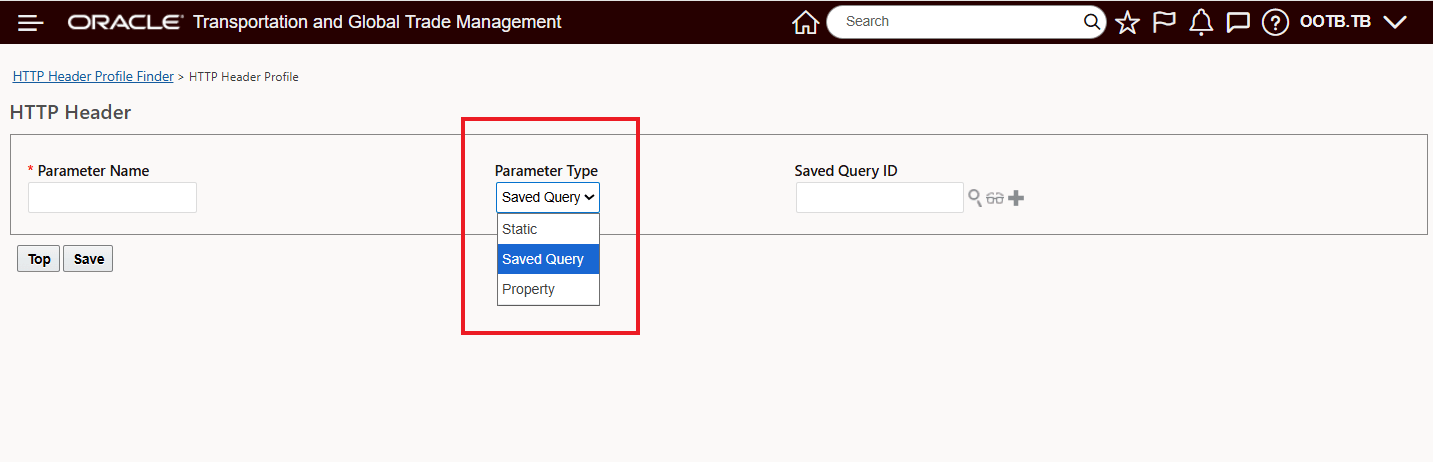
Property Types - Static, Saved Query, Property
In the example below, the completed HTTP Header Profile contains both dynamic and Static parameters.
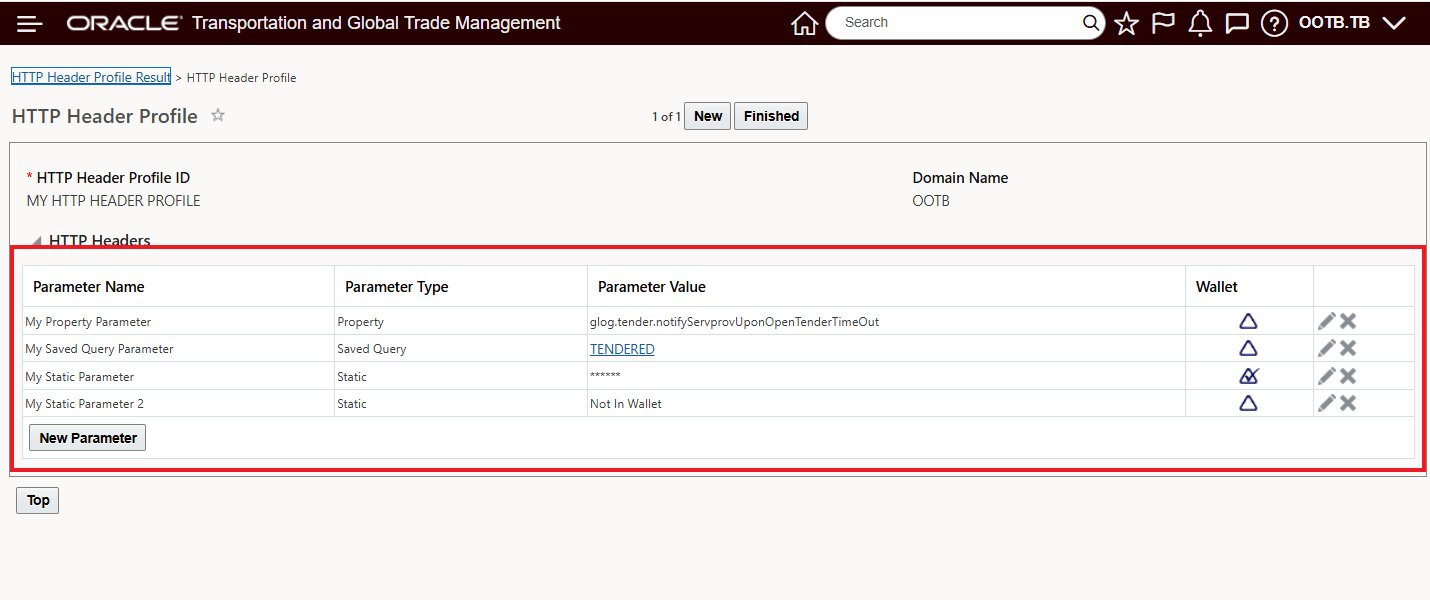
HTTP Header Profile with Static, Saved Query, and Property Parameter Types Configured
The defined HTTP Header Profile can then be added to the External System. The assigned HTTP Header Profile will be used to define additional HTTP header parameters that will be sent on outbound HTTP messages. Note that this is only supported by the REST communication method.
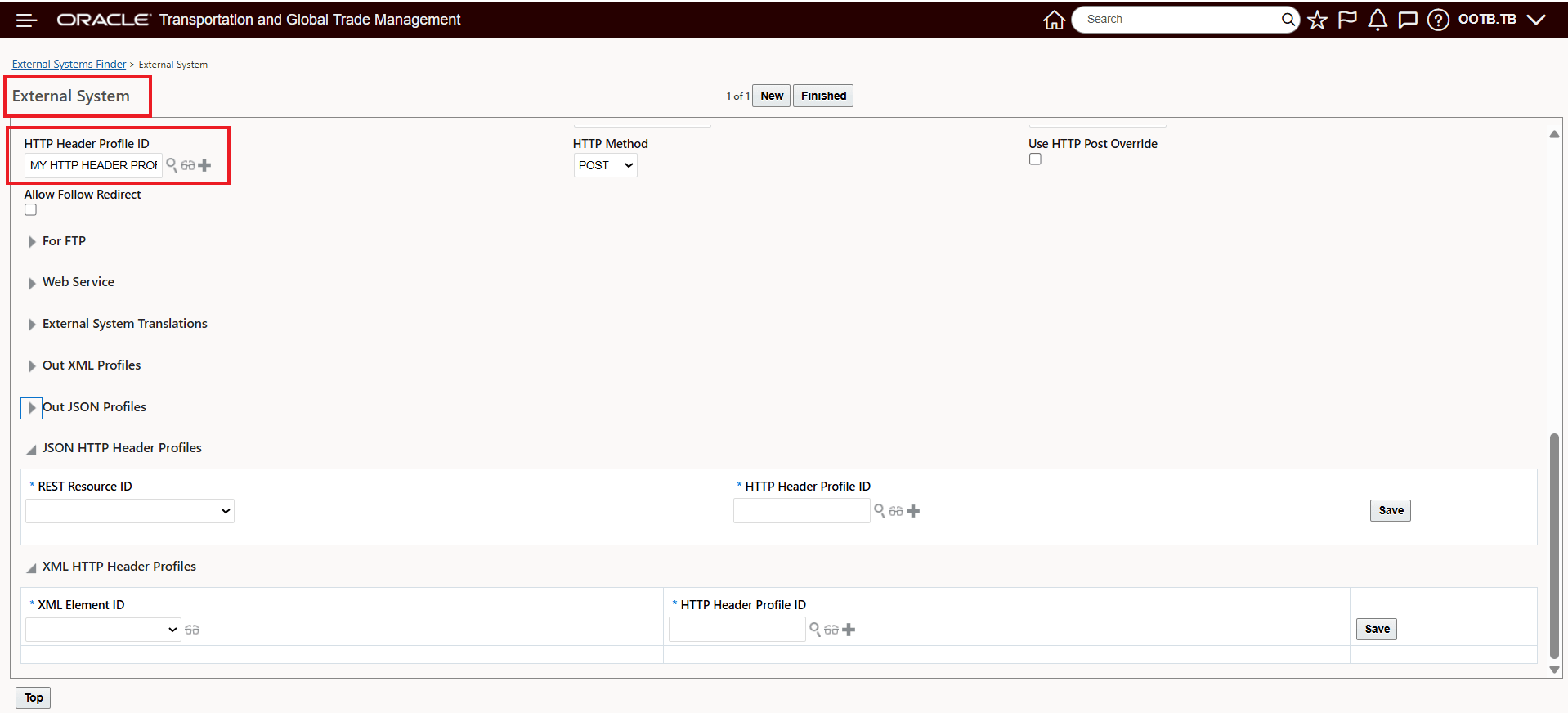
HTTP Header Profile Added to External System
Depending on the External System Content Type - "application/json," or "application/xml," you have the option to assign a HTTP Header Profile that can either be a REST Resource specific override or an XML Element override.
For the JSON HTTP Header Profiles, any outbound message using this REST resource will use the indicated dynamic HTTP header. If the external system content type is "application/json," the values mapped in this section will be used.
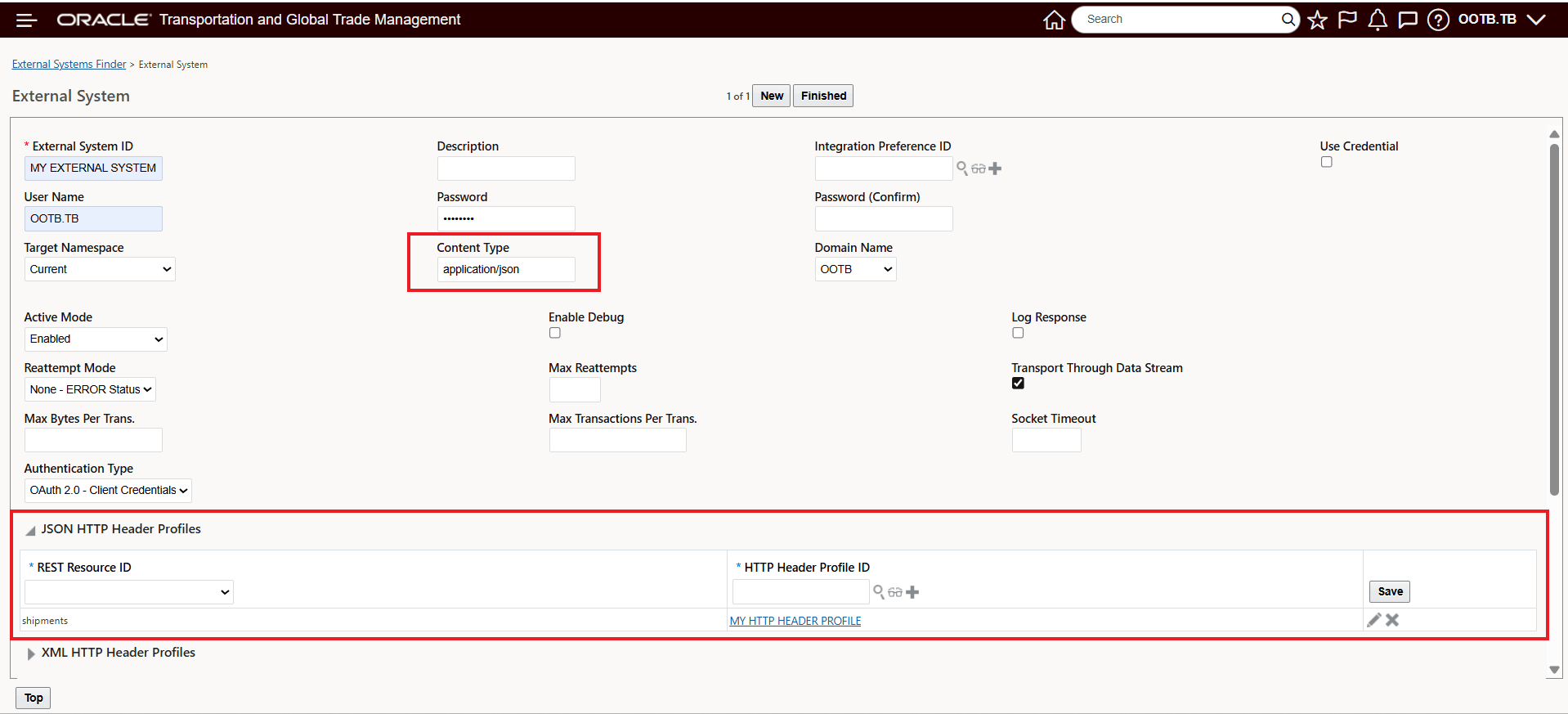
JSON HTTP Header Profile
For the XML HTTP Header Profiles, any outbound message using this XML element will use the indicated dynamic HTTP header. If the external system content type is "application/xml," the values mapped in this section will be used.
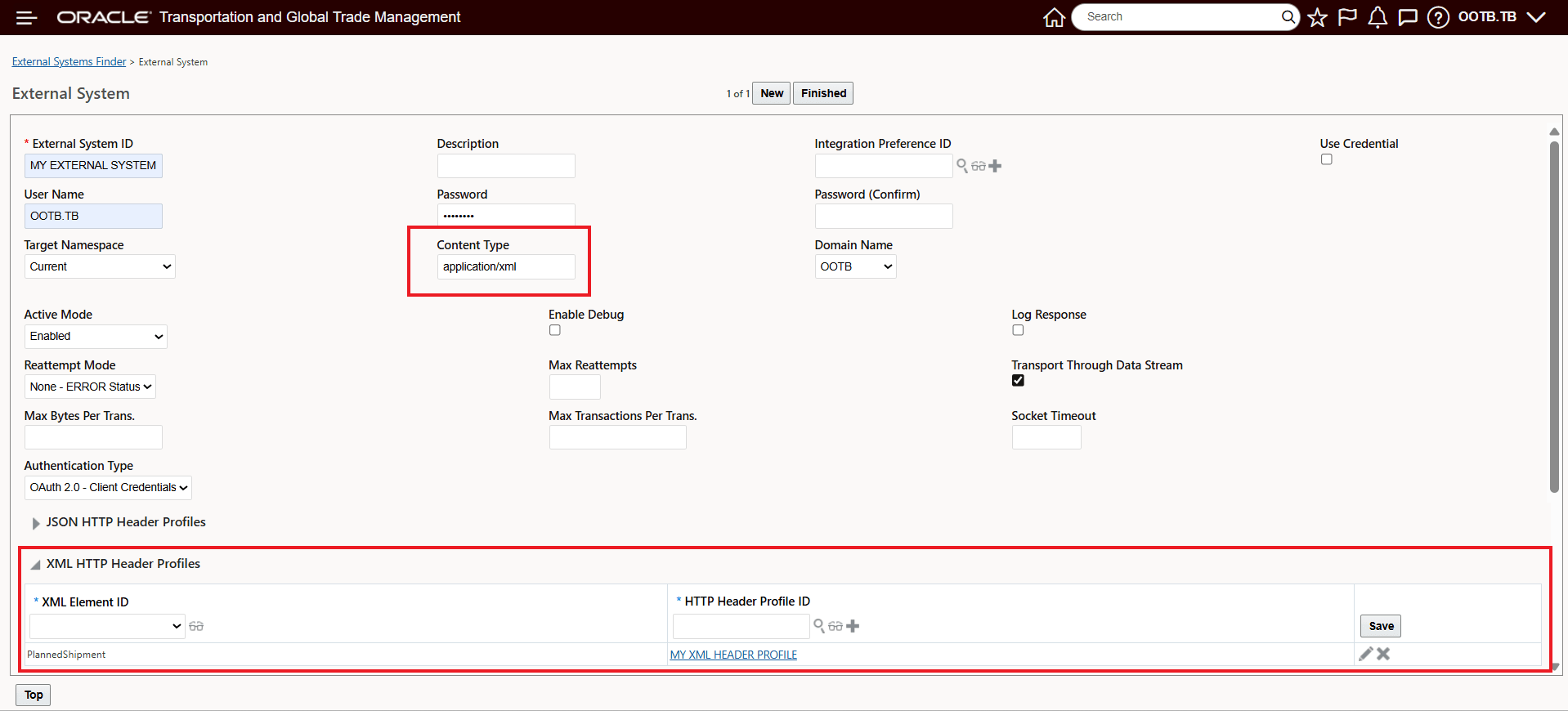
XML HTTP Header Profile
Business Benefit: This feature streamlines integration with external systems by allowing businesses to dynamically configure HTTP headers at runtime, leading to more flexible, efficient, and reliable data exchanges tailored to your different use cases and external system integrations.
Steps to enable and configure
Follow the steps below to create a new HTTP Header Profile.
- Navigate to Business Process Automation > Power Data > Integration > HTTP Header Profile.
- Enter an HTTP Header Profile ID.
- Click New Parameter. Enter a Parameter Name that you would like to include on the outbound HTTP message.
- Select a Parameter Type. Parameters can be static or dynamic - based on saved queries or properties.
- Static: The value entered for the parameter is the value provided in the HTTP Header Profile.
- Saved Query: Lets you create a dynamic parameter by using a saved query. The results of this saved query are used as the parameter value.
- Property: Lets you create dynamic parameters by using a property name. The property value stored for this property name is used as the parameter value.
- Static: The value entered for the parameter is the value provided in the HTTP Header Profile.
- If you have selected a parameter type of "Static":
- Enter a Parameter Value that you would like to include on the outbound HTTP message.
- Select the Wallet field to send the record to the OTM wallet.
- If you have selected a parameter type of "Saved Query", enter a Saved Query ID. The results of this saved query are used as the parameter value.
- If you have selected a parameter type of "Property", enter a Property Name. The property value stored for this property name is used as the parameter value.
- Assign the created HTTP Header Profile to the desired External System. Any outbound message using the configured External System will use the mapped HTTP Header Profile with the dynamically generated parameters.
- Additionally, on the External System - you have the option to create and assign HTTP Header Profiles as a JSON HTTP Header Profile mapped to REST Resources or an XML HTTP Profile mapped to XML Elements.
- JSON HTTP Header Profiles: Any outbound message using this REST resource will use the indicated dynamic HTTP header. If the external system content type is "application/json," the values mapped in this section will be used.
- XML HTTP Header Profiles: Any outbound message using this XML element will use the indicated dynamic HTTP header. If the external system content type is "application/xml," the values mapped in this section will be used.