Redwood UI: Support for Rule-Based Screens and Saved Searches
We’ve enhanced Redwood UIs to include support for Rule-Based Selection Criteria. We’ve also added personalized grids (Save/Undo View), and reusable Saved Searches with defaults, along with restored search safeguards and DATE_RANGE defaulting to improve performance on large datasets.
SELECTION CRITERIA AVAILABLE IN PUTAWAY TYPE CALCULATION RULE
We’ve added support for Selection Criteria in the Putaway Type Calculation Rule UI. (For example, Selection Criteria used in Putaway rules, task creation templates, audit rules, and so on.)
To access the selection criteria from the Putaway Type Calculation UI, click the More Actions (elipses button), then More Actions -> Selection Criteria.
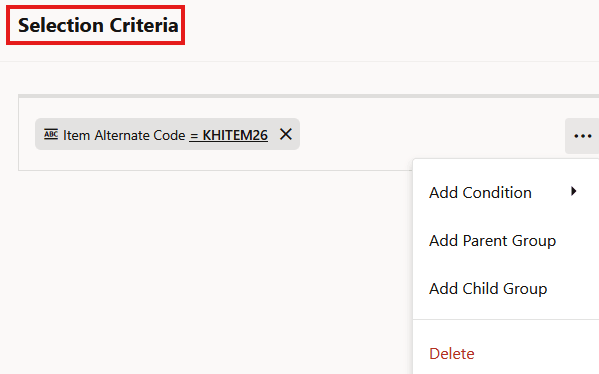
Selection Criteria
SAVE VIEW AND UNDO VIEW
We’ve added Saved layouts to persist across sessions so users don’t need to reconfigure after restarting.
- Save View: Users can add/remove/reorder columns and save layouts for reuse.
- Undo View: One-click restore to the default grid configuration.
SAVED SEARCHES (WITH DEFAULT, RESET, DELETE)
Users can create and store multiple saved search definitions per screen. One saved search can be set as the Default, applied automatically on screen launch. Users can also Delete saved searches and Reset to the default search criteria.
REQUIRED SEARCH FIELD ENFORCEMENT FOR LARGE DATASETS
Providing better performance and usability on high-volume screens, users must populate at least one required search field before executing a search. If none are populated, Redwood displays: “Atleast one required search field must be populated” (to match expected behavior).
This supports scenarios where required fields may be pre-populated on initial load, consistent with legacy behavior.
DEFAULT DATE_RANGE FILTERS (e.g., "30 DAYS AGO" BEHAVIOR)
For applicable migrated screens, Redwood will now pre-populate DATE_RANGE search chips with:
- From Date: 30 days ago (relative to current date)
- To Date: current facility date
Results are filtered appropriately immediately upon load/refresh. This provides faster screen load and more relevant default results on large datasets.
Steps to enable and configure
To access the selection criteria from the Putaway Type Calculation UI:
- Click the More Actions (elipses button.)
- Then click More Actions -> Selection Criteria.