AI Agentic App: Logistics Execution Command Center
The Logistics Execution Command Center Agentic app streamlines workflows by surfacing urgent issues in a single Command Summary, consolidating Warehouse Management (WMS) and Oracle Transportation Management (OTM) data. All user actions are logged and synchronized automatically, optimizing process flow.
The app can allow a planner to use both softwares in a single app, providing useful metrics using interactive UI/UX, highlighting exceptions with the supply chain operations and providing actionable insights into both products. This app identifies the top orders from OTM and WMS that pose the highest short-term risk to supply chain operations if no action is taken.
Traditionally, identifying these exceptions requires multiple custom dashboards, complex queries, and manual configuration. An agentic app can ingest OTM and WMS data directly, automatically detect at-risk orders, and generate actionable insights far faster than conventional methods.
Using “Ask Oracle” in the Logistics Execution Command Center
The Ask Oracle experience introduces the Logistics Execution Command Center, the agentic core of the app. Users can ask questions in natural language to get immediate, cross-system intelligence—reducing time spent navigating menus and accelerating decision-making.

Ask Oracle
Summary of Orders at Risk and Priority Actions
On launch, logistics managers see a summary of orders and priority actions that reflects the “pulse” of execution across both transportation and warehousing. The most critical action items, including Orders at Risk are surfaced immediately so teams can focus attention where it matters most.
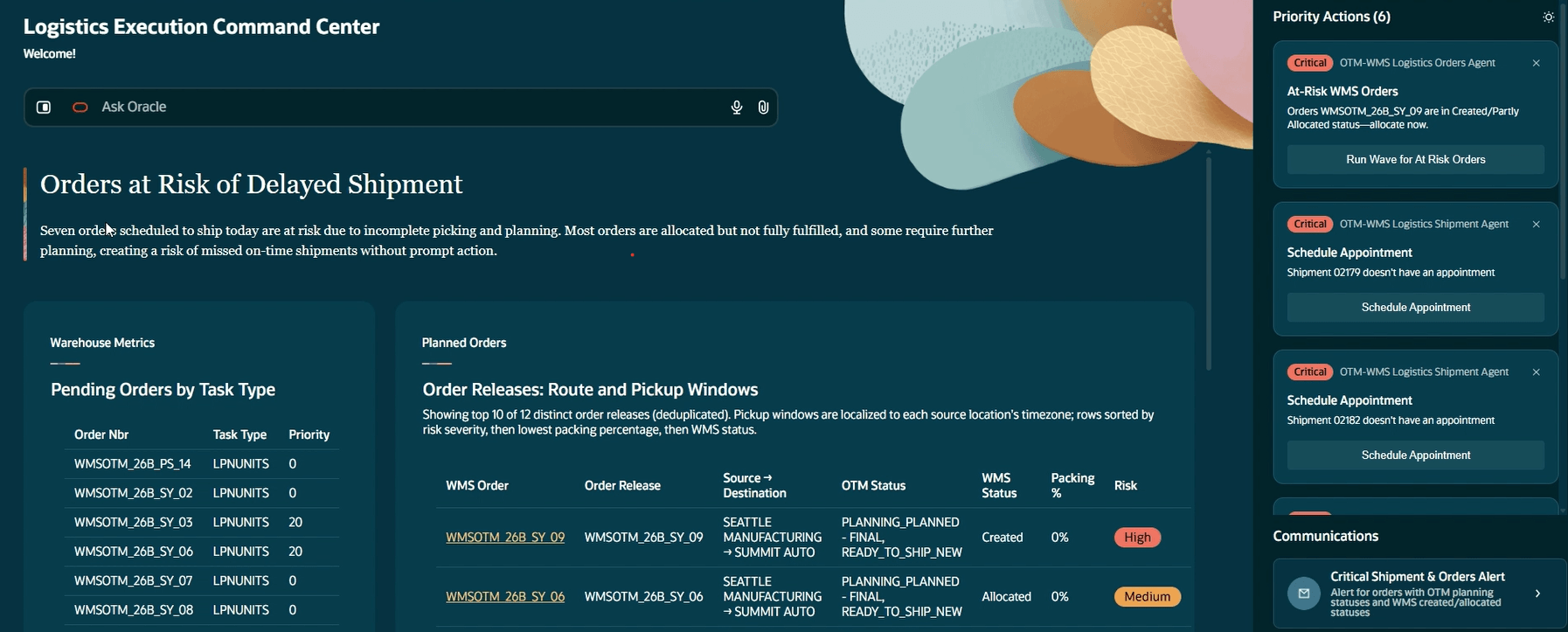
Orders at Risk
OTM-WMS Workflow Context:
- After order releases are planned into shipments in OTM, the data is sent to the warehouse management system to create corresponding WMS orders aligned to shipment requirements. This is done using the Four Part Key.
- Fulfillment depends on inventory availability, warehouse capacity, and operational efficiency.
- Once WMS orders are created, an allocation wave assigns resources. Orders may be fully or partially allocated.
- Fully allocated orders proceed to packing. Partially allocated orders may miss the planned fulfilment window, which ends at the OTM shipment start time.
- If an order is only partially allocated and cannot be fulfilled in time, it should be replanned to a new shipment scheduled to start the next day.
- For allocated orders, tasks corresponding to these orders are given higher priorities to complete faster.
Order Line Matching Between WMS and OTM via Four Part Key
We’re using the WMS-OTM integration to improve accuracy and reliability when identifying and exchanging order data between WMS and OTM.
Four-Part Integration Keys
The WMS-OTM Integration setup requires the following fields to be populated:
- ERP_SOURCE_HDR_REF = Refnum with Qual ORDER NUMBER
- ERP_SOURCE_SHIPMENT_REF = Refnums with Quals ORDER LINE NUMBER, FULFILLMENT LINE NUMBER.EXT, FULFILLMENT LINE NUMBER
- ERP_SOURCE_LINE_REF = Refnum with Qual ORDER LINE NUMBER
- ERP_SOURCE_SYSTEM_REF = FlexField Number
These updates provide more improved fulfillment execution, ensuring the agent can reliably identify the orders that need to ship today, and locate the corresponding OTM orders for those shipments.
NOTE: For orders to be considered in the agentic app, they must be within 3 days.
Unified View of Planned Orders (WMS + OTM)
A single, consolidated Planned Orders pane shows WMS orders alongside their related OTM transportation orders, ranked by risk. This unified context makes it easy to understand whether risk is coming from warehouse execution, transportation planning (or both) without toggling screens.
Once you expand the Planned Orders pane, you can view more details, including the pickup window.
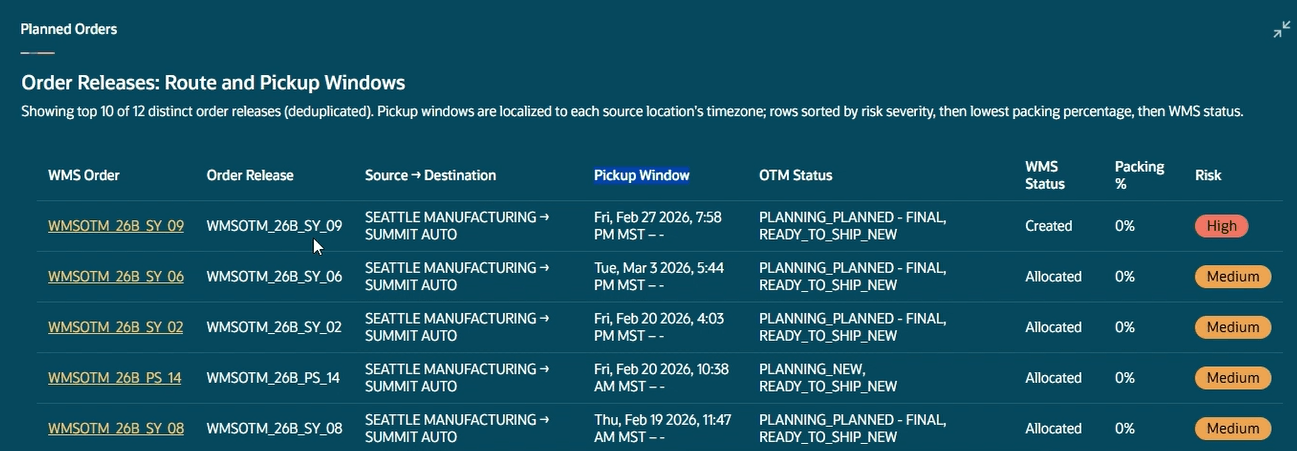
Planned Orders
Run Wave for At Risk Orders
From Planned Orders view, you will have an option from the Priority Actions pane to directly Run a Wave for At Risk Orders.
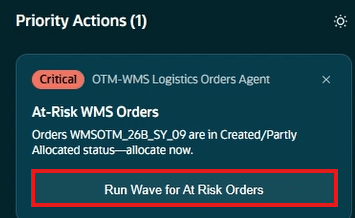
After clicking the Run Wave button, you’ll see a Wave Template field where you can press up and down arrow keys, or type and search for a template and run the wave.
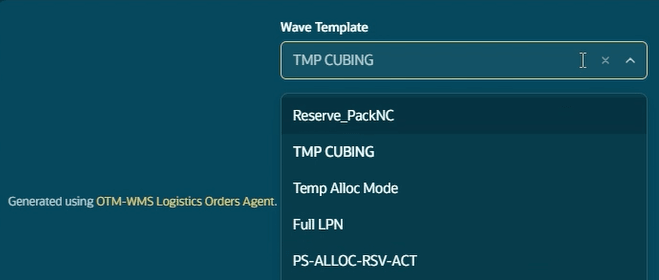
Wave Template
Run Wave for At Risk Orders
Query for Order Line Status
From the Planned Orders pane, you also have the option click on each hyperlinked WMS order to query inside order lines and search in active and reserve locations for order summary information. The query will search for orders and their associated items and provide a high-level summary of the available inventory in the warehouse. This will give you an idea of what inventory will be fulfilled.
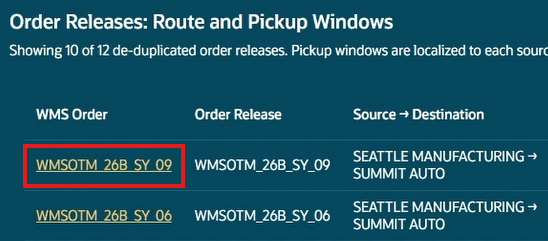
Order Releases
Communications Pane
The Communications pane will prompt you with suggested email communications that you can populate and send. For example, if there are any orders in critical status, you might want to send an email communicating this. Eliminating the need to hunt for data, managers can generate and send communications with a click.
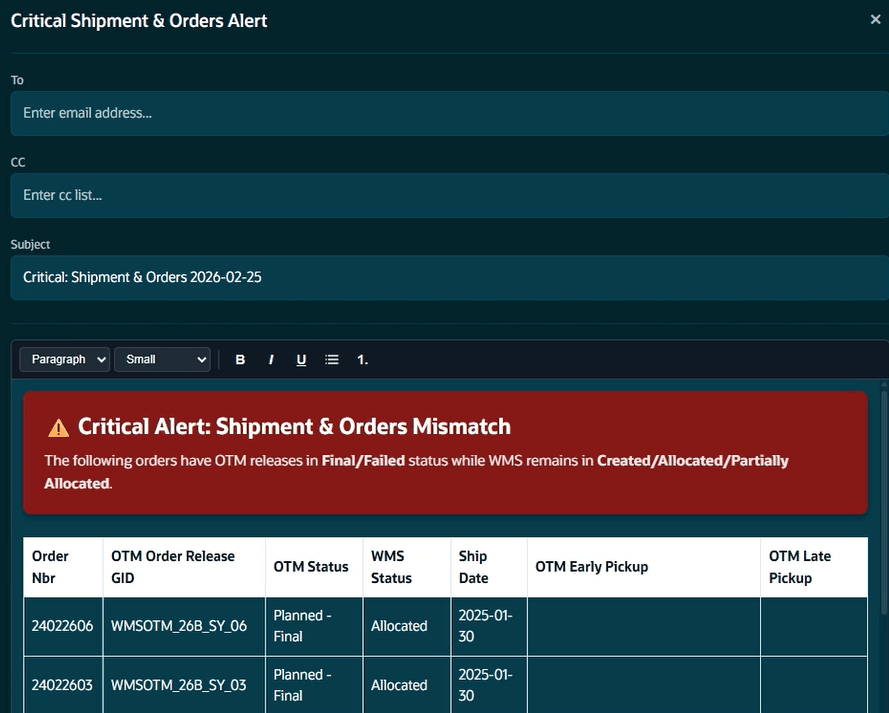
Communications Pane
Warehouse Metrics Pane for Today’s Shipping Execution
The WMS metrics pane shows what must ship today and the related warehouse task types. Users can drill into order details and then use the Priority Actions pane to view the tasks for the orders.
NOTE: priority task updates will only be available if the task has not been started.
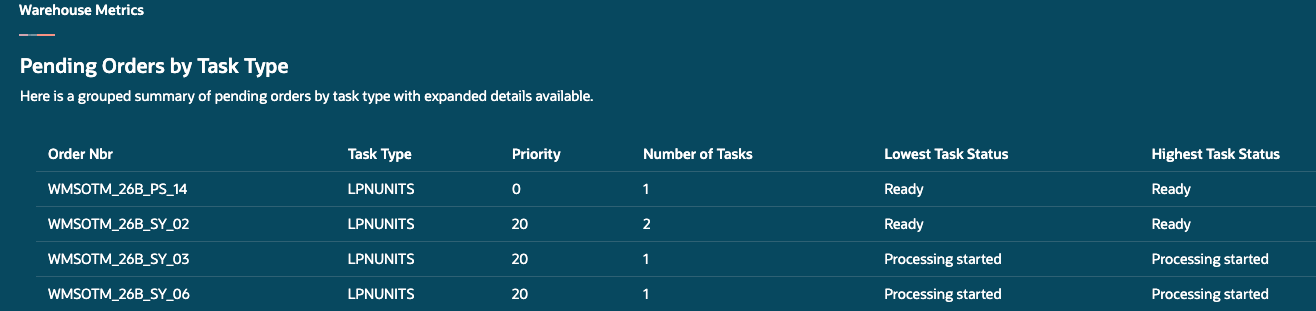
Pending Orders by Task Type
The WMS Status Distribution metric displays a distribution of the order status.
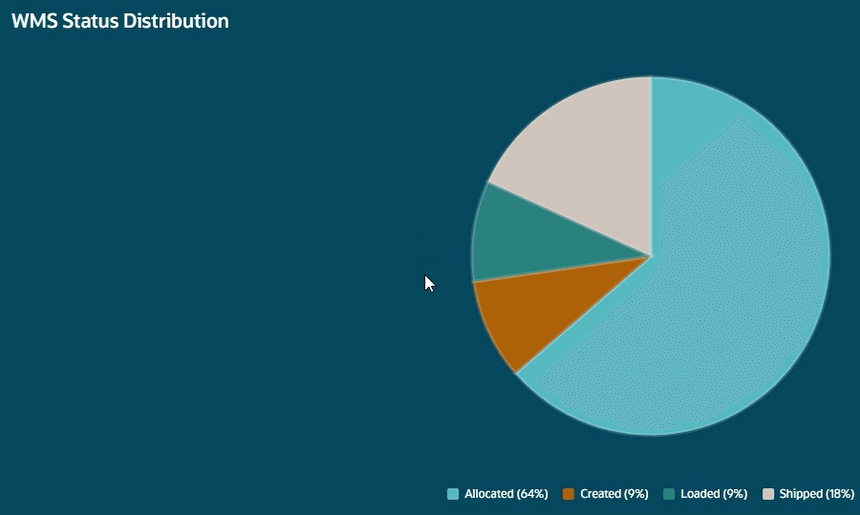
WMS Status Distribution
Planned Shipments Pane – an Early-Warning System
Delayed shipments or shipments missing confirmed dock appointments are flagged early, enabling managers to reschedule labor and warehouse activity to avoid idle time.
The Status column will give you an idea of the percentage of the Load that has been loaded and packed. The Load Statuses will include:
- Appointment missing – load doesn’t have an appointment assigned to it.
- Appointment missed - the scheduled load appointment time has passed.
- Appointment at risk – the appointment will be happening in the next 30 minute window.
Logistics Managers can also trigger Priority Actions to schedule or request appointments, keeping warehouse flow synchronized with carrier arrival. The appointment will be scheduled based on available appointment times in OTM.
NOTE: the priority action for scheduling the appointments will only display if the start time is within 24 hours from the current time.
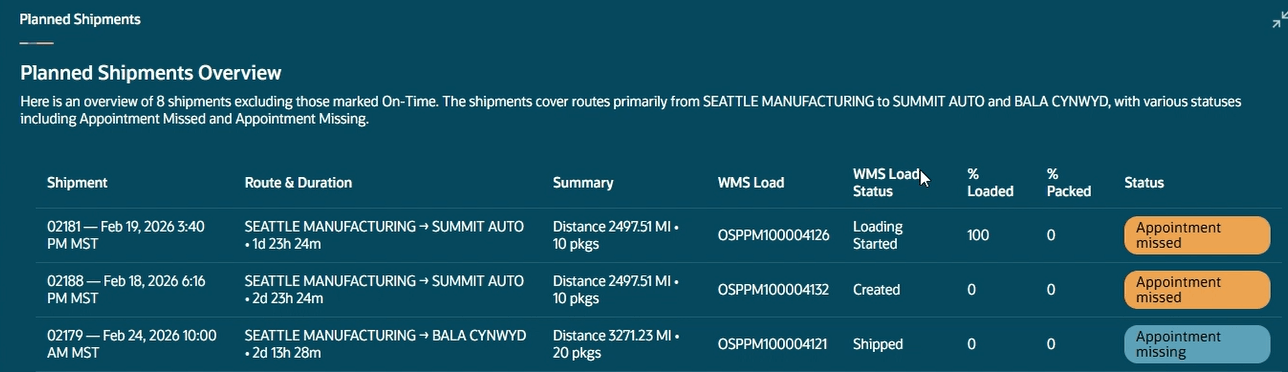
Planned Shipments
OTM Metrics Pane for Outbound Transportation Health
The OTM Metrics Pane provides an at-a-glance view of outbound flow (order counts, packages, weight, volume) and dynamically highlights the most relevant exceptions and KPIs for that day’s operations to support faster, better decisions.
Steps to enable and configure
Using the following steps, you can configure access to the Logistics Execution Command Center agentic app in WMS so that you can launch it directly from the WMS Redwood menu.
- From Redwood Desktop, configure the URL via the External Site WMS Module -> external_url screen parameter. The URL will open in a new browser tab, independent of WMS. No authentication, tokens, or WMS context are passed to the destination site.
NOTE: Normally you would enter the full URL path for the external_url parameter. However Oracle non-WMS applications configured in “SAAS app configuration” have a shortcut available. For example to configure an entry for the new “Logistics Execution Command Center” agentic application, the parameter should be set to (AI-AGENT-STUDIO)/hcmUI/redwoodAI/ora_logistics_execution_command_center.
You can refer to the domain part using the AI-AGENT-STUDIO entry that you would have configured in the SAAS App Configuration screen in redwood desktop
- Grant access to configure external URLs using the “access external sites” permission. This permission is granted by default to ADMIN. EMPLOYEE roles must be explicitly granted this permission.