Support Selective Approval of CC Adjustment Detail Records
We’ve now enhanced cycle count adjustment processing. This gives warehouse supervisors greater flexibility and control when reviewing deferred mode cycle count results. Previously, approvals and rejections could only be performed at the cycle count adjustment header level, forcing supervisors to reject all adjustment records under a location when only a subset of records required recounting. This often resulted in unnecessary recounts and operational inefficiencies.
With this update, supervisors can now approve or reject cycle count adjustment records directly at the detail level, allowing valid counts to be processed while only inaccurate SKUs are sent for recount. The enhancement supports both active and reserve locations, as well as location-driven and item-driven cycle counts.
Key Benefits
- Approve or reject cycle count adjustments at the detail level instead of the entire adjustment header
- Perform approvals and rejections across multiple selected records simultaneously
- Automatically approve or reject remaining unselected SKUs based on supervisor actions
- Create recount tasks only for rejected SKUs instead of recounting the full location
- Improve inventory accuracy while reducing recount effort and operational delays
- Support variance-driven approval workflows based on configurable quantity or percentage thresholds without using approval rules.
New Approval Status Tracking
A new Detail Approval Status column is available on the Cycle Count Adjustment Detail screen to help supervisors track the approval or rejection status of individual adjustment records.
You can add the column through the UI and save the personalized view. Existing adjustment detail records will display a blank value until actions are taken.
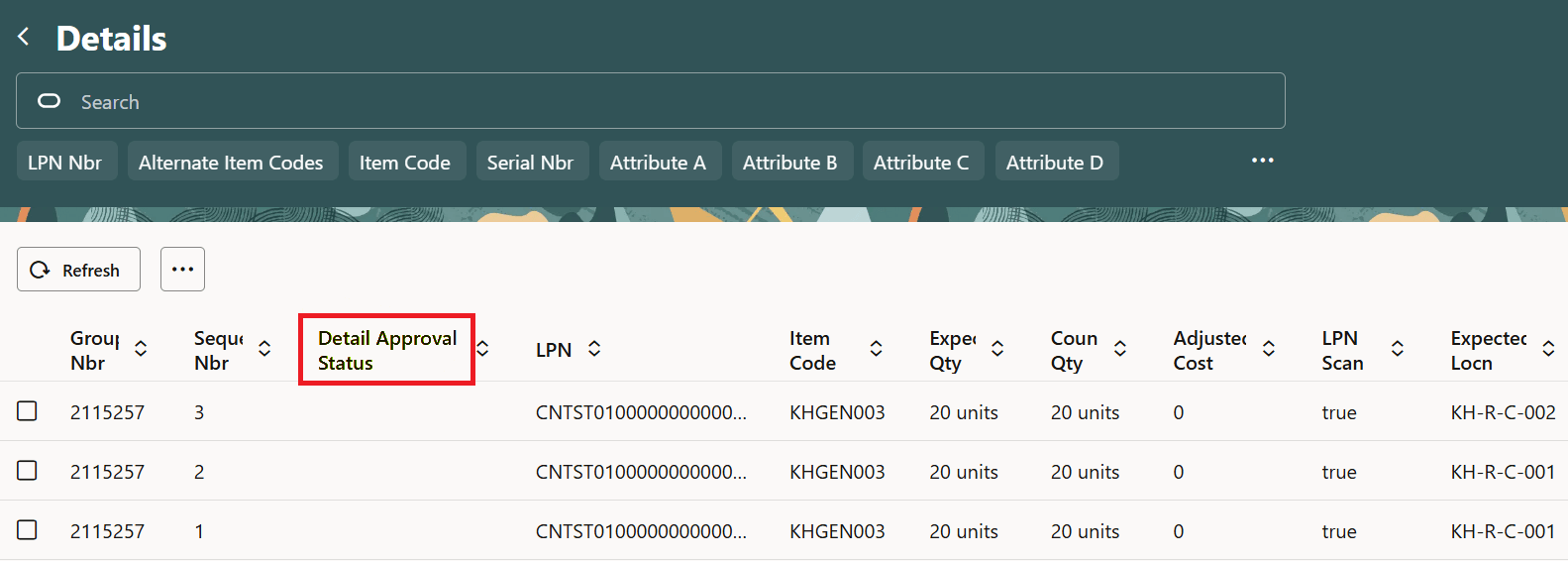
Detail Approval Status
New Approve and Reject Actions
The Cycle Count Adjustment Detail screen now includes new Approve and Reject action buttons that allow supervisors to process selected detail records directly from the UI.
Key capabilities include:
- Support for multi-select processing
- Approval and rejection at the SKU level
-
NOTE: Even if one record of a SKU is selected and approved ,all the remaining detail records within the adjustment header will be approved.
-
- Automatic handling of remaining unselected records
- Inventory updates applied only to approved SKUs with discrepancies
- Rejected SKUs are excluded from inventory adjustments
- When performing approvals, selected records are approved. Remaining records are automatically rejected.
- When performing rejections, selected records are rejected. Remaining records are automatically approved.
- During processing, the system displays confirmation dialogs showing how many SKUs will be approved or rejected before changes are applied.
Automatic Recount Task Creation
If any SKUs are rejected during approval or rejection processing, the system prompts supervisors to select:
- A task type
- A task priority
Once confirmed, the system automatically creates item-driven cycle count tasks for only the rejected SKUs.
Additional behavior includes:
- Even if there are no variances and a detail is not selected for approval, it will get rejected
- If one detail line for a SKU is rejected, the entire SKU is included in the recount task
- No new recount tasks are created if an active location-level cycle count task already exists. Even if a recount trigger is enabled, the item driven cycle count task will take precedence, and the location driven recount task will not be created.
Variance Driven Approval
A new Variance Driven Approval action allows supervisors to approve or reject records automatically based on configurable variance thresholds rather than manual record selection.
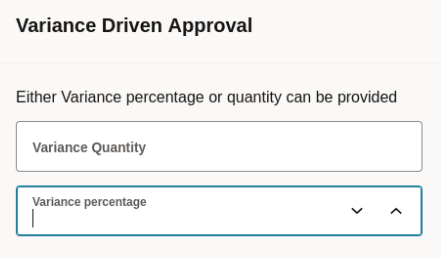
Variance Driven Approval
Using this feature, supervisors can:
- Define either a variance quantity or variance percentage
- Automatically approve records within the configured threshold
- Automatically reject records outside the threshold
This reduces the risk of manually approving incorrect adjustments while accelerating review of large cycle count batches.
Improved Handling for Uncounted Anticipated LPNs
To maintain inventory integrity in reserve locations, Warehouse Management now prevents partial approval or rejection of detail records associated with uncounted anticipated LPNs during Detail Count or LPN Scan mode counting.
If users attempt to selectively approve or reject records for an uncounted LPN, the system displays the following error:
“Selective approval is not allowed for LPNs that are deemed to be lost, %LPN”
This ensures all detail records associated with the missing LPN receive a consistent decision. The same validation also applies during variance-driven approval processing.
New Task Cancellation API Support for CC-LOCN-BY-ITEM Tasks
Warehouse Management now supports cancellation of CC-LOCN-BY-ITEM tasks through the following APIs:
POST /wms/lgfapi/v10/entity/task/{id}/cancel
POST /wms/lgfapi/v10/entity/task/{task_number}/cancel
POST..../wms/lgfapi/v10/entity/task/bulk_cancel/
The system validates that tasks are in Ready or Held status before allowing cancellation.
Steps to enable and configure
To enable the Approval Status Column,
- Navigate to the Cycle Count Adjustment Detail screen.
- Open the column configuration or personalization settings
- Add the Approval Status column
- Save the view configuration
The column will then display approval and rejection statuses for processed detail records.
Approve/Reject Cycle Count Adjustment Details
To use the new detail-level approval and rejection functionality, administrators must grant the following permissions through the Groups View > Permissions screen:
- Location/Approve CC Adjustment Details
- Location/Reject CC Adjustment Details
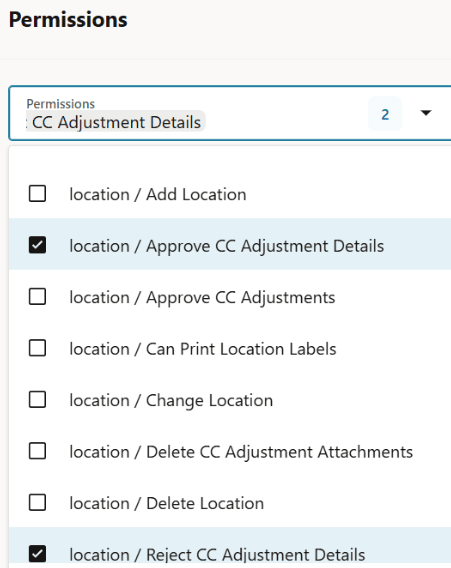
Approve Reject Permissions
Only users assigned these permissions can access the new Approve, Reject, and Variance Driven Approval actions.