Honor Expiry Date Range Rules for Cross Dock
Warehouses that handle perishable or date-sensitive inventory need to ensure that products are shipped within an acceptable expiry window. If cross-dock processing does not consider expiry rules, users may ship inventory that is too close to expiry or does not meet customer shelf-life requirements.
With this enhancement, WMS considers Expiry Date Range rules during cross-dock processing across receiving, putaway, distribute LPN, and receiving API flows. This helps customers improve product freshness, reduce returns, and apply consistent shelf-life controls before inventory is allocated to outbound orders.
INTRODUCING EXPIRY DATE RANGE IN CROSSDOCK FLOWTHROUGH RULES
A new action button Expiry Date Range has been introduced in the Crossdock Flowthrough Rules UI.
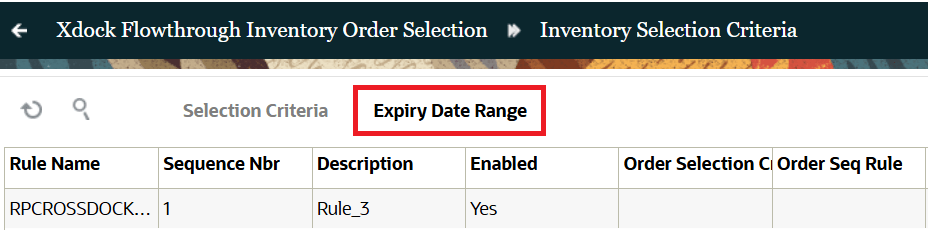
Crossdock Flowthrough Rule
When user clicks this button, WMS routes user to Expiry Date Range UI of the Wave Template. Here, we’ve introduced new Expiry Date Range drop-down field that displays all the Rules configured in Expiry Date Range. Users can configure expiry date range criteria directly from the Crossdock Flowthrough Rules setup. This makes it easier to define which expiry-tracked inventory is eligible for cross-dock.
The action button is permission controlled and requires existing permission: Crossdock Flowthrough Rule / Can configure selection criteria rules to be enabled for the non-admin users.
HONOURING EXPIRY DATE RANGE FOR CROSS-DOCK
We’ve enhanced WMS to honour Expiry Date Range for Cross-Dock in the following mobile modules:
- Receive by Shipment
- Receive by Load
- Receiving API
- Putaway
- Distribute LPN
Receive by Shipment now checks Expiry Date Range rules before cross-docking received inventory. When inventory-orderselection-rule is configured, WMS evaluates the incoming inventory against the Crossdock Flowthrough Rule. WMS considers Inventory Selection Criteria, Expiry Date Range, Order Selection Criteria, and Order Sequence Rule together.
If inventory meets the expiry rule and an eligible order exists, WMS cross-docks the inventory.
For example, for the following Crossdock Flowthrough Rules, let’s say:
| Rule Name | Inventory Selection Criteria | Value | Expiring After (in days) | Expiring Before (in days) |
|---|---|---|---|---|
| Rule-1 | Item | SKU-A | -5 | 5 |
If Today's Date is, 10/03/2026; So, Expiry Date Range - 5/03/2026 to 15/03/2026.
So the order would be:
| Order Number | Item | Quantity |
|---|---|---|
| ORD-01 | SKU-A | 10 |
Shipment:
| Shipment Number | Item (Expiry Tracking) | Shipped Quantity | Items Expiry Date |
|---|---|---|---|
| SHPMNT-01 | SKU-A | 10 | 10/03/2026 |
In this scenario SHPMNT-01 with SKU-A is eligible for Xdock, as per Crossdock Flowthrough Rules.
- If inventory does not meet the expiry rule, WMS receives the inventory without cross-docking.
- If the rule is blank, WMS keeps the existing cross-dock behavior.
- If the configured rule is invalid or disabled, WMS stops the cross-dock flow and displays a warning.
- Pallet cross-dock is not changed when Pallet Handling is set to LPN or Pallet Receiving.
NOTE: This applies to Mobile Receive by Load transaction flow.
RECEIVING API
The Receiving API now supports Expiry Date Range validation during cross-dock. This gives customers the same expiry control for API-based receiving that they have in Receiving flows.
- API receiving can use the configured Crossdock Flowthrough Rule. WMS validates incoming inventory against the expiry date range, inventory criteria, order criteria, and order sequence rule.
- If inventory qualifies, WMS cross-docks it to an eligible order.
- If inventory does not qualify, WMS receives it without cross-docking.
- If no eligible order is found, WMS returns the standard cross-dock error.
PUTAWAY
Putaway now considers Expiry Date Range rules when cross-dock is triggered during putaway. WMS applies the configured Crossdock Flowthrough Rule during putaway cross-dock.
When performing Putaway, inventory must meet the expiry date range and other configured rule criteria before WMS cross-docks it. If inventory does not qualify, WMS continues with the normal putaway or receiving flow. If the rule is blank, WMS keeps the existing putaway cross-dock behavior.
DISTRIBUTE LPN
Distribute LPN now honors Expiry Date Range rules when cross-dock is triggered from the distribution flow. WMS checks the configured expiry date range before cross-docking distributed inventory.
- WMS evaluates the expiry date range along with inventory selection, order selection, and order sequence rules.
- If inventory qualifies and an eligible order exists, WMS cross-docks it.
- If inventory does not qualify, WMS receives it without cross-docking.
- If the rule is blank, WMS keeps the existing Distribute LPN cross-dock behavior.
Also, WMS can validate inventory against an Expiry Date Range rule during Direct Allocation and Pick and Allocate. This helps customers reduce short-dated shipments, avoid rework, and improve compliance with customer and regulatory requirements.
Steps to enable and configure
- Configure the required Expiry Date Range rule in the Expiry Date Range setup.
- Go to Cross-dock Flowthrough Rules and add the Expiry Date Range rule.
- Grant users the permission Crossdock Flowthrough Rule / Can configure selection criteria rules if they need to maintain these rules.
- Configure inventory-orderselection-rule for the applicable flows, such as Mobile Receive by Shipment, Receive by Load, Receiving API, Putaway, or Distribute LPN.
- Review related criteria in the Crossdock Flowthrough Rule, including Inventory Selection Criteria, Order Selection Criteria, and Order Sequence Rule.
- Review XDOCK_ORD_INV_ATTR_CHECKS and XDOCK_ORD_SHP_PO_CHECKS if your cross-dock process uses those company parameters.
- To use existing cross-dock, keep the inventory-orderselection-rule blank.