Improvements to Redwood Desktop
Redwood Desktop introduces several usability enhancements that make it easier for users to access frequently used WMS screens, preserve their preferred desktop experience, and work more efficiently with page actions. Users can now choose a Group Menu experience that supports familiar legacy menu configurations, automatically maintain favorite screens for faster navigation, and benefit from a more responsive and organized Action menu across Redwood UIs. User-level preferences are also retained across sessions for a more consistent desktop experience.
Toggle group menu and product map from user settings
A new Product Map - Group Menu toggle is available from the User Settings Home screen. Product Map, which is the current experience available through Ask Oracle, remains the default. Users can switch the toggle to Group Menu when they prefer the group-based navigation experience.
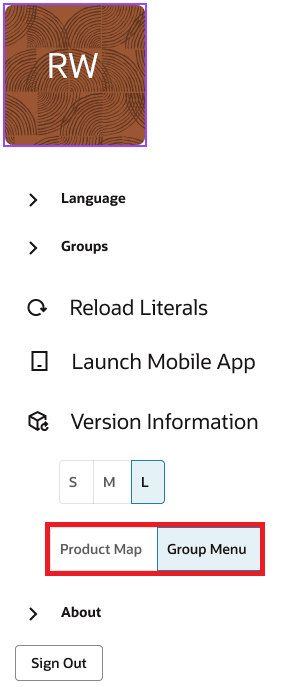
User Settings Home Screen
The Group Menu layout dynamically adjusts to the available screen space, displaying between one and four columns as appropriate. This responsive layout helps users view more categories and screens without unnecessary navigation.
The system now also saves the following preferences at the user level so they persist between sessions:
- Desktop menu preference: Product Map or Group Menu
- Desktop scale factor
Quickly return to favorite screens
Favorites are now maintained automatically, eliminating the need to repeatedly locate commonly used screens. When Group Menu is opened for the first time, the in-app navigation contains only the Home tab. When a user opens a screen through Ask Oracle, the screen is automatically added as a favorite in the in-app navigation. Existing favorites aren't duplicated.
Each user can have up to 10 favorite screens. If the maximum is reached and another screen is opened, Redwood Desktop removes the least-visited favorite and adds the newly opened screen. Favorites and visit counts are maintained separately for each user and persist after logout and subsequent login.
NOTE: Favorites are available only with Group Menu and aren't displayed or managed when Product Map is selected.
Work with an improved action menu
Redwood UIs now provide an updated action menu that more closely aligns with the familiar organization of existing WMS screens. Actions are separated into functional and layout-related areas, making commonly used commands easier to locate. The left side of the action area contains functional options such as Refresh, Details, and screen-specific Actions. Individual actions are displayed while sufficient space is available. When a screen contains many actions, such as Wave Inquiry, additional commands are consolidated under the More Actions menu. Actions also automatically move under More Actions as the page is resized and less space becomes available.
The right side contains layout and record-management options, including Copy, Edit, Delete, Configuration Export, View, Download, and Columns. The Configuration Export menu provides export, import, and copy-related options, while the View menu provides applicable view and reset-related options. The responsive action layout adapts as the browser or page size changes, helping keep the interface organized and usable across different screen sizes.
NOTE: The ability to move the Redwood tabs or close them are not supported
Steps to enable and configure
To use the new navigation experience:
- Open User Settings from the Home screen and locate the new Product Map - Group Menu toggle. Product Map is selected by default.
- Enable Group Menu to use the two-level group menu and favorites functionality.
NOTE: No separate favorites configuration is required. When Group Menu is enabled, screens opened through Ask Oracle are automatically added to the user's favorites, up to the 10-screen limit. The selected desktop menu preference, desktop scale factor, favorites, and associated visit information are saved at the user level and retained across sessions.