Waterfall Segmentation
Waterfall segmentation in Oracle Unity introduces a new way to classify and organize customers within segments on the basis of logic you have already defined in other segments. With this feature, each customer in a primary segment (such as "All Email Customers") is assigned to the highest-priority sub-segment they qualify for (like "Yoga Enthusiasts," "Swimmers," etc.). The assignment follows a top-down order—once a customer matches a sub-segment, they are classified and not processed further for lower-priority segments. The customer's final group is stored as a personalization attribute, which can be used in downstream systems, such as Oracle Responsys, for tailored messaging and orchestrated campaigns.
To add a waterfall attribute to your segment, first click om the waterfall icon at the top of the segment builder tab:
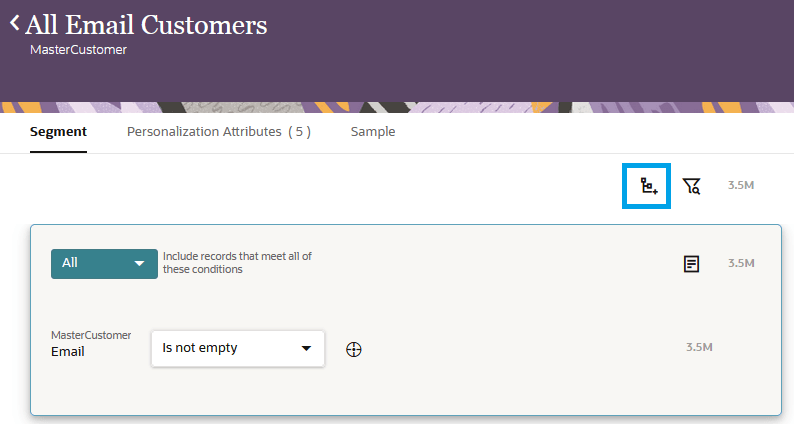
Add Waterfall Attribute to Segment
This opens a drawer where you can choose the segments you want to use in your waterfall. Once you have added your segments, you can select theCount option from the menu under the gear icon to see the count. Note that this can take significantly longer than regular counts–as many as 10 minutes or more. Once you are happy with your selection, you can click the Save button to permanently add the waterfall to your segment.
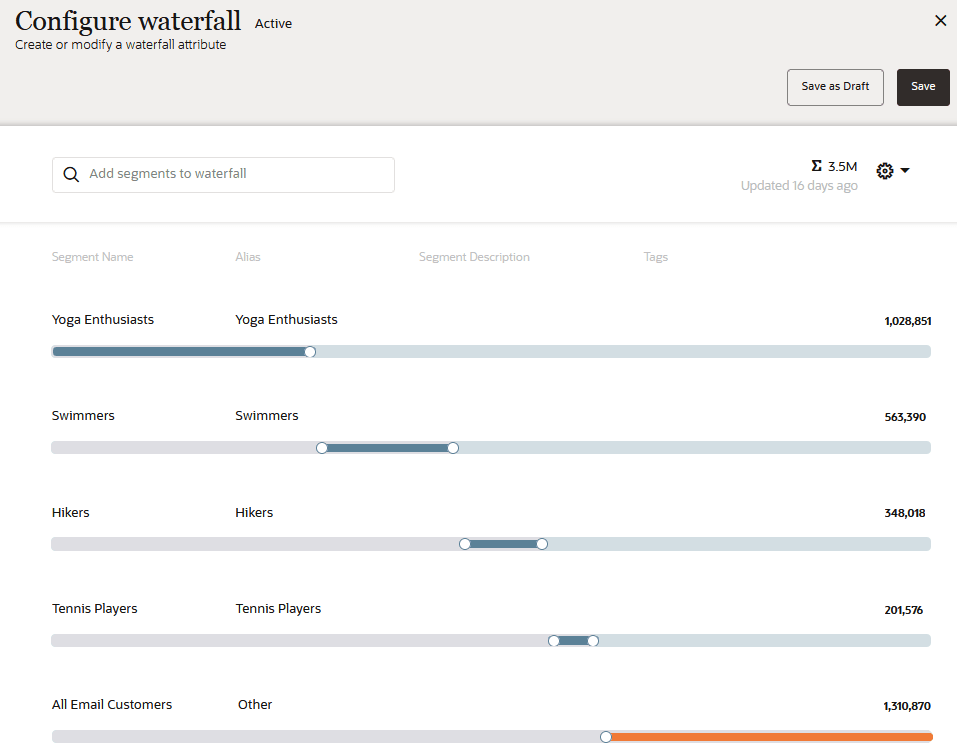
Configuration interface
Business Benefits:
- Supports prioritized audience assignment and messaging, ensuring each customer receives the most relevant communication based on predefined business priorities.
- Enhances personalization by capturing segment hierarchy as an attribute, enabling advanced use cases in downstream marketing platforms.
- Encourages reuse of existing segment logic, reducing additional modeling or logic-building overhead.
- Aligns segmentation with campaign strategies that require stepwise, mutually exclusive groups (e.g., rewards tiers, lifecycle stages).
Steps to Enable and Configure
You don't need to do anything to enable this feature.
Tips And Considerations
Tips and Considerations:
- Plan sub-segment order carefully: the first matching segment is used, impacting customer classification and downstream messaging.
- Waterfall segmentation calculations can take longer than regular counts, especially for larger datasets (may require 10 minutes or more).
- Always preview and validate segment counts before saving to ensure logic behaves as expected.
- The waterfall logic only works with already-defined segments; it does not generate new rules, but rather sequences and prioritizes existing groupings.
- When exporting, the waterfall group is output as a personalization attribute—ensure downstream systems are prepared to consume and use this attribute.
Access Requirements
Note: Available as part of the Oracle Unity April 2025 (25.04) Release.