Build Segments with SQL for Advanced Logic
With this release, Fusion Unity introduced SQL segments, allowing technical users to create audience segments by directly writing SQL queries instead of using the visual segmentation builder. This capability supports advanced transformations, aggregations, and complex logic that may not be achievable through the standard visual builder. SQL segments integrate seamlessly with Unity’s segmentation framework and can also be reused as reference segments within visual segments, combining flexibility with scalability.
Business Benefits:
- Empowers technical users to build segments faster using familiar SQL syntax
- Enables advanced segmentation use cases beyond the limits of the visual builder
- Supports complex transformations and aggregations for more precise targeting
- Enhances flexibility by allowing SQL segments to be reused within visual segments
- Bridges technical and business workflows by combining SQL-driven and visual segmentation approaches
Steps to enable and configure
You don't need to do anything to enable this feature.
Tips and considerations
How to Start Using
- In the "Create" drawer, select "SQL".
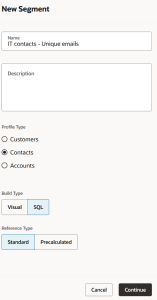
Create Segment
- Write your SQL using shortcuts and validations. Use "@" to get a list of tables, "." to get a list of columns, and "#" to get a list of functions. Note that the top-level SELECT clause must contain the segment's profile ID, for instance "Contacts_ID" or "Accounts_ID". You will not be able to get a count, get a sample, or publish your segment without this ID.
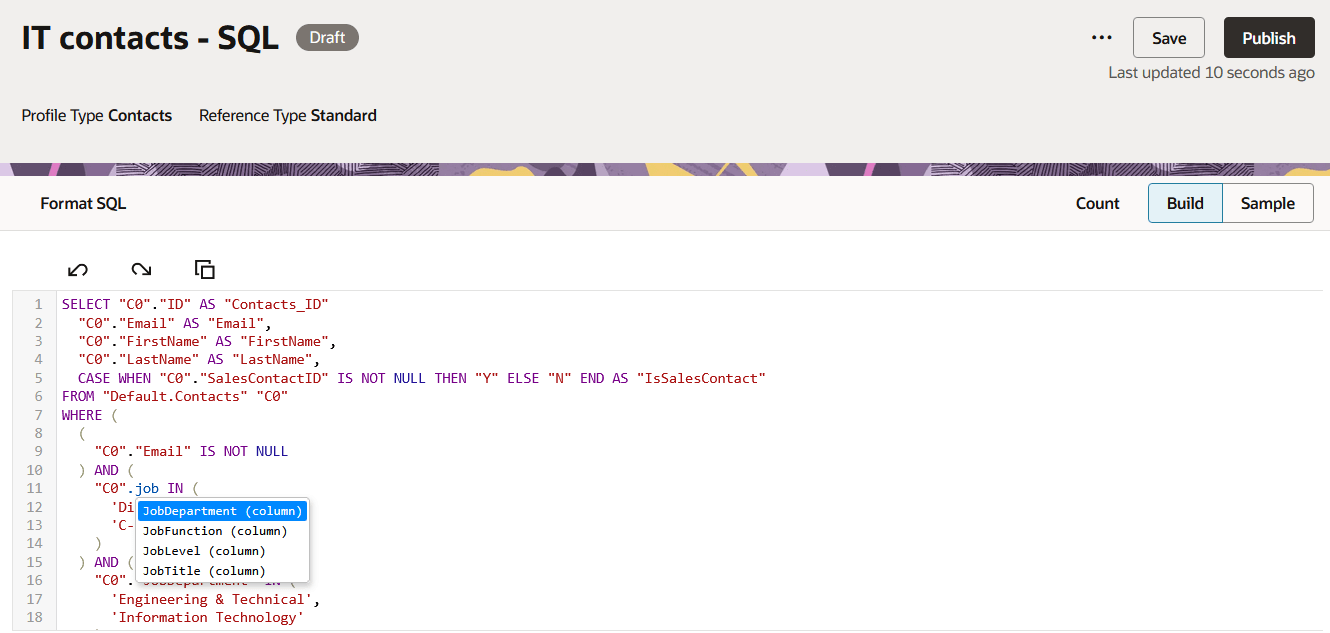
SQL Input
- Use the Count and Sample buttons to validate your segment. The columns in your top-level SELECT clause will be used for your sample.
- Save and publish when you are satisfied with the results. Your SQL segment can now be used by reference in other segments.
Tips and Considerations
- Some auto-generated SQL from converted visual segments may require manual optimization
- Best suited for users with SQL expertise and understanding of the data model
- Use SQL segments for edge cases or advanced logic not supported in the visual builder
- Combine SQL segments with visual segments to balance usability and flexibility
- Validate queries carefully to ensure performance and accuracy at scale
Access requirements
- Ensure users have appropriate roles:
- Customer Data Platform Administrator (ORA_FMK_CUSTOMER_DATA_PLATFORM_ADMINISTRATOR)
- Customer Data Platform Manager (ORA_FMK_CUSTOMER_DATA_PLATFORM_MANAGER)
- Customer Data Platform Specialist / Analyst