Filter Quotes Based on Company vs Individual
With this release, Oracle Commerce introduces a new 'My Quotes' filter on Our Account Quotes page enabling users to quickly view quotes where they are the designated contact.
Capability highlights
- Easily apply the new 'My Quotes' filter, in the Our Account Quotes page, to quickly see all quotes where the logged in user is the designated contact.
- Remove the filter at any time to view all company quotes.
- Combine the 'My Quotes' filter with other filters (such as 'Initiated By' or “Phase”) for a customized, focused view.
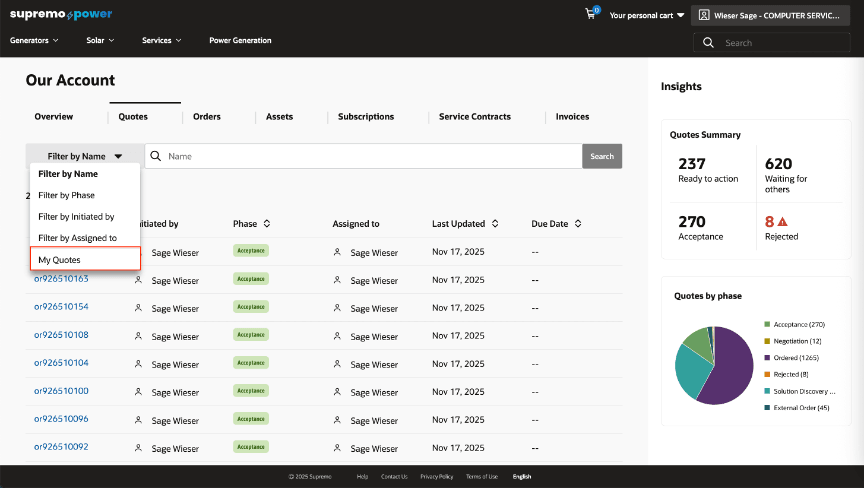
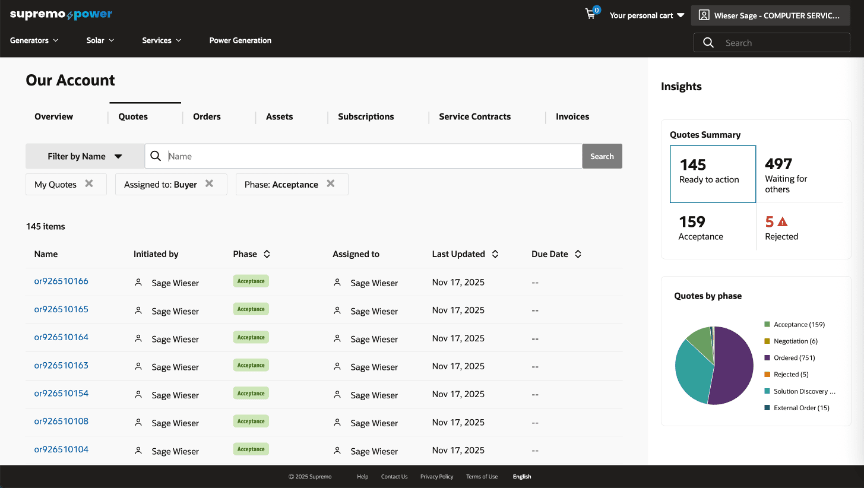
Improves efficiency by helping users easily switch between personal and company quotes, streamlining quote management and saving time.
Steps to enable and configure
- Login to Oracle CPQ.
- Navigate to Settings -> Commerce and Documents -> Process Definition.
- Choose the Data Columns option from the navigation dropdown beside the standard commerce process used for Self Service. Use the list button the list the data columns.
- Add a new data column for the transaction attribute: Contact Email by using the Add button.
- Deploy the change made to the standard commerce process using the deployment center.
Tips and considerations
- This feature is built-in on the htim-reference-store. Please make sure to upgrade to the latest version of this reference storefront.
- This feature is applicable only for Commerce on CPQ customers.