Usability Enhancements in Usage Dashboard
User Experience (UX) improvements for the Usage Events Dashboard (UEDB) .Key enhancements include:
- Clickable info tiles on the dashboard to segment data: “Batches with Errors,” “Batches in Process,” “Batches Processed,” and “Open Batches.” Selecting a tile filters and updates the data shown.
- Default landing tile is "Batches with Errors" with an associated “Batch by status” pie chart for visual context.
- The search panel offers batch status filtering (with some fields read-only depending on the tile) and date-based filtering (e.g., "Processed date < sysdate-30").
- The search region displays relevant columns such as Batch Number, Usage Type, Schedule Type, Error, Total Events, and more, depending on the tile and filter.
- Enhanced drawer layouts for viewing Export Queue (now allows downloading exported files) and Import Queue (download disabled for errored files).
- Event List page improvements, displaying additional batch fields above the search region: Usage Type, Process Name, Process Status, and Batch Status.
- Supported actions from the dashboard include: Create Batch, Submit for Usage Rating, Export, View Export Queue, Import, and View Import Queue.
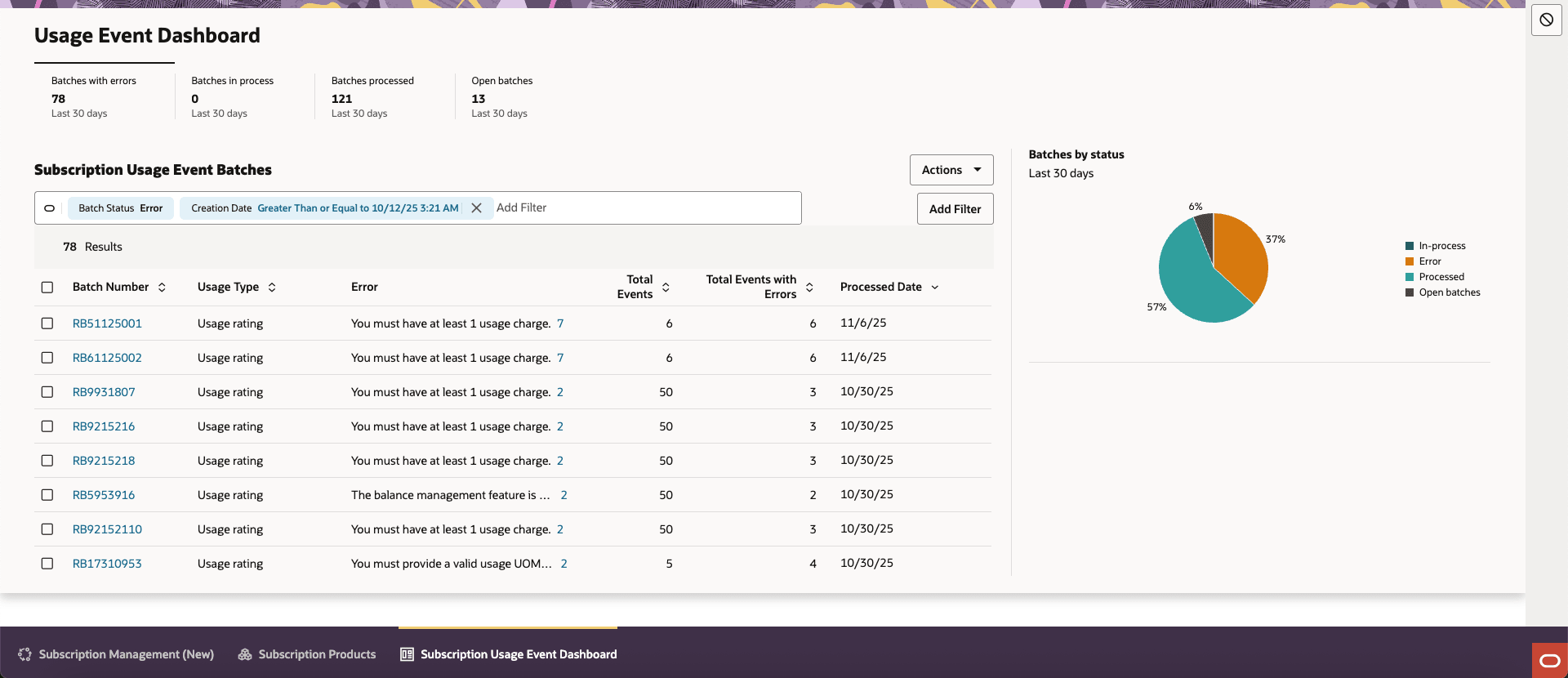
Usage Events Dashboard
- Improved Operational Visibility: Enables users to quickly identify and act on critical batches (e.g., those in error or still processing), reducing the time required for troubleshooting.
- User Efficiency: Clickable info tiles and pre-filtered data panels accelerate common tasks, allowing users to move directly to areas needing attention.
- Better Data Insights: Summary info tiles and dynamic charts provide a visual overview of current batch statuses for informed decision-making.
- Ease of Use: Streamlined navigation and enhanced filtering options reduce manual searching, leading to a smoother and more intuitive user experience.
- Faster Exception Handling: Immediate access to batches with errors and quick actions reduce downtime and expedite the resolution of processing issues.
Steps to Enable and Configure
You don't need to do anything to enable this feature.