Redwood Quote Process Steps Workflow
The Redwood-style Quotes Process Steps workflow interface displays the workflow in a diagram view to allow users to visualize the process flow. The new interface adds the following capabilities to improve the administrator experience:
- Intuitively create process steps with a diagram builder.
- Add nodes and see them reflected immediately in the process diagram.
- Dive into a process easily with filters and zoom capabilities.
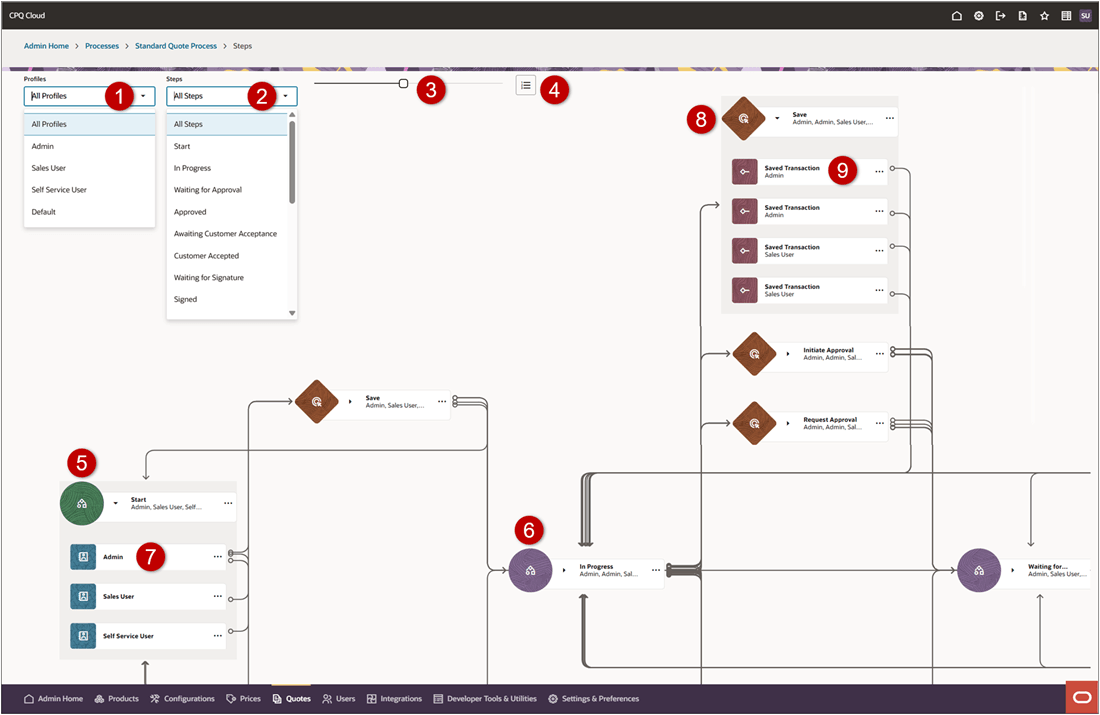
| Item | Description |
|---|---|
| 1 | Profiles Filter: Use this menu to display steps for all profiles or just the steps associated with the selected profile. |
| 2 | Steps Filter: Use this menu to display all steps or just the select step. |
| 3 | Use the slide bar to zoom in and zoom on the display. |
| 4 | Reorder steps |
| 5 | The Start Step is the beginning of the workflow. When you click on a step, the actions related to this step are highlighted. |
| 6 | All other Steps represent different states in the workflow. When you click on a step, the actions related to this step are highlighted. |
| 7 | Profiles are used to create different views for different user types. When you click on a profile, the actions related to this profile are highlighted. |
| 8 | Actions can move users between steps. When you click on an action, the steps related to this action are highlighted. |
| 9 | Actions can have Transitions that take the assigned profile users to a different step. When you click on a transition, the steps related to this action transition are highlighted. |
This feature provides the following business benefits:
- Visually design and maintain complex Steps workflow in the Redwood Process Builder, with clear, at-a-glance visibility into step processes and dependencies.
- Adding, rearranging, and removing nodes is easy; changes are reflected immediately so you can see the impact.
- Easily focus on a profile or dive into steps to review and troubleshoot a profile, process, or combination.
Steps to enable and configure
You don't need to do anything to enable this feature.
Tips and considerations
Following upgrade to Oracle CPQ 26A, the Admin Home page defaults to the Redwood UI. You can explore the UIs and begin working through your tasks in the new redesigned interface. Existing customers will be able to revert to the Classic UI experience by navigating back to the Admin Home Page and clicking Switch to Classic. Oracle CPQ running in Oracle Fusion supports only the Redwood UI and does not have the Switch to Classic button.