Early Billing
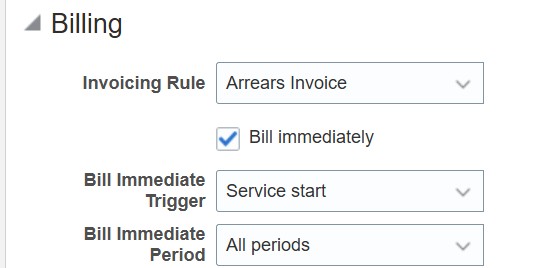
You can now choose to bill the first charge period or the first bill period or the entire term of a subscription even before the subscription start date. The Bill immediately checkbox in product now enables 2 more fields which gives you more control on what you want to bill and when you want to bill.
Bill Immediately

Bill Immediately
The existing Bill immediately checkbox is now enhanced by adding two dependent attributes - Bill Immediate Trigger and Bill Immediate Period.
Bill Immediate Trigger specifies how immediate is the billing to be done i.e. from current date (Immediate) or from the subscription start date (Service Start).
Bill Immediate Period specifies which bill lines must be billed immediately i.e. All periods or First bill period or First charge period.
The following table captures the behavior for a combination of the attribute values.
Matrix for Bill Immediately
| Bill Immediate Period | |||
|---|---|---|---|
| Bill Immediate Trigger | All periods | First bill period | First charge period |
| Immediate |
All the bill lines will have the Interface date and Planned Invoice date as the current date. Billing interface offset, Billing Date and Invoicing rule are discarded. |
Bill lines with sequence number 0 or 1 have the Interface date and Planned Invoice date as the current date. Billing interface offset, Billing Date and Invoicing rule are discarded. |
Bill lines with period number 0 or 1 have the Interface date and Planned Invoice date as the current date. Billing interface offset, Billing Date and Invoicing rule are discarded. |
| Service start |
This is the Default combination. All the bill lines have same interface date and Planned invoice date. Values for interface date and invoice date calculated based on the billing attributes. |
Bill lines with sequence number 0 or 1 have the subscription product start date as the Interface date and Planned Invoice date. Values for interface date and invoice date calculated based on the billing attributes. |
Bill lines with period number 0 or 1 have the subscription product start date as the Interface date and Planned Invoice date. Values for interface date and invoice date calculated based on the billing attributes. |
Consider a subscription product with
Start Date: 10-NOV-2025
End Date: 9-FEB-2026
Billing Frequency: Month
Charges
Monthly Fee: 95 USD (Recurring)
Sale Price: 1000 USD (One-time)
Period Start: Service Start
Billing Date: Period Start
The subscription is created on 6-NOV-2025.
Let us see how the billing period's interface and invoice date look for the various combinations of Bill Immediate Trigger and Bill Immediate Period.
Bill Immediate Trigger: Service start
Bill Immediate Period: All periods
Billing Summary
| Sequence Number | Period Number | Amount | Charge Name | Bill-from Date | Bill-to Date | Interface Date | Planned Invoice Date |
|---|---|---|---|---|---|---|---|
| 0 | 0 | 1000 | Selling Price | 10-Nov-2025 | 9-Feb-2026 | 10-Nov-2025 | 10-Nov-2025 |
| 1 | 1 | 95 | Monthly Fee | 10-Nov-2025 | 9-Dec-2025 | 10-Nov-2025 | 10-Nov-2025 |
| 2 | 2 | 95 | Monthly Fee | 10-Dec-2025 | 9-Jan-2026 | 10-Nov-2025 | 10-Nov-2025 |
| 3 | 3 | 95 | Monthly Fee | 10-Jan-2026 | 9-Feb-2026 | 10-Nov-2025 | 10-Nov-2025 |
Bill Immediate Trigger: Immediate
Bill Immediate Period: All periods
Billing Summary
| Sequence Number | Period Number | Amount | Charge Name | Bill-from Date | Bill-to Date | Interface Date | Planned Invoice Date |
|---|---|---|---|---|---|---|---|
| 0 | 0 | 1000 | Selling Price | 10-Nov-2025 | 9-Feb-2026 | 6-Nov-2025 | 6-Nov-2025 |
| 1 | 1 | 95 | Monthly Fee | 10-Nov-2025 | 9-Dec-2025 | 6-Nov-2025 | 6-Nov-2025 |
| 2 | 2 | 95 | Monthly Fee | 10-Dec-2025 | 9-Jan-2026 | 6-Nov-2025 | 6-Nov-2025 |
| 3 | 3 | 95 | Monthly Fee | 10-Jan-2026 | 9-Feb-2026 | 6-Nov-2025 | 6-Nov-2025 |
Bill Immediate Trigger: Immediate
Bill Immediate Period: First bill period
Billing Summary
| Sequence Number | Period Number | Amount | Charge Name | Bill-from Date | Bill-to Date | Interface Date | Planned Invoice Date |
|---|---|---|---|---|---|---|---|
| 0 | 0 | 1000 | Selling Price | 10-Nov-2025 | 9-Feb-2026 | 6-Nov-2025 | 6-Nov-2025 |
| 1 | 1 | 95 | Monthly Fee | 10-Nov-2025 | 9-Dec-2025 | 6-Nov-2025 | 6-Nov-2025 |
| 2 | 2 | 95 | Monthly Fee | 10-Dec-2025 | 9-Jan-2026 | 10-Dec-2025 | 10-Dec-2025 |
| 3 | 3 | 95 | Monthly Fee | 10-Jan-2026 | 9-Feb-2026 | 10-Jan-2026 | 10-Jan-2026 |
Bill Immediate Trigger: Service start
Bill Immediate Period: First bill period
Billing Summary
| Sequence Number | Period Number | Amount | Charge Name | Bill-from Date | Bill-to Date | Interface Date | Planned Invoice Date |
|---|---|---|---|---|---|---|---|
| 0 | 0 | 1000 | Selling Price | 10-Nov-2025 | 9-Feb-2026 | 10-Nov-2025 | 10-Nov-2025 |
| 1 | 1 | 95 | Monthly Fee | 10-Nov-2025 | 9-Dec-2025 | 10-Nov-2025 | 10-Nov-2025 |
| 2 | 2 | 95 | Monthly Fee | 10-Dec-2025 | 9-Jan-2026 | 10-Dec-2025 | 10-Dec-2025 |
| 3 | 3 | 95 | Monthly Fee | 10-Jan-2026 | 9-Feb-2026 | 10-Jan-2026 | 10-Jan-2026 |
Bill Immediate Trigger: Service start
Bill Immediate Period: First charge period
Billing Frequency: Quarter
Billing Summary
| Sequence Number | Period Number | Amount | Charge Name | Bill-from Date | Bill-to Date | Interface Date | Planned Invoice Date |
|---|---|---|---|---|---|---|---|
| 0 | 0 | 1000 | Selling Price | 10-Nov-2025 | 9-Feb-2026 | 10-Nov-2025 | 10-Nov-2025 |
| 1 | 1 | 95 | Monthly Fee | 10-Nov-2025 | 9-Dec-2025 | 10-Nov-2025 | 10-Nov-2025 |
| 1 | 2 | 95 | Monthly Fee | 10-Dec-2025 | 9-Jan-2026 | 10-Nov-2025 | 10-Nov-2025 |
| 1 | 3 | 95 | Monthly Fee | 10-Jan-2026 | 9-Feb-2026 | 10-Nov-2025 | 10-Nov-2025 |
As the billing frequency is quarterly the invoice date for all the bill lines in the quarter are the same date.
Bill Immediate Trigger: Service start
Bill Immediate Period: First charge period
Billing Frequency: Week
Billing Summary
| Sequence Number | Period Number | Amount | Charge Name | Bill-from Date | Bill-to Date | Interface Date | Planned Invoice Date |
|---|---|---|---|---|---|---|---|
| 0 | 0 | 1000 | Selling Price | 10-Nov-2025 | 9-Feb-2026 | 10-Nov-2025 | 10-Nov-2025 |
| 1 | 1 | 22.17 | Monthly Fee | 10-Nov-2025 | 16-Nov-2025 | 10-Nov-2025 | 10-Nov-2025 |
| 2 | 1 | 22.17 | Monthly Fee | 17-Nov-2025 | 23-Nov-2025 | 10-Nov-2025 | 10-Nov-2025 |
| 3 | 1 | 22.17 | Monthly Fee | 24-Nov-2025 | 30-Nov-2025 | 10-Nov-2025 | 10-Nov-2025 |
| 4 | 1 | 22.17 | Monthly Fee | 1-Dec-2025 | 7-Dec-2025 | 10-Nov-2025 | 10-Nov-2025 |
| 5 | 1 | 6.32 | Monthly Fee | 8-Dec-2025 | 9-Dec-2025 | 10-Nov-2025 | 10-Nov-2025 |
| 6 | 2 | 21.45 | Monthly Fee | 10-Dec-2025 | 16-Dec-2025 | 10-Dec-2025 | 10-Dec-2025 |
| 7 | 2 | 21.45 | Monthly Fee | 17-Dec-2025 | 23-Dec-2025 | 17-Dec-2025 | 17-Dec-2025 |
| 8 | 2 | 21.45 | Monthly Fee | 24-Dec-2025 | 30-Dec-2025 | 24-Dec-2025 | 24-Dec-2025 |
| 9 | 2 | 21.45 | Monthly Fee | 31-Dec-2025 | 6-Jan-2026 | 31-Dec-2025 | 31-Dec-2025 |
| 10 | 2 | 9.2 | Monthly Fee | 7-Jan-2026 | 9-Jan-2026 | 7-Jan-2026 | 7-Jan-2026 |
| 11 | 3 | 21.45 | Monthly Fee | 10-Jan-2026 | 16-Jan-2026 | 10-Jan-2026 | 10-Jan-2026 |
| 12 | 3 | 21.45 | Monthly Fee | 17-Jan-2026 | 23-Jan-2026 | 17-Jan-2026 | 17-Jan-2026 |
| 13 | 3 | 21.45 | Monthly Fee | 24-Jan-2026 | 30-Jan-2026 | 24-Jan-2026 | 24-Jan-2026 |
| 14 | 3 | 21.45 | Monthly Fee | 31-Jan-2026 | 6-Feb-2026 | 31-Jan-2026 | 31-Jan-2026 |
| 15 | 3 | 9.2 | Monthly Fee | 7-Feb-2026 | 9-Feb-2026 | 7-Feb-2026 | 7-Feb-2026 |
Bill Immediate Trigger: Immediate
Bill Immediate Period: First charge period
Billing Frequency: Quarter
Billing Summary
| Sequence Number | Period Number | Amount | Charge Name | Bill-from Date | Bill-to Date | Interface Date | Planned Invoice Date |
|---|---|---|---|---|---|---|---|
| 0 | 0 | 1000 | Selling Price | 10-Nov-2025 | 9-Feb-2026 | 6-Nov-2025 | 6-Nov-2025 |
| 1 | 1 | 95 | Monthly Fee | 10-Nov-2025 | 9-Dec-2025 | 6-Nov-2025 | 6-Nov-2025 |
| 1 | 2 | 95 | Monthly Fee | 10-Dec-2025 | 9-Jan-2026 | 6-Nov-2025 | 6-Nov-2025 |
| 1 | 3 | 95 | Monthly Fee | 10-Jan-2026 | 9-Feb-2026 | 6-Nov-2025 | 6-Nov-2025 |
- Bill the subscription immediately even before the subscription starts to collect upfront payment.
- Flexibility in deciding which bill lines should be billed immediately.
Steps to enable and configure
You don't need to do anything to enable this feature.
Tips and considerations
- First bill period(s) are the bill line with sequence number 0 or 1.
- First charge period(s) are the bill lines with period number 0 or 1.
- If the profile option "Retain Invoice Date in Transaction" is set to 'Yes', then the current date value captured (the date subscription was created) will be retained as it is and will be interfaced to Receivables as the Planned Invoice date without any Legal Entity time zone conversion.
- If the profile option "Retain Invoice Date in Transaction" is set to 'No', then the current date value captured (the date subscription was created) will be retained as it is as the Planned Invoice Date. However, the date the bill line is interfaced to Receivables will be passed as the Invoice date with any Legal Entity time zone conversion, if applicable.