Use Period Thresholds for Proration
This feature extends the range of options available to bill the first and last partial bill periods. Until this feature, the First and Last partial periods were always prorated. Now, you can do the following:
- Bill the partial period in full i.e. the charge amount applicable for a full charge period
- Not bill the partial period i.e. 0 is billed.
- Not bill if the partial period is less than specified threshold. Two threshold types are Days and Charge Period Fraction.
The Subscription profile shows a new section titled Partial Period Billing and Credit Rules.
A new section Partial Period Billing and Credit Rules is also shown in the Product summary page.
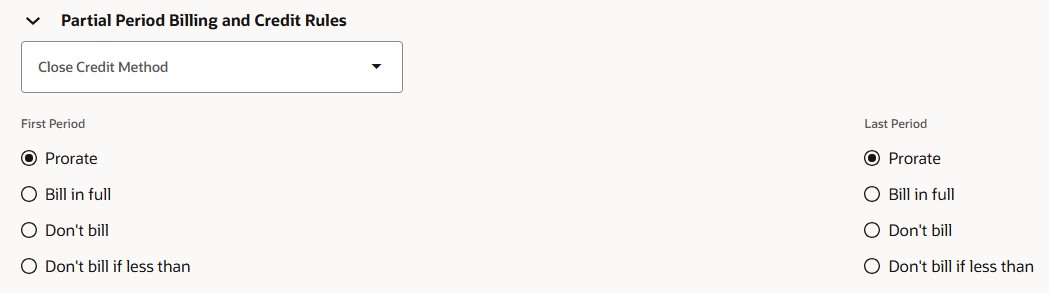
Partial Period Billing
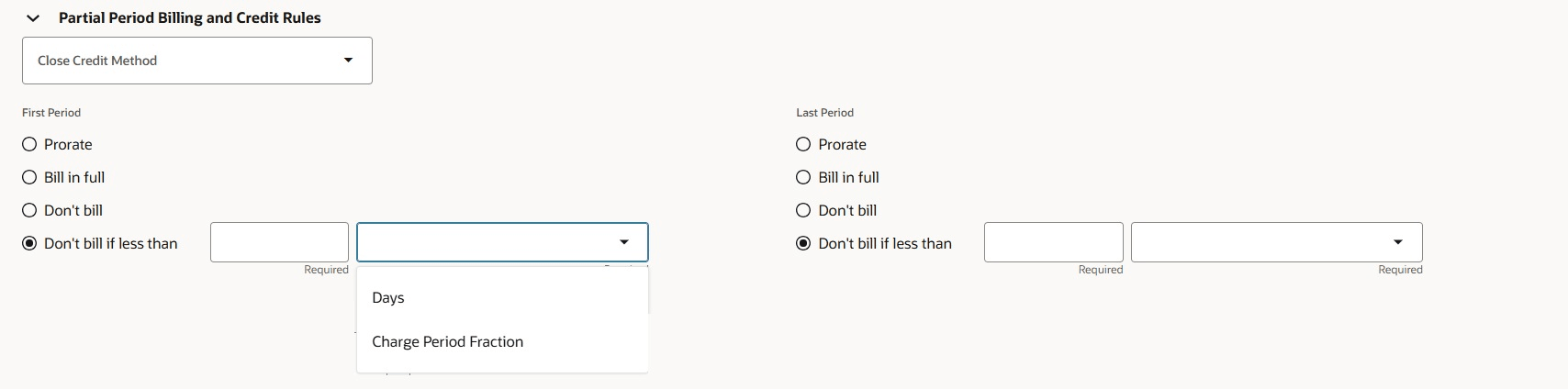
Partial Period Billing Options
Let us look at some examples of how these partial period options work.
Consider a subscription product
Subscription Product

Charges
| Charge | Periodicity | Unit Price |
|---|---|---|
| Sale Price | One-time | 1000 USD |
| Monthly Fee | Month | 95 |
Billing Summary
| Sequence Number | Period Number | Amount | Charge Name | Bill-from Date | Bill-to Date | Interface Date | Planned Invoice Date |
|---|---|---|---|---|---|---|---|
| 0 | 0 | 1000 | Sale Price | 9-Nov-2025 | 8-Apr-2026 | 2-Nov-2025 | 2-Nov-2025 |
| 1 | 1 | 95 | Monthly Fee | 9-Nov-2025 | 1-Dec-2025 | 2-Nov-2025 | 2-Nov-2025 |
| 2 | 2 | 95 | Monthly Fee | 2-Dec-2025 | 1-Jan-2026 | 2-Dec-2025 | 2-Dec-2025 |
| 3 | 3 | 95 | Monthly Fee | 2-Jan-2026 | 1-Feb-2026 | 2-Jan-2026 | 2-Jan-2026 |
| 4 | 4 | 95 | Monthly Fee | 2-Feb-2026 | 1-Mar-2026 | 2-Feb-2026 | 2-Feb-2026 |
| 5 | 5 | 95 | Monthly Fee | 2-Mar-2026 | 1-Apr-2026 | 2-Mar-2026 | 2-Mar-2026 |
| 6 | 6 | 0 | Monthly Fee | 2-Apr-2026 | 8-Apr-2026 | 2-Apr-2026 | 2-Apr-2026 |
The first partial period is billed for 95 USD and the last partial period is not billed.
Consider another subscription product
Subscription Product

Charges
| Charge | Periodicity | Unit Price |
|---|---|---|
| Sale Price | One-time | 1000 USD |
| Monthly Fee | Month | 95 |
Billing Summary
| Sequence Number | Period Number | Amount | Charge Name | Bill-from Date | Bill-to Date | Interface Date | Planned Invoice Date |
|---|---|---|---|---|---|---|---|
| 0 | 0 | 1000 | Sale Price | 9-Nov-2025 | 8-Apr-2026 | 2-Nov-2025 | 2-Nov-2025 |
| 1 | 1 | 72.83 | Monthly Fee | 9-Nov-2025 | 1-Dec-2025 | 2-Nov-2025 | 2-Nov-2025 |
| 2 | 2 | 95 | Monthly Fee | 2-Dec-2025 | 1-Jan-2026 | 2-Dec-2025 | 2-Dec-2025 |
| 3 | 3 | 95 | Monthly Fee | 2-Jan-2026 | 1-Feb-2026 | 2-Jan-2026 | 2-Jan-2026 |
| 4 | 4 | 95 | Monthly Fee | 2-Feb-2026 | 1-Mar-2026 | 2-Feb-2026 | 2-Feb-2026 |
| 5 | 5 | 95 | Monthly Fee | 2-Mar-2026 | 1-Apr-2026 | 2-Mar-2026 | 2-Mar-2026 |
| 6 | 6 | 95 | Monthly Fee | 2-Apr-2026 | 8-Apr-2026 | 2-Apr-2026 | 2-Apr-2026 |
The first partial period is prorated, and the last partial period is billed the complete charge amount.
Consider another subscription product
Subscription Product

Charges
| Charge | Periodicity | Unit Price |
|---|---|---|
| Sale Price | One-time | 1000 USD |
| Monthly Fee | Month | 95 |
Billing Summary
| Sequence Number | Period Number | Amount | Charge Name | Bill-from Date | Bill-to Date | Interface Date | Planned Invoice Date |
|---|---|---|---|---|---|---|---|
| 0 | 0 | 1000 | Sale Price | 9-Nov-2025 | 8-Apr-2026 | 2-Nov-2025 | 2-Nov-2025 |
| 1 | 1 | 0 | Monthly Fee | 9-Nov-2025 | 1-Dec-2025 | 2-Nov-2025 | 2-Nov-2025 |
| 2 | 2 | 95 | Monthly Fee | 2-Dec-2025 | 1-Jan-2026 | 2-Dec-2025 | 2-Dec-2025 |
| 3 | 3 | 95 | Monthly Fee | 2-Jan-2026 | 1-Feb-2026 | 2-Jan-2026 | 2-Jan-2026 |
| 4 | 4 | 95 | Monthly Fee | 2-Feb-2026 | 1-Mar-2026 | 2-Feb-2026 | 2-Feb-2026 |
| 5 | 5 | 95 | Monthly Fee | 2-Mar-2026 | 1-Apr-2026 | 2-Mar-2026 | 2-Mar-2026 |
| 6 | 6 | 95 | Monthly Fee | 2-Apr-2026 | 8-Apr-2026 | 2-Apr-2026 | 2-Apr-2026 |
The first partial period is not billed because 22 days is less than 0.9 charge period fraction i.e. 0.9 *30= 27 days.
The last partial period is billed the complete charge amount as the number of days i.e. 6 is more than 5 days.
- Predictable, dispute-resistant billing: customers are charged only for whole months, reducing confusion about partial-period charges.
- Consistent price presentation: stable monthly amount (e.g., $5.99) across full months avoids proration calculations and rounding issues.
Steps to enable and configure
You don't need to do anything to enable this feature.
Tips and considerations
- Profile option Enable Partial Period Advanced Billing Options should be set to 'Y' to show the First Partial Period and Last Partial Period attributes.
- The values for the Partial Periods can be set from the Redwood UI, ADF UI, REST and Import.