Standard ABO: ABO Workbench
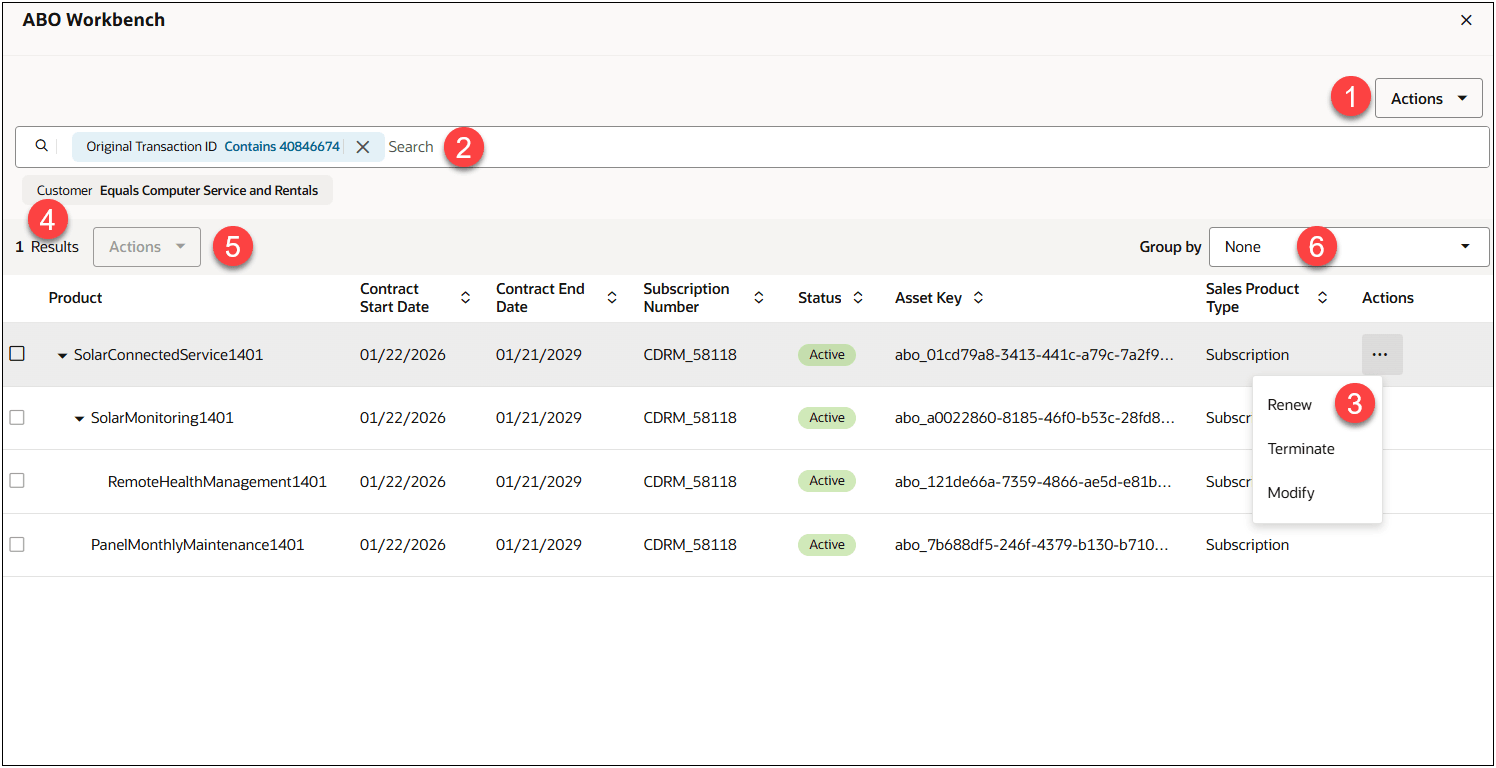
The ABO Workbench is designed for sales users to view and manage assets within Standard ABO. The ABO workbench provides the following:
- Asset Hierarchy structure can be displayed with expand/collapse option.
- Dynamic search filter for users to decide the assets and asset hierarchy they want to view.
- Assets can be organized by a common grouping attribute.
- Administrators can manage which columns are displayed in the ABO Workbench and deploy the ABO Workbench layout.
| Item | Description |
|---|---|
| 1 |
The Actions drop-down is available only to Administrators with proper permission. Administrators can select from the following options:
|
| 2 |
Search and Filter
|
| 3 |
Click on an asset's action ellipsis to perform the action for that asset. Only actions that are valid for the selected asset are available in the actions drop-down. Depending on the status of the order and asset, the following actions could display:
|
| 4 | The Results field displays the number of assets returned for the current search. |
| 5 | When multiple transactions are selected, the multi-assets Actions drop-down supports performing an action on multiple assets at the same time. Only actions that are valid for all selected assets are available in the multi-assets Actions drop-down. |
| 6 | The Group by drop-down allows users to efficiently group related assets within the ABO Workbench by a specified attribute set. For example, group by Bill To Account Name, Bill To Address, Ship To Party Name, Sold To Party Name, Start Date, End Date, or Subscription Number. |
Steps to enable and configure
Oracle CPQ Standard ABO must be implemented on the site to access the ABO Workbench. Refer to Setting up Standard Asset-Based Ordering for information.
To access the ABO Workbench on a Standard ABO site, open a quote with an associated customer Id and click Customer Assets. The Customer Assets Commerce action is used to retrieve and display assets for the associated Customer ID in the ABO Workbench. Refer to ABO Workbench in Oracle CPQ Administration Online Help.