Deal Pricing AI-Assist Agent
Oracle CPQ 26C introduces the Deal Pricing AI-Assist Agent which helps sales users start with an aggregate deal target, such as total contract value or total discount, and calculate the line-level discount adjustments required to reach the deal target. Users can run goal seek agent from the quote, preview proposed pricing in the line item grid, compare the resulting total discount and total contract value, and apply the pricing only when they are ready to save the transaction.
The agent supports top-down deal-level discounting and bottom-up line edits. When pricing guidance is available, sales users can choose to stay within guidelines so proposed spreads honor pricing rules, floors, and rounding policies where possible. The agent reports whether the goal was achieved, whether guidance was violated, and which products or charges need attention.
Administrators can configure the Deal Pricing panel and select the commerce attributes used for total contract value, total discount, manual discount type, discount value, and related calculations. Pricing managers can upload pricing guidance rules in Agent Studio to drive policy-aware recommendations.
Feature Highlights:
- Instantly calculate required line-item adjustments (Goal Seek) to hit specific Total Contract Value (TCV) or Total Discount targets
- Sales users can preview the results on LIG to model and evaluate multiple pricing scenarios without committing changes or triggering premature approval workflows
- Seamlessly switch between aggregate deal-level "Top-Down" discounting (Goal seek) and surgical "Bottom-Up" line-item editing
- Real-time adherence to pricing rules, floors, and rounding policies, ensuring all automated spreads remain within corporate compliance
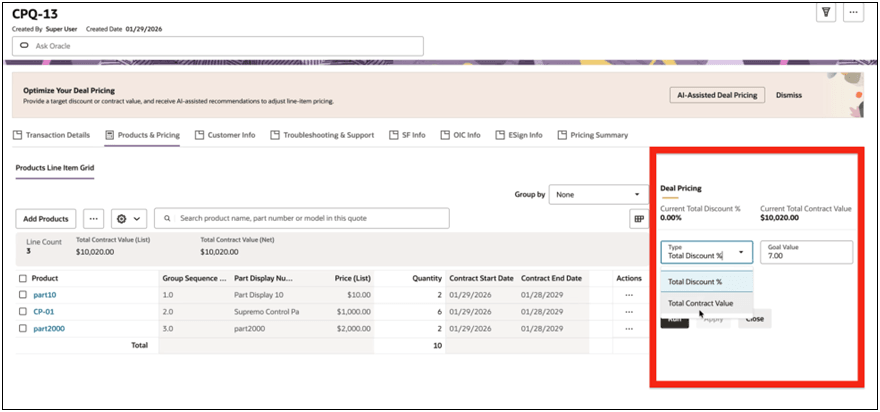
Sales teams can model pricing scenarios faster, reduce manual line-by-line discount iterations, and respond to customer budget or discount requests in a timely fashion. Previewing proposed pricing helps protect profitability and reduce rework caused by discounting outside corporate pricing guidance.
Steps to enable and configure
Complete the following steps to setup the Deal Pricing AI-Assist Agent:
1. Setup the Deal Pricing Agent from the pre-seeded template in Oracle AI Agent Studio.
a. Navigate to the Oracle AI Agent Studio.
b. Search for the seeded Goal Seek agent.
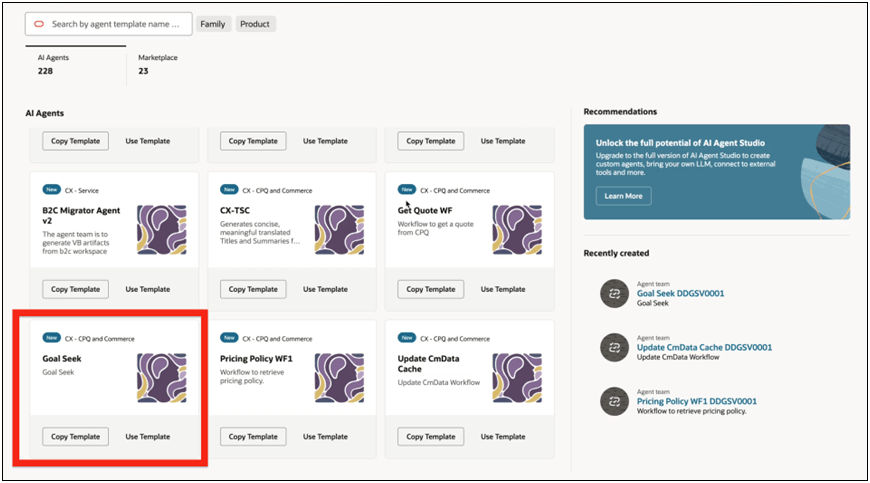
c. Click Copy Template.
d. Enter an Agent Team Suffix. This will create an new Goal Seek agent based on the seeded template.
2. Upload Pricing Policy Documentation. The pricing policy document only needs to be uploaded once. Once uploaded it can be used repeatedly for the Deal Pricing Agent.
a. Navigate to Tools.
b. Enter Discount Policy Guidelines in the tools search.
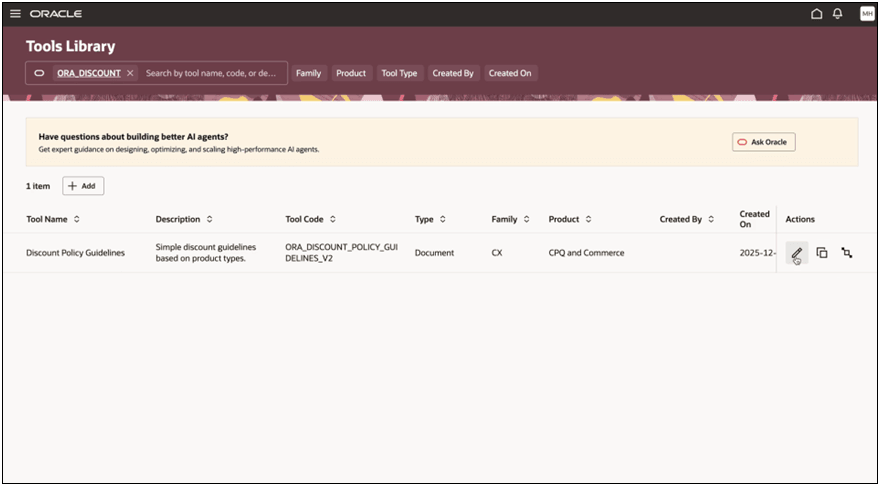
c. Click the Edit button under Actions for the policy document. The policy document details display.
d. Upload the policy document PDF under the Documents section.
e. Update the document status to Ready to Publish.
The publishing job will be picked up on next schedule. You may optionally run the publishing job manually. When the publishing job has completed, the uploaded document’s status will display as Published and the document is ready to use.
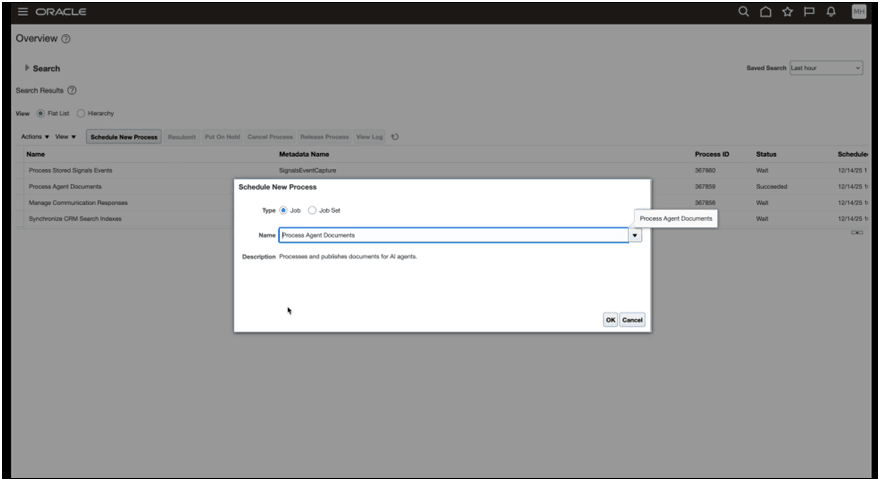
3. Inside the Goal Seek workflow, a sub-workflow exists for the uploaded policy document.
a. The sub-workflow includes a Retrieval-Augmented Generation (RAG) document tool which references the Discount Policy Guidelines.
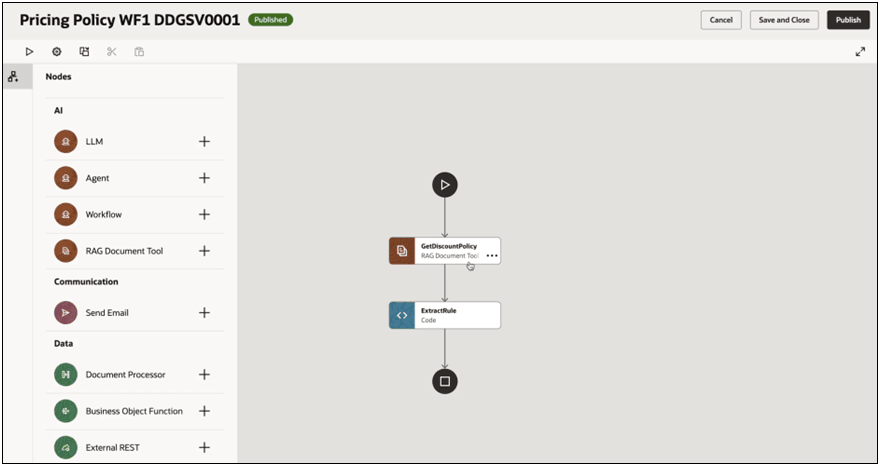
b. The seeded prompt can be customized as needed.
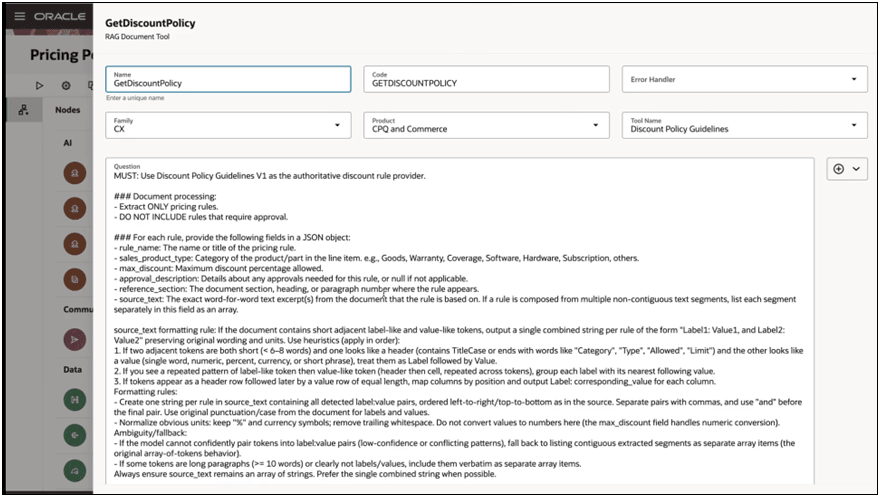
4. Configure the Deal Pricing or Goal Seek options in Quote Layout Editor and expose the Deal Pricing panel or action where sales users work with quote pricing.
5. Map the Commerce attributes used for total contract value, total discount value, manual discount type, discount value, discount amount, and related calculations.
6. For custom Commerce processes, select the attributes used in calculations and add the available Deal Pricing attributes.
Tips and considerations
-
Pricing guidance is optional. If no pricing guidance exists, the agent can still spread discounts and no pricing-guidance violations are reported.
-
Preview mode lets users review proposed line item grid values before the quote is updated. The transaction is updated only after the user saves the proposal. Target total contract value uses the quote currency.
-
Simple usage charges are handled like onetime or recurring charges, and rate plans are ignored for discount spreading.