AI-Assist Rewrite Agent in Oracle CPQ RTE Template Editor
The Oracle CPQ 26C Redwood UI Rich Text Editor (RTE) now supports AI-assisted rewriting actions for template content. You can request highlight text and request improvements for clarity, tone, grammar, and style while preserving the business intent of the message using the AI Rewrite Tools.
Feature Highlights:
- Rewrite selected template text for clarity and readability.
- Adjust tone of content for professional, concise, or customer-friendly communication.
- Expand or shorten content while keeping core meaning intact.
- Improve grammar and structural consistency across reusable templates.
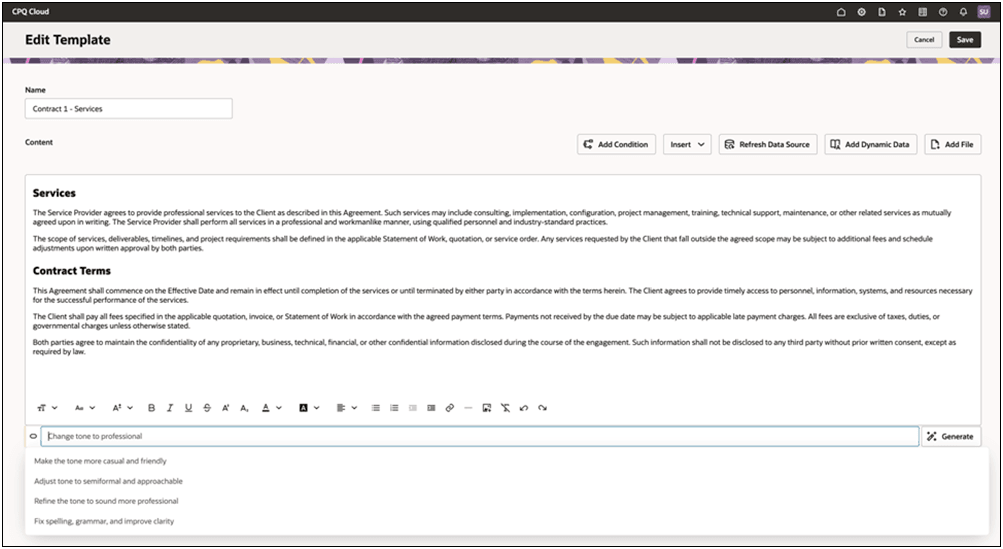
This capability reduces manual editing effort and helps standardize outbound communication quality across the organization. Teams can deliver more polished, on-brand content faster, improving customer trust and operational efficiency.
This feature provides the following benefits:
- Shortens authoring and review cycles for template content.
- Improves consistency in customer-facing messaging across quotes and documents.
Steps to enable and configure
Note: You must enable the ZCA_MANAGE_GENAI_VBCS_RESOURCE profile to configure this feature.
To configure the Profile Value for the AI-Assist Rewrite Agent, complete the following steps:
- Log in to Oracle Fusion and navigate to Setup and Maintenance.
- Search for and open Manage Administrator Profile Values.
- Search for the profile option ZCA_MANAGE_GENAI_VBCS_RESOURCE.
- Select the profile option from the search results.
- In the Profile Values section, create a new profile value at the appropriate level (for example, Site or User, depending on your deployment requirements).
- Enter the required profile value.
- Click Save and Close.
To use the AI-Assit Rewrite Agent, complete the following steps:
- Navigate to Admin Home > Quotes>Process>View Templates>Select Template.
- Open the Quote Admin RTE template area in Oracle CPQ.
- Select or highlight the content you want to improve.
- Run AI Rewrite Assist and choose the preferred rewrite output.
- Review the content.
- Click Save to update the template.
Tips and considerations
We recommend you consider the following:
- Review rewritten text before publishing templates to Production.
- Use your specific business organization style guidance to maintain voice and terminology.