View and Enter Territory Quotas in Sales Forecasting
Sales Managers using the revenue-based sales forecasting based on territories and their hierarchy can now view and enter territory sales quotas. Territory quotas can be loaded to sales forecasts through REST services and Import Management. Managers can also enter territory quotas directly in the forecast.
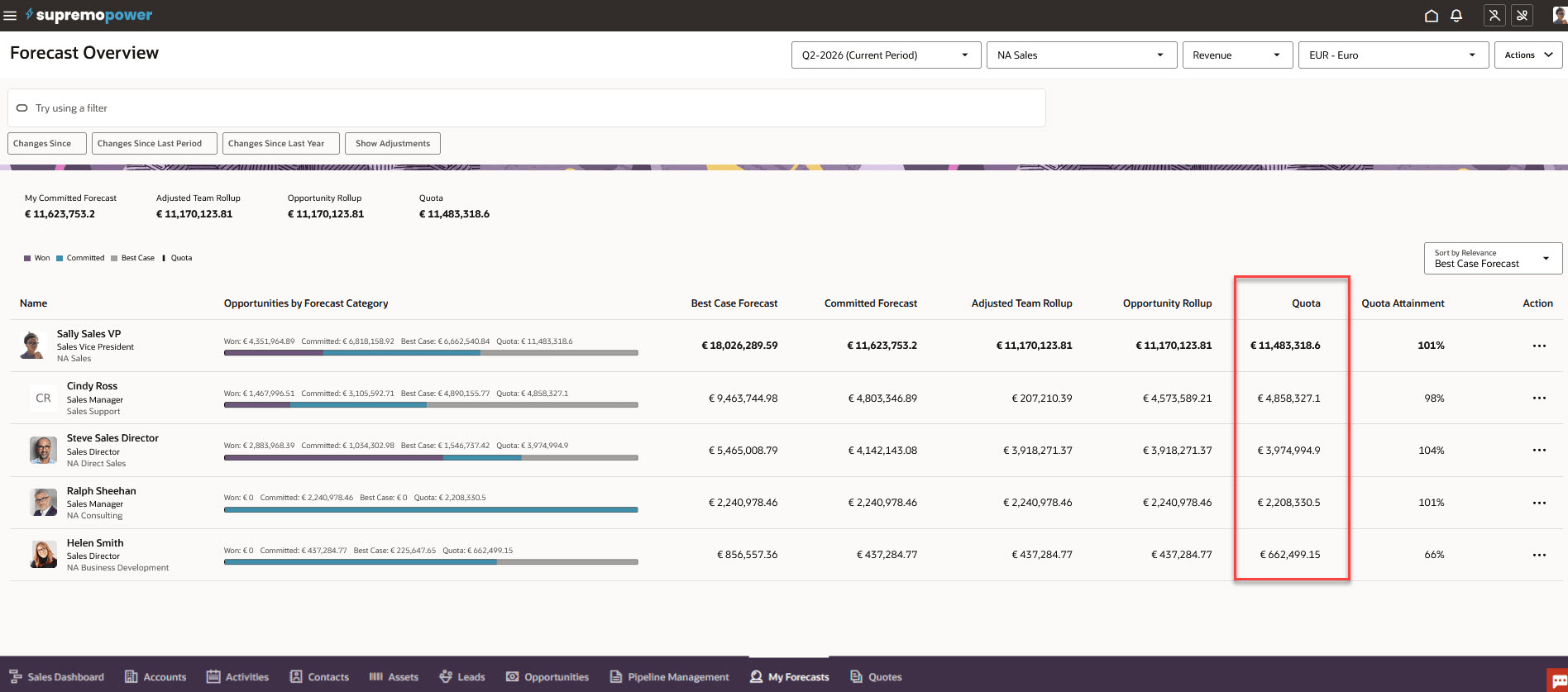
View Territory Quotas in Revenue-based Sales Forecasting
Viewing and entering territory sales quotas help sales managers improve their sales accountability and provides clearer ownership and fairer target measurement by tracking quota performance by territory.
Steps to enable and configure
Your sales administrator can optionally load territory quotas through REST services and Import Management. Or sales managers and administrators can also enter territory quotas directly for the opportunities in the Forecast UI.
Tips and considerations
Resource quotas are available in Opportunity-based Sales Forecasting and Territory Quotas are available in Revenue-based Sales Forecasting.
For customers using Revenue-based Sales Forecasting rolling up the territory hierarchy and resource quotas in a prior release, after the upgrade you should now load or enter territory quotas. Territory quotas must be loaded or entered for all active forecast periods.
Key resources
For more information, see
How do I get started with Sales Forecasting?
and
Sales Forecasting in Redwood - Using and Implementing Videos
Access requirements
This feature is available to sales managers and executives who have the Manage Sales Forecast from Digital Sales (ZSF_MANAGE_DIGITAL_SALES_FORECAST) privilege and the View Sales Forecast from Digital Sales (ZSF_VIEW_DIGITAL_SALES_FORECAST) privilege.