Honor sales agreement pricing from Fusion Pricing for Oracle CPQ running in Fusion
Oracle CPQ Pricing can honor customer-specific Sales Agreement pricing from Fusion Pricing when CPQ uses Fusion Pricing as the pricing engine. When a quote line has a selected or defaulted Sales Agreement line, CPQ passes the agreement context to Fusion Pricing so the returned price reflects the applicable customer agreement.
Sales users can select a Sales Agreement at the quote header and use it to default agreement information to quote lines. When multiple valid agreements exist for the same account and product, users with the right access can select a different Sales Agreement line at the quote line level.
The Sales Agreement picker uses eligible agreement information filtered by account, product, status, effective dates, business unit, currency, item, inventory organization, and unit of measure. CPQ maps the selected or defaulted agreement values into the Fusion Pricing request, including the agreement integration ID, agreement version, and agreement line ID.
When agreement pricing makes a charge non-negotiable, discount type and discount value are read-only for that charge. Negotiable charges continue to allow manual discount entry according to existing runtime behavior.
This feature helps organizations keep quoted prices aligned with customer-specific Sales Agreements mastered in Fusion Pricing. It reduces manual pricing overrides, supports downstream pricing consistency, and helps prevent renegotiation of prices that are already governed by active customer agreements.
Steps to enable and configure
Prerequisites: This feature applies only to Oracle CPQ running in Fusion sites with Fusion Pricing enabled, and the Include Product Price in Charge Set setting enabled.
To enable the feature, complete the following:
- Navigate to CPQ Admin Home > Setting & Preferences > General Settings.
- Set Include Product Price in Charge Set to Yes in the General Site Options.
- Enable Fusion Pricing for the site. Refer to Oracle CPQ Fusion Administration Pricing Integration for more information.
- Make sure eligible Sales Agreements and Sales Agreement lines exist in Fusion Contracts for the applicable account, product, date, currency, business unit, item, inventory organization, and unit of measure context.
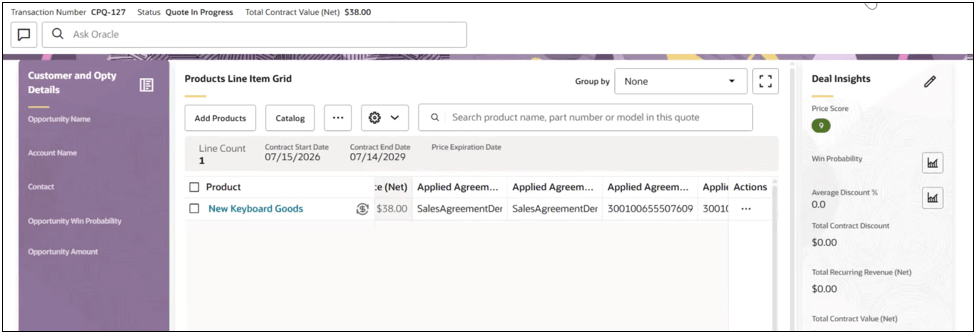
- Update the Standard Process layout to include Quote header Sales Agreement Number and Quote line or line item grid Applied Sales Agreement Number.
- Add line-level pricing attributes mapping to Applied Agreement Integration ID, Applied Agreement Version, and Applied Agreement Line ID.
- Apply access rules for discount type and discount value attributes to read-only when Fusion Pricing returns a non-negotiable charge(s).
To use sales agreement pricing from Fusion Pricing, complete the following steps:
- Create or open a quote.
- Select a Sales Agreement at the quote header, or select an Applied Sales Agreement line at the quote line level.
- Add or update quote lines.
- Save, refresh, or reopen the quote to confirm the selected agreement attributes and priced values remain consistent.
Tips and considerations
- Header Sales Agreement selection is used to default line-level agreement information. It doesn’t introduce separate header-level pricing behavior.
- If no Sales Agreement applies to a quote line, Oracle CPQ continues through the existing Fusion Pricing flow without Sales Agreement-specific pricing.
- If agreement values are cleared or don’t apply, Oracle CPQ doesn’t send old sales agreement data during repricing.
- Keep pricing behavior consistent when quote lines are added, updated, repriced, saved, refreshed, or reopened.
- Select or override an Applied Sales Agreement line at the quote line level when multiple eligible agreements exist.
- Make discount type and discount value read-only when Fusion Pricing returns a non-negotiable charge.