AI Agent: Workflow Policy Advisor
The Workflow Policy Advisor agent will quickly provide the Product Design Engineers the information they need while working on workflows. For example, questions can be asked about who should be an approver and is this change ready for approval.
By eliminating the need to navigate between web pages or download documents, this tool enables Design Engineers to complete their efficiently, resulting in a streamlined process.
This agent has two tools:
- Workflow Policy Advisor Document: This tool enables any policy documents that are required for Product Design and Manufacturer Engineers to easily get answers to their approver and routing questions, as a part of Workflow processing.
- Workflow Policy Advisor Agent: This agent retrieves information from the given workflow.
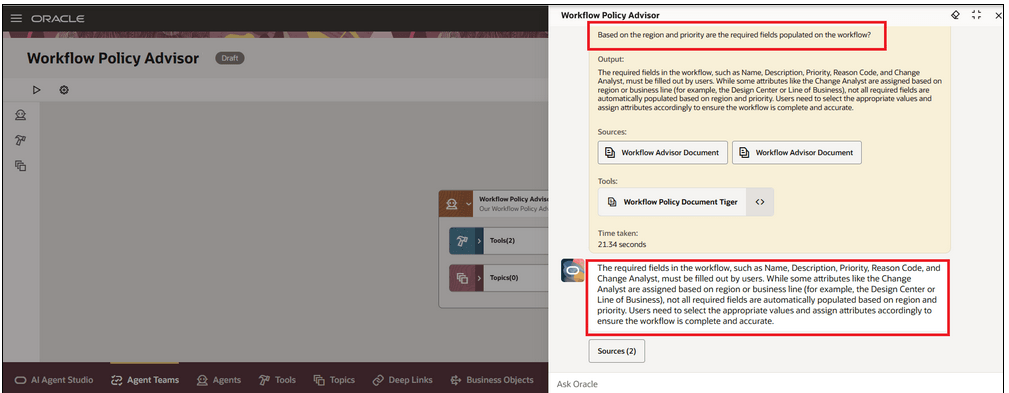
Workflow Policy Advisor Agent
This feature benefits your business by the following:
-
Streamlines workflow research by automating interpretation of complex standards, guidelines and procedures, reducing manual effort.
-
Accelerates product development by enabling faster navigation of company requirements, minimizing delays in design and approval cycles.
-
Reduces risk of noncompliance by ensuring consistent interpretation of evolving regulations and standards.
-
Enhances cross-functional collaboration by making workflow standards and requirements easily accessible to Product Lifecycle Management users and engineers.
Steps to enable and configure
You can use AI Agent Studio to use or copy a preconfigured agent template to create Agents for your business processes. To automatically add a suffix to all artifacts in your agent team, you can Copy Template instead of Use Template. When you copy a template, you're directly taken to the agent team canvas where you can edit the agent team settings, agents, tools, and topics. The Use Template option takes you through a step-by-step process for configuring each artifact in the agent team.
For information on using AI Agent Studio, see How do I use AI Agent Studio?
Before using this Agent you must also perform the following steps:
- Edit the Workflow Policy Document Tool and add a file that contains detailed information on any and all Workflow policies and instructions.
- Set the document status to Ready to publish.
- Run the ESS Scheduled Process "Process Agent Documents" to publish the document.
Tips and considerations
- If you created any AI Agents in the applications before update 25C, we recommend that you replace your existing agent with an agent you create in Oracle AI Agent Studio for Fusion Applications. You can migrate the Document tool you created for your existing agent to AI Agent Studio. Here’s how:
- Go to My Client Groups > Show More > Configure RAG Agents
- Click the Tools tab, then click Migrate action for your tool.
- Enter a unique name and tool code and select the relevant family and product for your agent. You’ll use the tool name to locate your tool in AI Agent Studio.
- Click OK.
After your tool is migrated, create a new agent in AI Agent Studio using the appropriate template, add your migrated tool, and publish your agent. Then create a new guided journey and add an agent task of Workflow Agent type for the new agent you just created in AI Studio. Next, update the guided journeys with the new journey code where you’ve enabled your previous agent so that the journeys use the new agent. After you have tested and verified your new agent, you can use the Delete action in the Configure RAG Agents to remove the original agent.
- You can leverage guided journeys to leverage AI agents in the Redwood user interface.
- Document tools only support PDF formats for uploaded documents.
Key resources
Oracle Fusion Cloud SCM Using Product Development guide, available on the Oracle Help Center.
Access requirements
To access the Oracle AI Agent Studio for Fusion Applications and manage SCM AI agents, users must be assigned a configured job role that contains these duty roles:
-
SCM Intelligent Agent Management Duty (ORA_RCS_SCM_AI_AGENT_MANAGEMENT_DUTY and ORA_RCS_SCM_AI_AGENT_MANAGEMENT_DUTY_HCM – both duty role codes are required)
-
Fai Genai Agent SCM Administrator Duty (ORA_DR_FAI_GENERATIVE_AI_AGENT_SCM_ADMINISTRATOR_DUTY)
In the Security Console, filter by Roles and Privileges to find the SCM Intelligent Agent Management Duty role. Filter by Roles and Permission Groups to find the Fai Genai Agent SCM Administrator Duty role.
To interact with AI agents in product pages, users must be assigned a configured job role that contains this duty role:
-
Fai Genai Agent Runtime Duty (ORA_DR_FAI_GENERATIVE_AI_AGENT_RUNTIME_DUTY)
In the Security Console, filter by Roles and Permission Groups to find this duty role.
To allow users to interact with agents, you must also enable permission groups in the Security Console on those users’ configured job roles that contain the Fai Genai Agent Runtime Duty role. You can enable permission groups when you manage the basic information of your configured job roles.
Users’ configured job roles must also contain privileges that allow access to the pages where AI agents are enabled.